Does Scrivener 3 have a tool to allow you to check the frequencies of certain words to avoid overuse?
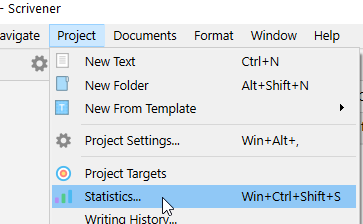
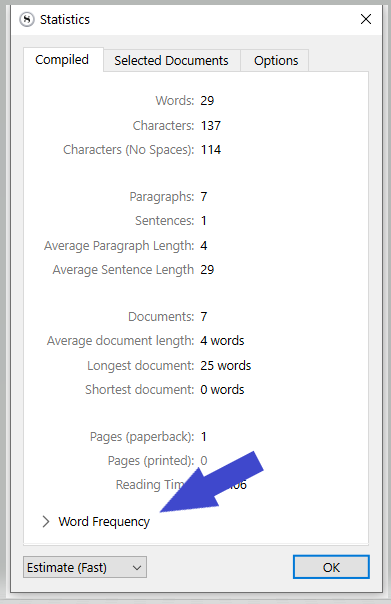
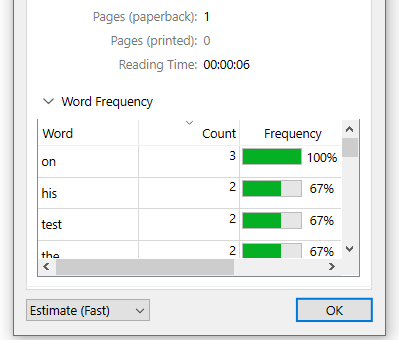
While I welcome the feature (that I found during the tutorial training), I don’t find it very useful because of the many words that are too common and normally showing up (like ‘the’).
It would make sense to filter out those words to keep only the relevant ones. I know that there’s wouldn’t be a perfect list for everyone, but at least something to work on.
Is anyone actually using this word frequency feature, or maybe nobody really cares beyond a polite acknowledgement? Or they skim over the generic words to manually/visually spot the relevant ones?
I use it.
I actually find the inclusion of the high frequency words helpful because they give useful context to judge the other words.
Knowing that I’ve used the word “quantum” 15 times isn’t that helpful in of itself, but knowing that I’ve used it more often than I’ve used the word “said” is very telling!
3 Likes
I usually use it when I say to myself, “I’ve used that word before today”, but I can’t find it with a rudimentary squiz.
This is what I do if I’m interesting in discovering overused words, particularly adjectives, adverbs, or unusual words that would draw attention to themselves if overused. (While sorting by count)
If I’m looking for overuse of a specific word–e.g., I know I happen to fall back on ‘but’ a lot–then I sort the list by word and scroll down to it.
1 Like
There is an option to exclude certain words (“Options” tab). I gather it is better this way than to exclude articles and prepositions by default, not to mention that people write in plenty of different languages. 
Personally, I think that nothing beats a thorough read through of the draft. No tool will see the text the way a reader will see it.
ETA: I just went to check out of curiosity and found out that the two most used words in my current project are the main characters’ names. 
I like to use Duplicate Word Finder to spot the overuses.
You have to copy/paste, yes, but you get the info you need.
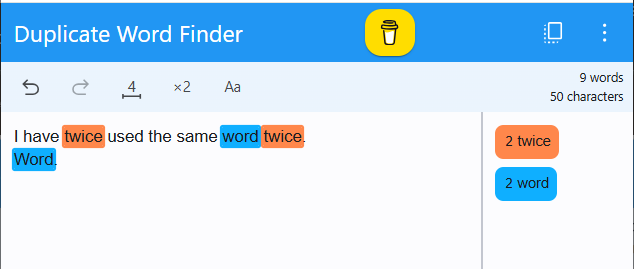
You can set a minimum word length and a minimum redundancy count as conditions for the duplicates to be reported.
Reported word duplicates can be soloed or muted.
You may also export the redundant words list.
. . . . . . . . . . . . . . . . . . . . . .
This regex used in project search (in Scrivener) will find redundant words within a paragraph :
\b(\w{4,})\b(?=(?:\W+\w+){1,200}?\W+\b\1\b)
[I had one that wasn’t bound to paragraphs, I’ll dig it up and update. … EDIT⮚ Oh well… It would appear that I dreamt that. Can’t find it. Either I remember wrong, or it used to work and some system update makes it no longer work outside of the limits of a paragraph… (I am not happy)]
It will highlight any word that is repeated within this range (that you may modify at will) :
{1,200} [Leave the 1 untouched, set the 200 to your need.]
Minimal word length in letters : (\w{4,}) … Four letters in this case.
The only “issue” with it is that regex being linear, it can’t report the last word of a string of redundancies. But, if a word is highlighted, you know there is another one following within the set range. Use Find...
1 Like
With the intention of catching all words, I considered a two-pronged approach, examining the content of a document from beginning to end and then vice versa.
I setup a combined “lookahead” and “lookbehind” RegEx. That didn’t work.
Then, I checked the variable-length lookbehind, only to find that part of the string rendered nothing.
So, it seems Qt (the framework on which Scrivener is developed) and its RegEx implementation, which is PCRE-based, has limitations related to lookbehind.
Anyway, anyone looking for an AutoHotKey version 2 shortcut for the RegEx you provided, can use the following:
::rxrw::
{
SendText(“\b(\w{4,})\b(?=(?:\W+\w+){1,200}?\W+\b\1\b)”)
}
Once Project Search is setup for RegEx in Scrivener, type rxrw, which will be replaced by the string and find duplicates.
1 Like
That’s nice, but my regex formula no longer looks past the boundary of a paragraph. The range {1,200} is now quite useless.
As a matter of fact, the whole is now quite useless, unless you compile to a new doc, use Find... to remove all carriage returns and linebreaks from that reference file/doc, then apply the formula to the resulting gigantic paragraph.
Perhaps it works on Mac, but it no longer does under Windows. And not just Scrivener ; it no longer works in LibreOffice just the same.
I’ve tried modifying it to ignore \n but I still can’t get it to work.

I’ve edited my previous post.
Where I said it is limited to the first paragraph, I meant “to the paragraph”
It won’t find and report a duplicate if the duplicate is within range, but in the next paragraph.
Can’t see that in your screenshot.
Here’s mine :


I was right. Under Windows, it no longer looks past the first paragraph. And it is worse than I thought, as per the above screenshots. (I’ve edited my initial post back to “first paragraph”.)

The string is interrupted and won’t kick back in:

Crap. I was wrong again. It works, but only within a paragraph. Not just the first, but not across a carriage return (linebreaks are fine afterall).
Okay, I see in mine it’s a bit of a hodgepodge. It misses the first “Cole” in paragraph 4 yet identifies the first “down” in paragraph 6. 
This formula would be a gem otherwise.
That’s because “Cole” is there only once in the paragraph, and “down” is there twice.
It should be within 200 words, not limited to within a paragraph.
If it write Cole.
And then Cole again. (New paragraph)
The first “Cole” should be reported. (All of them but the last, due to lookahead limitations.)
Alright. I’d find it useful to examine a whole scene, extending the number of words apart.
Sometimes, I come up with a great word, or so I think, whereas, in reality, I’ve remembered a word I used earlier or subconsciously spotted. That causes me major dilemmas and rewrites, because I don’t want an alternative in either instance.
If you duplicate the document, make that new cloned document a reference, then use Find... to remove all carriage returns or replace them with linebreaks, it’ll work.
You can use that reference document to spot redundancies, then fix them in the original document.
At least that’s that.
[In your case ⮚whole scene⮘ you’d want to remove the range – or set it to 99999999 – so that it keeps looking through the whole content.]
I’ll give you a cookie if you figure out how to fix it back so that it works in the original document. (Despite the carriage returns.)
2 Likes
Thanks for this info…
Is Duplicate Word Finder an App?