Hi all - just finished first draft of first novel and trying to finesse it.
It is five parts of nine chapters each.
All of the parts are Part Heading section type and all the chapters are Chapter section type.
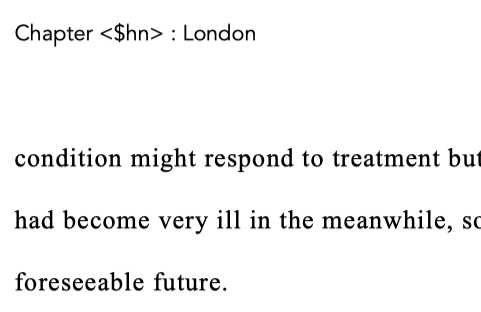
I’m entering <$n> in the Project Formats>Page Settings>Main Body>Header and Footer Text>Header in the hope that the sequential Chapter Number will appear (e.g. Chapter 1 : London)
<$sectiontitle> appears correctly when compiled.
<$n> appears as written here when compiled.
I had previously numbered all the chapters manually (e.g. ‘1. London’), but painstakingly removed the manual numbers as Gemini assured me I could display them automatically using this technique but so far can’t make it work.
I’ve tried to troubleshoot, googled it, check with various AI’s. No joy.
Gemini suggested <$hn> for ‘heirarchical number’ but with the same result/
Hi.
Two issues here.
First, the least, <$hn> (as per your screenshot) is intended to be automatically indent aware, and render 1.1 - 1.2 - 2.1 - 2.2 […] 2.9 and so on. Like for a scientific or technical publication. Not so much a novel. – Although I think I’ve seen it done before… Still, I don’t think that in your case it is the right placeholder. (You even name it as <$n>, else, in your post.)
→ I think that <$n> is the placeholder you want. (Nevermind what Gemini said.)
Second, and most importantly, this type of auto-numbering placeholders (<$n>, <$r>, <$hn> …) doesn’t work in page headers.
They are to be used as part of a section title, or inside the text / content.
4 Likes
Thanks. As it happens, and as the format of this book will be quite stable moving forward, I’ve decided to revert to manually numbering chapters, which render perfectly well.
Other than that, all good!
So, you are using this ?
<$pageGroupTitle>
…for your page header. (?)
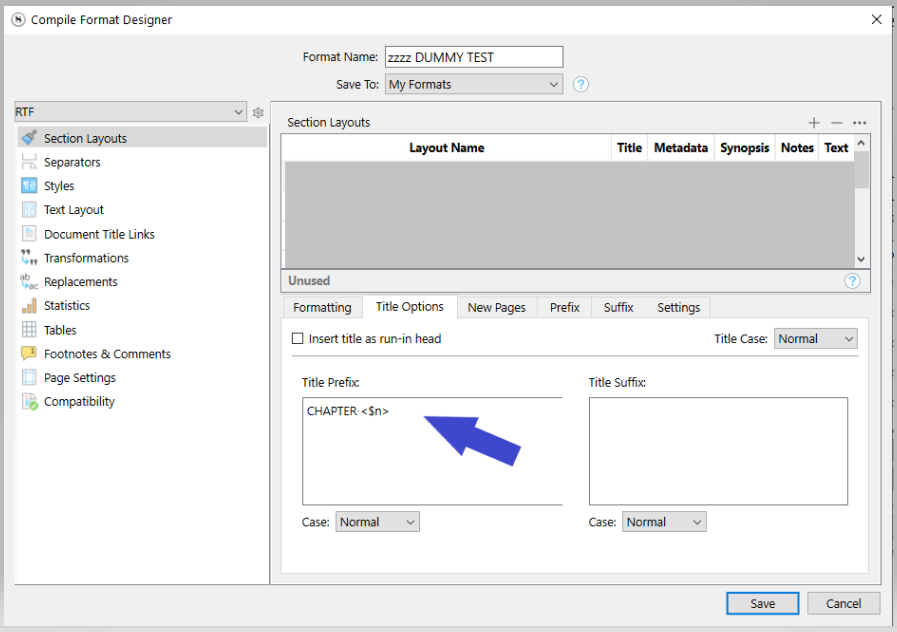
Else, if what you are saying is that you’ve given up on the page header, use <$n> in your doc title or insert it properly (Title Options tab) in your compile format so that you don’t have to do anything, but don’t bother yourself with manual numbering. You gain nothing, doing it by hand, should that be the case.
It’s up to you.  There is no catastrophic reason not to manually number your documents, other than the time invested in doing it, and perhaps future tweaks.
In all cases, the automatic way :
1 Like
No, didn’t try that! I tried first in page header, which as you point out, and as I discovered, didn’t work. Then I tried that window, but made the entry in Prefix, not Title Option, which didn’t seem to appear anywhere. At that point, I raised the above post.
The current pdf is being sent to some friends for review but as I’ve manually entered the chapter number info, I’ll leave it now, and revisit for second draft.
1 Like