Hi there! I emailed my Scrivener project to myself from my laptop. A pop-up appeared asking which versions to sync in my email and I didn’t understand the pop-up and just checked the first version that appeared in the checklist. Then I quit the program in my laptop. I now think the options I didn’t check included the work of an entire day (8,800 words!!). I’ve looked in every backup file I can find, and they all seem to have somehow synced to the screwed up version I created by mistake. I’ve lost thousands of words in project files that didn’t get saved properly. Is there hope? I don’t know what else to check.
Have you checked Scrivener’s automatic backups? You can find them via the Scrivener → Settings → Backups pane.
2 Likes
yes, I checked in the backups folder where Scrivener said all my backups were saved, and I opened them one by one, and none of them contain the missing project files.
I must not be understanding something. Seems like the project on your laptop should be unchanged, if all you did was email a copy of it. Why are your 8800 new words not still sitting in the project on your laptop?
1 Like
We need to sort out some terminology in order to know what is going on and help. First, there is no such thing as “syncing in my email”. Desktop Scrivener does not “sync by email”. So, it is at this point, very unclear what you were actually doing.
On what machine did the pop-up come up (the sending laptop or the receiving desktop) and when?
You speak of syncing, but it is unclear what you mean. (Again, there is no such thing as syncing by email.) Are your Scrivener projects stored in an area of your laptop (and desktop) that is being synced to the cloud via some sync service (iCloud, Dropbox, etc.)? (This would, of course, make mysterious why you were emailing your project to yourself!)
2 Likes
Something to consider: You have a certain narrative about what happened – something about the transfer of your project – but that might not be the right story. This can make a difference to where and how you look for the missing 8,800 words.
You should use project search to search for a phrase you know occurs in the missing 8800 text. Make sure the project search settings are set to look in the right places. You want to search for an exact phrase in text or all.
If your text is found, then you know the problem is that your 8800 are located somewhere in your project that you don’t expect.
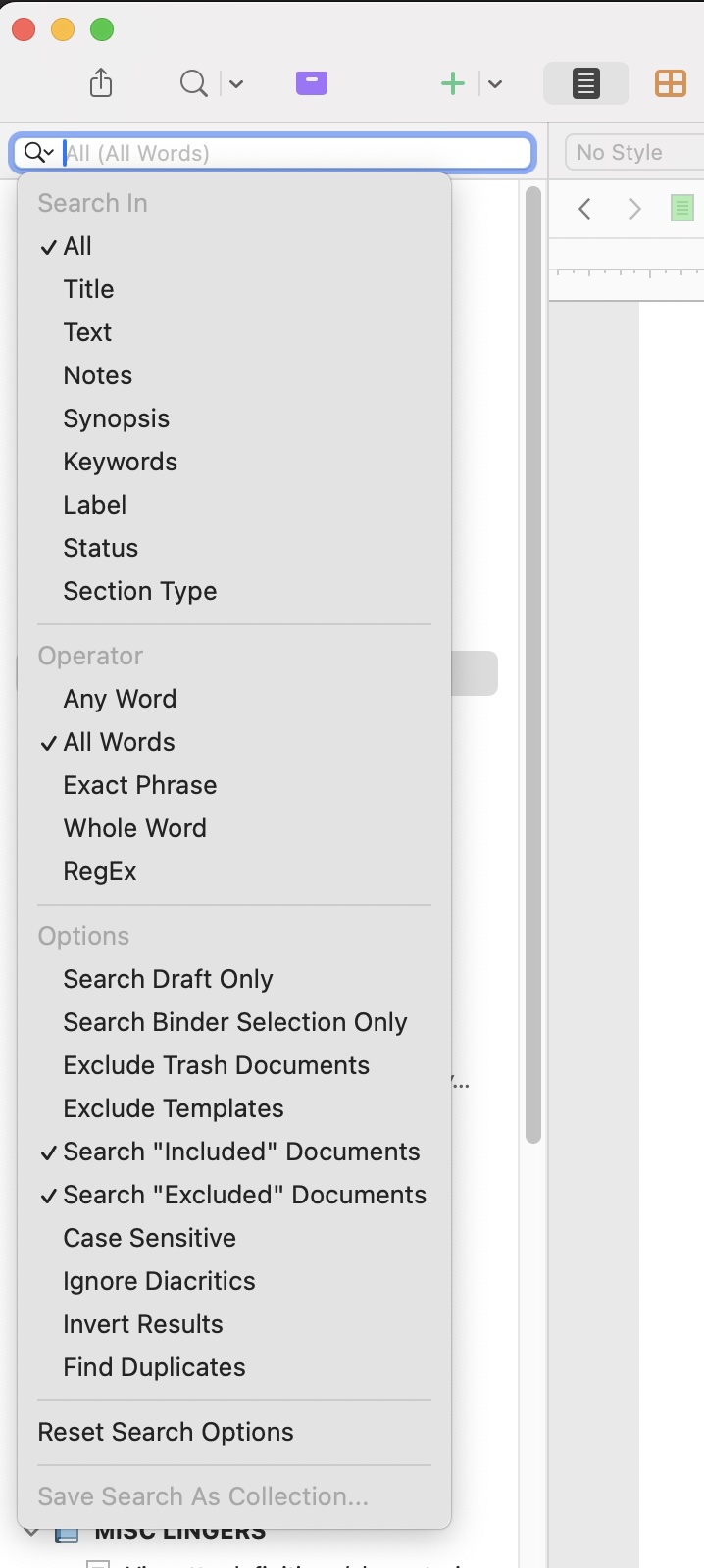
1 Like
yeah, let me go through this as step-by-step as I can remember:
-
I opened my laptop to send myself the file. I hit save-as first. a pop-up appeared asking which versions to sync in my save (I have never seen this pop-up before). the pop-up included a few possible boxes to check off with dates and timestamps. I checked off only one timestamp box because I was afraid of what would happen if I tried to sync several ones. I think this was mistake #1. all of this happened on my Macbook Air.
-
I emailed the newly saved file to myself and quit Scrivener on my laptop. I think quitting the app on my laptop was mistake #2.
-
I downloaded the file on my desktop iMac and opened it in Scrivener there. this was the first I saw the mistake version that’s missing 8,800 words.
-
from there, I checked my documents folder on my laptop (where I have Scrivener set to save my backups). I opened every single backup document I could find and none of them had my 8,800 words. same with the rtf files I opened.
based on the fact that my backups are also missing the same stuff that the emailed file was missing, I’m starting to suspect that I just…did not save properly on my laptop in the first place. meaning I wrote the 8,800 words in the file on my laptop, failed to save them, and then when I save-as’d but failed to check every timestamp box I must not have checked the box that included my big 8,800 word push.
no matter what happened here, user error was definitely the trigger, so I’m certainly not going to blame Scrivener, especially if I’m correct and I just screwed up saving on my end. but not saving would be extremely unlike me, I’ve been obsessive about it since I was a kid, so I’m still looking for every possible hail mary that might exist in case the user error is something correctable…
I am more and more convinced that your work is not lost and it is only a matter of finding it.
- Scrivener automatically saves the documents in your project when you work on them. So, your 8800 words would have been automatically saved into the project file on your laptop harddrive.
- The pop-up box you describe is a mystery to me. Save As would not present such a pop-up in any circumstances. It may be possible that you chose something else off the File menu by accident – though I can’t think what.
- Nothing in what you describe sounds like it could possible /erase/ your 8800 words from your Scriv project on your laptop. And so far I am not hearing anything that tells us there is any cloud auto-syncing going on between projects. So you need to get to your laptop, find your project file in the Finder, duplicate it to have a safety, open the original and to the phrase search I suggested. Because we need to determine if those 8800 words really are missing from the original project.
- Here is something to watch out for: You have been opening backup-projects. Your Recents menu will be a full list of those. Don’t open your project from the Recents menu. Find the original in the Finder and open it from there.
2 Likes
It seems entirely possible that you emailed to yourself not a copy of your current project, but a (previous) backup of it from your Docs folder and that is why your new material is not there.
Where is your active copy of your project stored on your laptop? (Please tell me it is not stored in the same folder as your Scrivener backups.)
Okay, so now I think that, if Scrivener does indeed auto-save, the problem was me getting screwed by iCloud auto-syncing.
It took a long time of sorting through backups/duplicates, but I managed to track down the original file that I was working on from my laptop. And when I tried to open that file, I think the same pop-up appeared:
“Resolve Conflict - Project structure modifications for [project] aren’t in sync, possibly because of conflicts caused by storing the project on a…” (idk why the rest of the pop-up won’t even show up for me, this is all so extraordinarily frustrating!)
It then shows the file with two “modification names,” but the two names and the binder count are identical. And for both modification names, the “modified date” is 12/11/25 at 3:54pm. When I look at the binder overview from this pop-up screen, it doesn’t reference the project folder from 12/12 at all.
This tracks with my concern that the 8,800 words I wrote in the evening of 12/11 and all of 12/12 are somehow gone — even in the file I was originally working from, it’s as if that writing time never happened. Which leads me again to the concern that I got screwed somehow by cloud auto-syncing. Because when I look at iCloud now, it’s as if 12/12 never happened there, either.
Specifically, what folder did you find the Scrivener project (which is a macOS “package” not a file, by the way) and exactly what folder do you direct your automatic backups and are they zip or not?
Edit: Also as you made a “Save as …” copy, specifically what folders were the original version and then specifically what folder did you put the copy?
1 Like