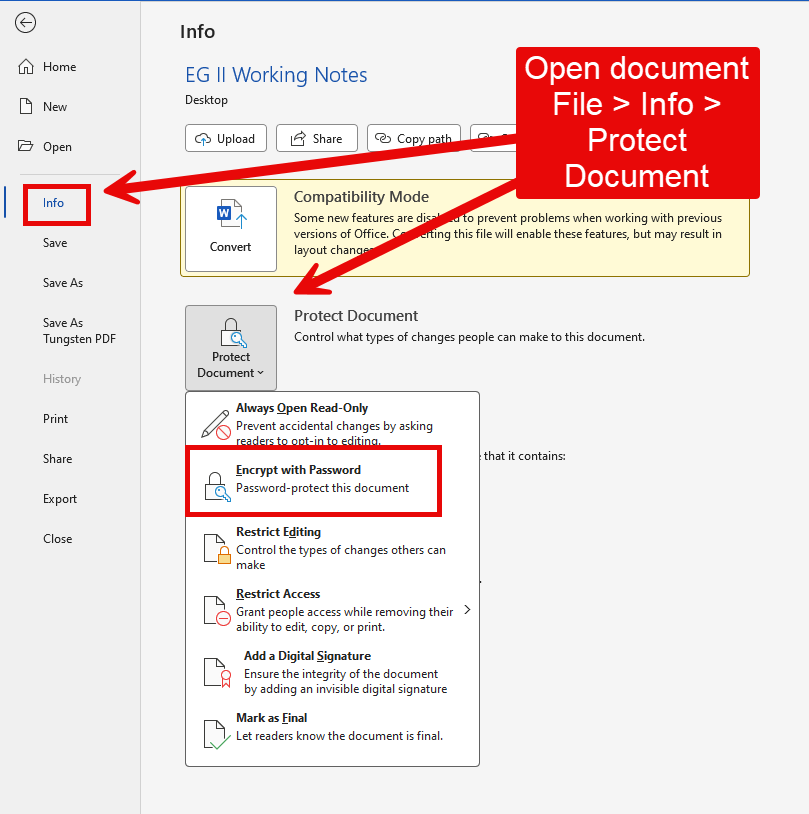
Quick question — what’s the best way to encrypt certain files in a project so they can only be opened with a password? Ideally I’d like to password-protect specific files or folders rather than lock down the whole project.
Would really appreciate any pointers. Thanks in advance!
Hallo zusammen,
kurze Frage: Wie kann ich einzelne Dateien in einem Projekt so verschlüsseln, dass sie nur mit einem Passwort zugänglich sind? Am liebsten würde ich bestimmte Dateien oder ganze Ordner mit einem Passwortschutz versehen, statt das gesamte Projekt zu sperren.
Über einen kurzen Tipp würde ich mich sehr freuen – vielen Dank im Voraus!
I don’t think you lock certain files down inside Scrivener, but could create a side project where you put all the files you want to encrypt. Leave a blank document with the file name and put in a collection encrypted. You could even drag the file you are protecting from the side project in as a bookmark. You would need to backup the project as a zip file and use a software (free) like 7 zip to encrypt. If do not need the sensitive information often, then do the side project backup as a zip file and encrpyt, then delete the Scrivener folder holding the side project. If the bookmark for the file is there, you will automatically open the scrivener project which contains it when you click. If the file is zipped and the project gone, the file is effectively encrypted. When you need access use password, unzip project, and click the bookmark in main project to open the encrypted material. Not sure if any easier way other than encrypting the zip of the main project and deleting the project folder and unzip every time you use.
Perhaps you could try encrypting the entire drive or a partition (with your Scrivener project put on that partition). Then decrypt when time to work with Scrivener. Might be something in Windows or a third party product. I do not know how that is accomplished in Windows unlike with macOS is is optionally turned on and seamless. Others can surely comment. i doubt Scrivener would work well with only particular files encrypted. Could try though.
Thank you very much for your assistance. I would like to implement encryption for specific files within my workflow. To provide some context, I have consolidated all team documentation into a single Scrivener project to streamline management and eliminate the recurring issue of colleagues requesting duplicate files due to poor organization. My plan is to share this entire Scrivener project over our local area network (LAN). However, I need to configure granular, encrypted access permissions for different folders within the project, ensuring that each team member can only access documents relevant to their specific scope of responsibility.
You are proposing giving specified/controlled access to specific files in a Scrivener project. Regardless of how the control is achieved (file permissions or encryption), Scrivener not designed for that. Even if you put the Scrivener project onto a file server, then use server permissions to grant access to individual files–with you having access to all—your colleagues messing with the Scrivener source files will only probably mess [technical word there] things up. Scrivener not made for that.
I’d suggest first deciding if you really need that level of discrete control. Often times, in my experience, not needed and organisational over-kill. But that your call.
You could consider doing selective compile copies of “deliverable” files (not source files) directed to individual people. Scrivener’s Collections feature probably will help you make that easier. Try.
If such fine access control to source files is really needed, you may wish to consider other tools to do the job. Keeping the source files (text, DOCX, whatever…) on the file server with a file-server-based permission structure setup to enable the writing collaboration (which I assume you seek–or maybe not?).
I don’t think Scrivener is the tool you want to use, given your design basis as expressed.
I suggested using full disk encryption or an encrypted partition in a previous post. I assumed you were controlling the risk of access by bad actors who have physical access to your computer. Given your new information that you are considering encryption as a way to control access by others on a File Server … that idea of mine is not viable.
Thank you so much for your detailed guidance. While this method does work, there’s one practical drawback: every time I make edits to a file, I have to recompile it and reset the password. It’s easy to forget and quite cumbersome.
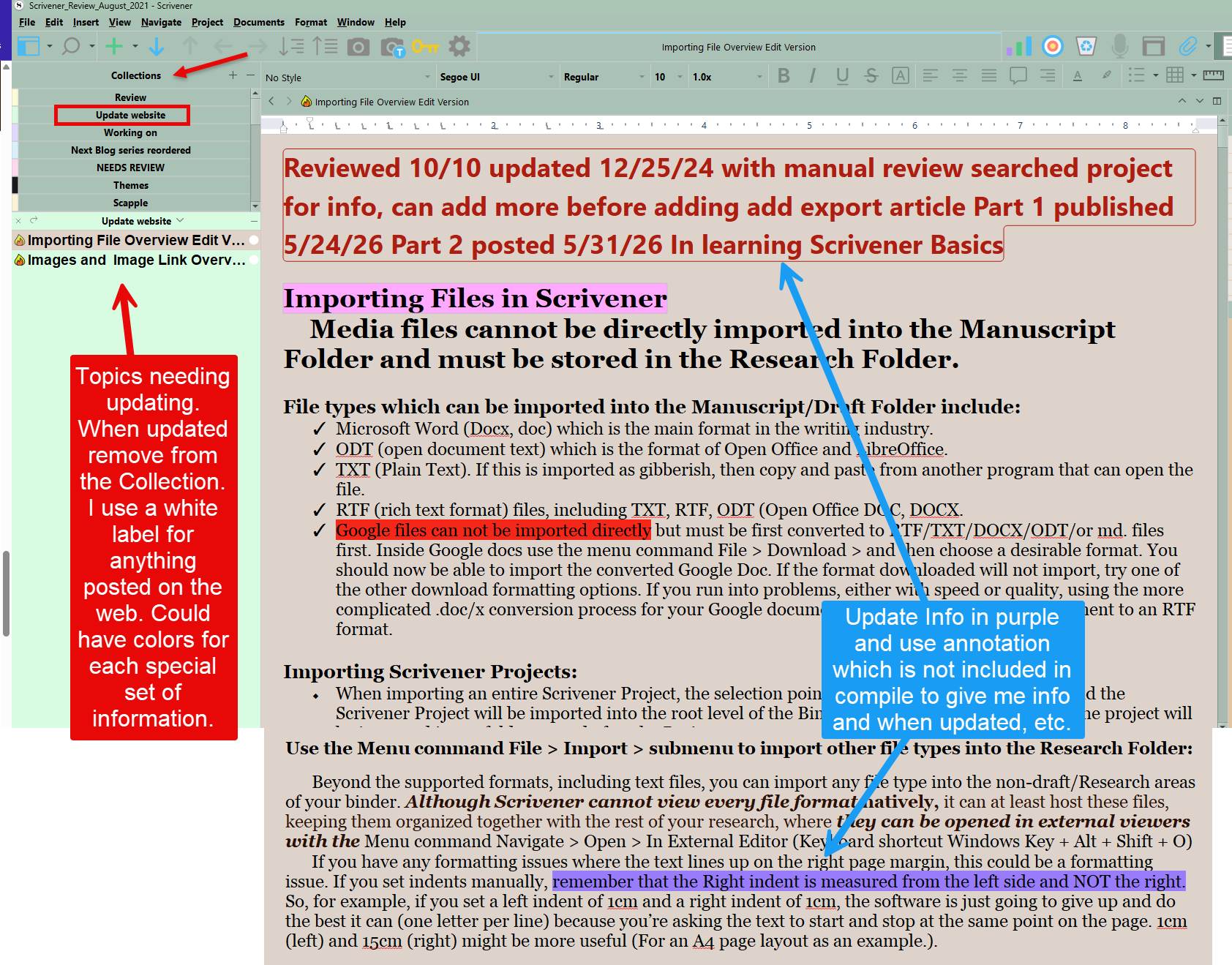
true. What I do for my website is when edit a file, I put it in a collection called Update Website (or update instructions for you). Thus easy to see what needs to be updated. Any updates are highlighted in purple. So would be easy to look at windows document and make update. When done remove from Update collection. You could have a collection for each combined word document. yes would still have to update, but at a glance a collection, you know what needs to be updated and the purple (or your choice highlight) is easy to correct.
Again is my system, but shows what is possible. Updating word file, not require new compile or new password. Could even cut and paste whole sections rather than line by line.
As noted by others, Scrivener is not designed for this. It doesn’t inherently support encryption at all, and it’s not designed for sharing documents among people who are not authorized to edit those documents.
More generally, you are attempting to use the same tool for editing and document distribution. There’s an inherent conflict there, as by its nature editing requires unrestricted access.
Tools exist that can do both. Google Docs, Microsoft 365, and others can manage access and editing permissions on a per document basis. But Scrivener is not one of those tools, and trying to make it one is likely to be a very frustrating experience for everyone involved.
Thank you for your reply. I really wish there were a single piece of software that could handle every aspect of document editing work. I’ve gotten so used to my current tool that I’d rather not switch to something new. I can also understand that designing such a product would involve a lot of inherent trade-offs — it must be quite a challenge for the product team. What I’m imagining is something like seamless switching of user interfaces based on the type of project you create — kind of like a personalized experience for every user. For example, when I choose to create a collaborative document project, it would come with those collaboration features built in; but when I choose to work on a personal project, it would just stay exactly like the original interface… My idea might be a bit one-sided — I just wanted to share my thoughts.