I’m going through the tutorial and reading The Editor chapter that states:
“When viewing PDF files, the footer view allows you to navigate between the pages. Click on “spacewalk_info” in the Research folder to test this out, and then come back here by clicking on the “back” arrow in the header view.”
At this point I select “spacewalk_info” to view the pdf file and select the < back history button which switches back to the Editor chapter positioned at the last section.
If I select “spacewalk_info” again it will view the pdf file, however when the < back history button is selected, it arbitrarily takes me to “The Binder” chapter.
I would expect the history to retrace the sequence of events. I understand I could explicitly select “The Editor” to resume at the point outlined in the very sentence that recommended the use of the history feature.
I’m not sure if this is the expected behavior as my generation of this dialog is prompted by questioning the behavior of this feature. Thank you.
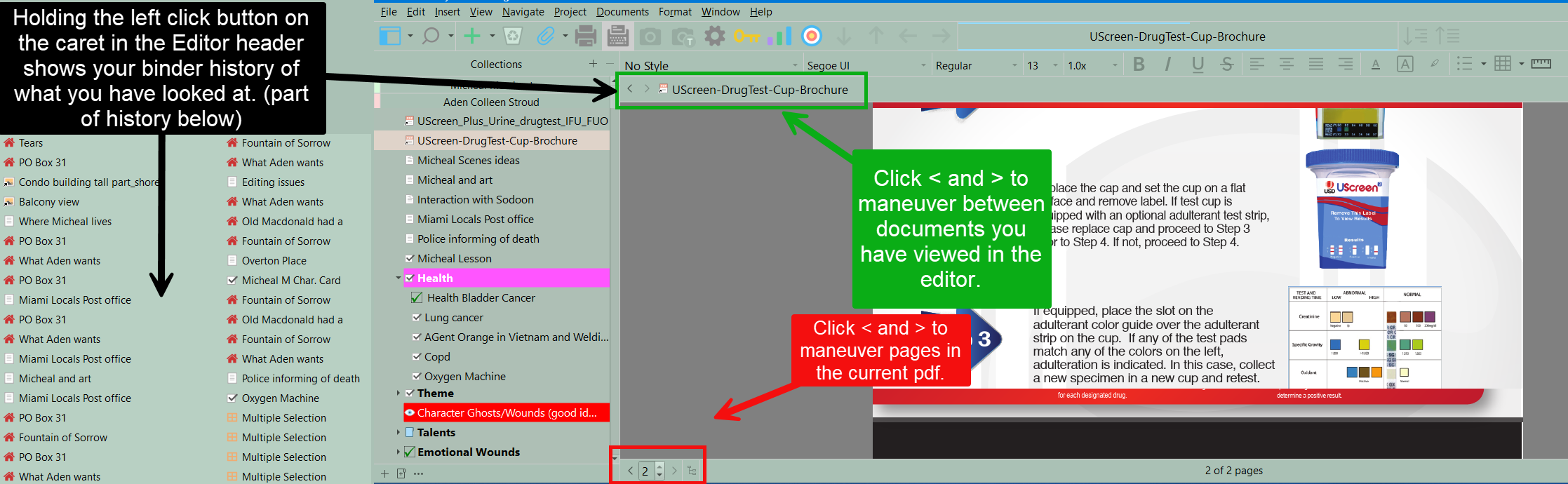
The footer changes pages back and forth inside the current pdf. The carets in the editor header on the left maneuver between documents you have viewed in the editor not pages in the pdf itself.
Also note that if you go back in history then manually select a new document, you fork the history at this point and everything that came after that point is no longer part of the navigation history.
(And navigating through the navigation history using the carrets don’t register as history.)
So, if you go like this :
Doc 1
Doc 2
Doc 3
Doc 4
Then use the carret to go back to Doc2, then select Doc 5, the history is now
Doc 1
Doc 2
Doc 5
Thanks for the report! It looks like the bug you spotted is pretty narrow, in that it requires you to click back on the thing in the binder that is highlighted. At that point Back movement will not work correctly (even if you navigate around a bit before trying). Curiously, Forward movement does work correctly. If you had tried from “The Binder” you would find it goes to “The Editor”, and then the PDF, even though it skipped over “The Editor” initially (and after that point it all works fine).
I thank everyone for their assistance and help with understanding this history feature. Speaking of history, here’s one that doesn’t require mouse-clicks! …