I am a new user of the software. During the trial, I noticed that a line of text is too close to the bottom. I would like to know how to adjust it so that it is vertically centered. I have looked for a long time but couldn’t find a method. I sincerely ask experienced users to teach me—many thanks.
Welcome to Scrivener and the Scrivener forum.
Please clarify what you are asking? Centering in the Editor or in the output to a deliverable from the Compile step? And vertically centered between what two places?
FYI and to clarify, Scrivener is not a WYSIWYG editing/writing tool. My hunch is you are expecting that? If not done already, good to go through the Interactive Tutorial.
1 Like
View → Text Editing → Typewriter Scrolling
1 Like
thank you very much. and I have been tried to sovled it. but the method above can not work. please give me another answer. thank you very much , my friends.
1 Like
We might need another description from you then, of precisely what it is you are trying to do. In my reading of your question, of desiring the line you are typing on to be in the middle of the screen, that is precisely what typewriter mode does.[1]
Although on the Mac it is by default less strict, and might pin the typing line from wherever it is on the screen when you moved the cursor. You can turn that off in the Settings: Editing: Options tab, by enabling, Typewriter scrolling always jumps to scroll line. ↩︎
3 Likes
It means that when editing, a line of text cannot be centered vertically within a line, but is at the bottom of the line. The goal I want to achieve is: how to set it so that a line of text is always centered vertically within a line during editing.
Like this?
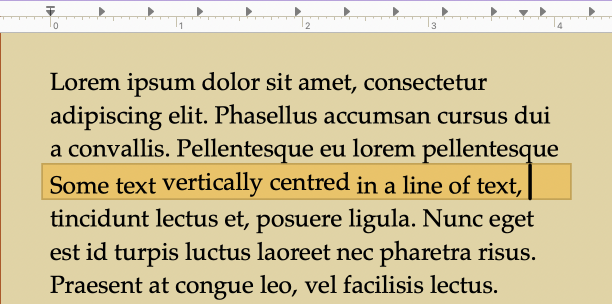
You can adjust the baseline for selected text via the Format ▸ Font ▸ Baseline ▸ options; applying Raise Baseline a few times, depending on the font, may do what you want? You could then also create a character style from that selected text which would let you more easily apply those settings to other text, and to make adjustments later as needed for your specific compile format. (See section 17.3 in the user manual for more on using and managing styles.)
Using styles to mark the raised text would also give you the most flexibility for modifications post-compile, as you may get a better look with a dedicated text layout program depending on your goals—a desktop publisher would let you more minutely manage the line height, baseline level, and so on, than what Scrivener is capable of using Apple’s textkit, should you need that.
3 Likes
Too close to the bottom of what? You’re screen (when typing)? That is what typewriter scrolling is for – keeping the line you are typing from living too low on the screen.
Has MimeticMouton got the right idea of what you are trying to do? That would just make me wonder why in the world you would you want to do that!
2 Likes