I can see each chapters word count, but how do I show total word count of all chapters in a document?


Hover that middle section where it says the document’s title, in my first screenshot.
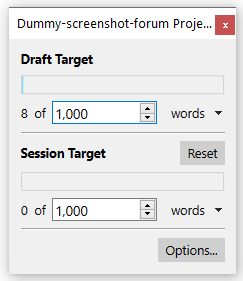
The settings for this display are in Project / Project Targets > Options… > Draft Target (as per your specific question)
Thanks. Although I seem to have two sets of numbers there I’m sure I’ll figure it out. 
1 Like

So I’m on the very latest version, today in fact, on my Mac mini. This is what I see in the title bar.

Not sure why I have two sets of numbers in a virtually new document. Not a problem, just interested.
Well…
If you mean “new project”, clearly something is wrong. Unless you created the project off of a template, it should read “0”.
And even still, I can’t imagine a 98k words template…
If you mean “document” as per the proper nomenclature (although your very first post leads me to think you are not), then yes, that is entirely normal. This is not related to a single binder element, file or document. These numbers relate to the whole of your project.
(Single documents display their wordcount at the bottom of the editor. – Among other places. But not there.)
The numbers that you see in the Quick Search bar are also shown in the Project Targets panel, discussed in detail in Section 20.1.1 in the manual. The Project Targets panel is a little more explicit about exactly what the numbers mean.
1 Like