I am wanting to add a text page to layout the timeline in my novel so I can keep track. How have any of you done that? Inserted a table? Thank you!
If this is for your personal use – not for the reader – I’d say using metadata in combination with the Outliner (think of a “date” field) or Collections is a much more sane approach.
Further reading: Scrivener for macOS manual, “C.4 Custom Metadata” (p.850), “C.4.6 Date Fields” (p.854), “8.3 The Outliner” (p.180), “8.3.3 Managing Columns” (p.181), “8.3.6 Sorting by Columns” (p.184). This gives you (potentially multiple different) date sorting options independent of the Binder order. It’s basically a table, without having to create one yourself.
2 Likes
This would not be for the reader, just for me so I don’t lose track of when events happen. I’m not super familiar with the metadata. Is it essentially “assigning” a date to a certain scene and then collecting all of them in one spot?
I may not have explained perfectly above. Essentially I am wanting to track the info below for example:
King is killed→1 week goes by→fmc rides into the woods→1 week goes by→new animal introduced
2 Likes
Yes.
But you’re not limited to literally dates. You could create a custom field “time passed” and enter whatever.
AEON timeline is a popular option to have a visual of your timeline (when scenes take place etc). I don’t use it, so I can’t say more. Search the forum for “AEON”, it has been discussed somewhat.
It is compatible with a Scrivener project to some extent.
6 Likes
And the way in which Aeon augments Scrivener results in data much as described above, but without you having to set up the columns and input the time intervals/dates/etc. It will create metadata fields to track what it needs to, and you can add them to the Outliner for browsing in Scrivener (though whether that will be useful to an Aeon user, who would have a visualisation and drag-and-drop interface, I’m not sure, but it’s there and could be used in searches, collections, column sorting and such).
4 Likes
I use Scrivener and Aeon Timeline together to track elements of my novels, including the story timeline. Since Aeon Timeline syncs beautifully with Scrivener, the workflow is very smooth.
I posted this informal video a while back, but rather than make you hunt for it (assuming you want to view it), here it is. It will start at the discussion most relevant to your question:

The video is not perfect, but it should give you an idea of how it could work for your writing project.
FYI, earlier in the video I show the features I use the most. I don’t actually have much of a need for tracking a timeline per se, though it’s outstanding for that.
5 Likes
Why not make a date up like 1/1/ xxxx for whatever year story begins and if a week later is 1/8/xxxx , etc
You could set a timeline up in Scapple.Scapple is very freeform, so you could stylize your own solution to the level of your need. Imagine a series of text boxes (e.g. containing short desc of events) strung together linearly with connector lines (which can have text labels attached to them, e.g. amt of elapsed time). You could run several of these in parallel to track distinct developments (plot lines, character arcs).
BUT if what you mean to track could be captured in a linear list, you should probably do just what you were thinking: make a doc in your Research folder and simply list the events you want to keep track of and annotate it with whatever info you want there. Keep it simple if you can.
It is, I think, not until you find you need to track multiple things in parallel in order to keep your head straight that you need something more than a list.
2 Likes
I use Scapple in the same way. (I also use Freeform for really complicated timelines.)
I love Scapple as well, but recently switched to Simple Mind pro which is like Scapple on Steriods (one time fee and free trial) and have used this as a timeline or plotting mechanism.
I structure my work in three timestreams: Present, Recent Past and Distant Past.
I show a time change only when necessary. What I mean by this is if I’m writing in the present and the next chapters are in the present, then I don’t show a time change. It’s not confusing for a reader, or it shouldn’t be.
If I switch to an event that happened long ago, my chapter would be something like: Chapter X: Title of Chapter, Friday, 31 May 1985 – Distant Past to orient the reader.
I write according to Chapters (folders) with Scenes (documents within the respective Chapter’s hierarchy).
I keep metadata on the date and approximate time of day of a scene, and a dropdown on Present, Recent Past and Distant Past.
But I don’t use the metadata to reflect the change in the Chapter Header because if there is no data, Scrivener will still create unnecessary blank space in the Chapter Header.
So, how do I overcome this limitation?
-
I use synopsis to capture what’s happening with the narrative at the Scene level, not the Chapter level.
-
This allows me to capture a change in the Chapter’s Synopsis reflecting: Today, 24 January 2026, or 10 January 2026 – Three Weeks Ago or whatever else, when needed only.
-
Then, in the Compile Format Designer, for the Chapter Heading section layout, I also tick the Synopsis checkbox, which does not leave space in a Chapter Header, when there is nothing in the associated Synopsis.
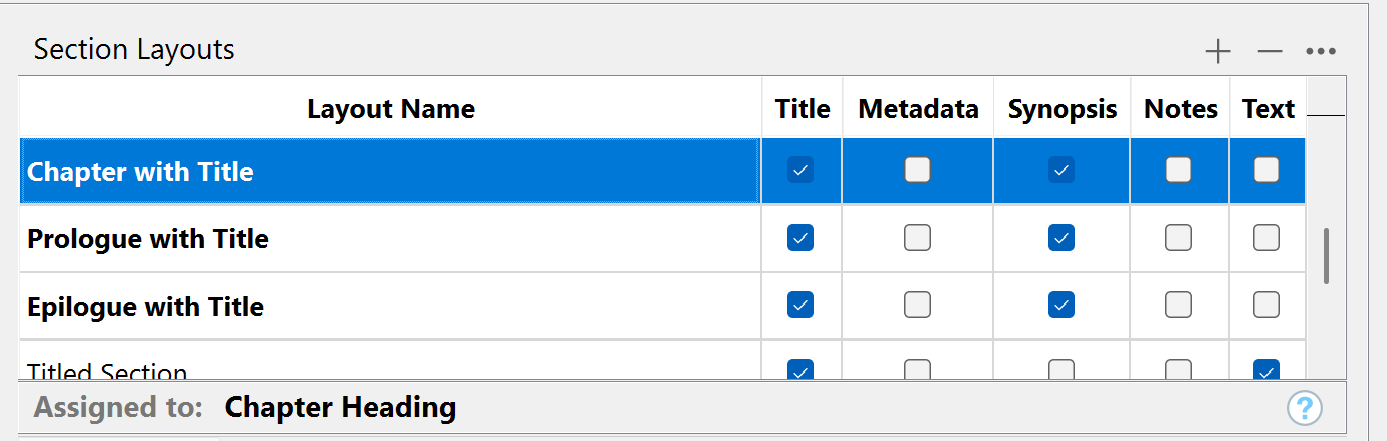
This approach also helps to compile a clean outline of the novel, according to the synopsis, reflecting each chapter’s content and changes in time.
So, I’ve killed two birds, having info for the reader (the Synopsis) and myself (the metadata).
Aeon Timeline is an incredible software. It is not just a fantastic tool for story developments, but also the best software of this type for planning projects.
Paolo
1 Like
Have a fantastic update to the software that just came out which greatly enhances its functionality and if use custom metadata text fields with the date as text scrivener scenes can sync to Aeon and be placed precisely on a timeline which can be filtered by any criteria you want. My text format in current project is (example Thu 11 Apr 2023 and have start and end date for a scene as separate custom metadata text fields)