Can somebody please explain to me how Scrivener decides which of my three displays to use when I open a project? And how I can change that?
This is driving me absolutely nuts to the point I am starting to look into alternatives! And I love Scriv!
Problem is not just that I dislike having to drag the project window to the proper display, but these displays have different resolutions and Scrivener does NOT handle that transition well. In effect, I can not properly use scrivener until it decides to (as far as I can tell accidentally) decides to open on the proper display!
It is random?
Technically Scrivener should open a project where and as it was when you last closed it.
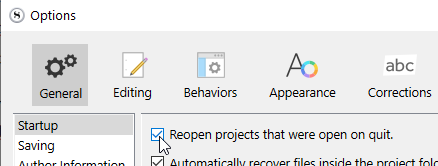
Any chance you have this setting unchecked?
I’m thinking that perhaps if you don’t have this setting checked, Scrivener simply starts-up on your screen1 (no project - no reason to do otherwise), and then that forfeits it. Just a hunch.
Hi Vincent,
No, I have that turned on. And when I start Scrivener it does start my most recent project, and on the correct display. It took me ages to get that to settle “right”, and that make me hesitant to mess too much now ;).
But if I open a 2nd project (I have a “grimoire” where I make notes of all kind of lose ideas, things that I need out of my head, that frequently gets opened, and I have more stories I work on), that 2nd project opens on a different display.
Even when I was struggling with getting my main story’s window to open correctly I could not work out the logic behind it. It has, at times, opened on all three of my displays. I can’t even work out if this is a setting per document, or for the app as a whole! (And I’ve worked in IT for 40 years…)
All I know is it’s driving me nuts 
Open your projects one by one (do this below for just one at a time).
Move the current project on the right screen if not already.
Make it full size and then quit Scrivener.
Repeat for next project (if the one you just did tests successful on reopen).
Each project for which you will do that should retain this screen position next time around.
(I said should. lol)
Like your name says? 
1 Like
Yes.
So, I opened the doc, from explorer this time, not from within Scrivener. It opened on screen 3. Dragged it to screen 2, made an edit, saved, closed. Reopened. Screen 3. Did it again, but this time saved in non-maximized mode. It opened non-maximized. On Screen 3. That had the odd effect of making the window very large when I dragged it to screen 2. It briefly ended up partly on screen 1. Maximized, edit, save, restart. Can you feel it coming? Yes, it opened on screen 1. Non-maximized.
Eventually, after 7 or 8 tries, I got it to open on the right screen (2) and in the right form (maximized).
Theories so far: The selection of the screen might be influenced (but not determined solely) by where the upper-left corner of a non-maximized windows would be. Upper-left of maximized window doesn’t seem to be relevant. I don’t know what other factors affect it.
The choice between opening maximized or not seems to be a matter of simply being more stubborn about it. Keep saving and closing it maximized state, and eventually you might get lucky?
It’s annoying the hell out of me, but knowing being stubborn about it might help gives at least some light at the end of this tunnel. Still completely nuts that it’s not predictable how and where an app will start, but OK… I’ll take this. For now
Thanks for your input!