I have finished my draft and would like to compile the completed work but wish first to get rid of all the untitled folders in my binder. When I hit delete nothing happens. When I click on the untitled folder and try and move it to the trash I get the dreaded red slash circle so that doesn’t work either. More concerning is that when I search the Manual using “Delete Untitled folders” nothing comes up.
Right-click:
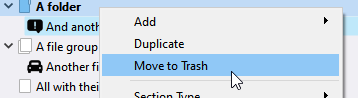
Else, you likely get the “no go” sign because you have the mouse all the way to the left. Nudge it to the right just a bit ?
You could also simply mark them as excluded from compile. In the case you don’t actually really want to delete them.
If you display the whole of your draft/manuscript in outline view, 
you can then see your documents/folders just as in the binder, but with this setting easily accessible:
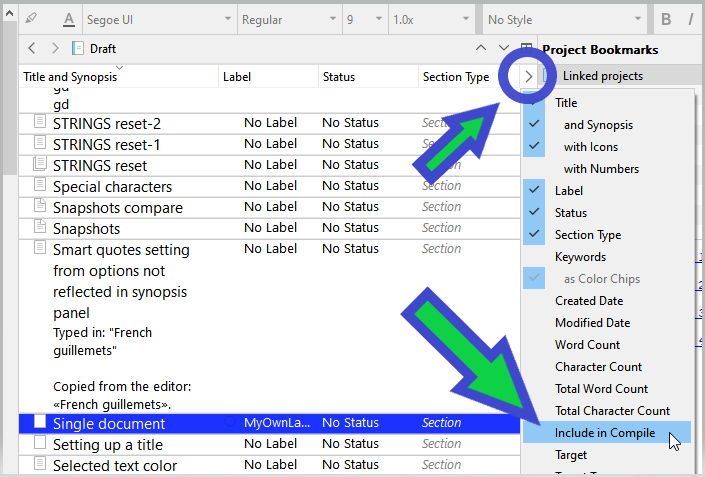
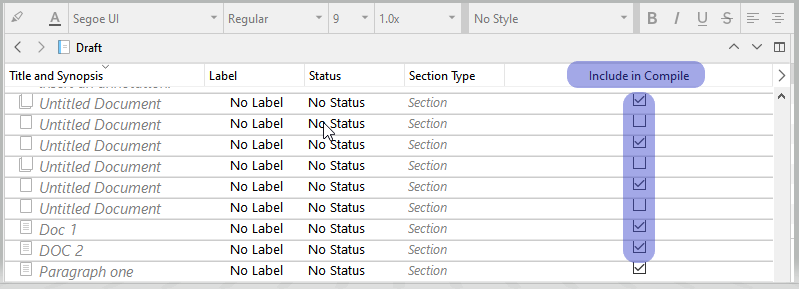
P.S. You can drag the column next to the titles’ for convenience.
I love that it took MINUTES to get a response. Profuse thanks!
1 Like
It’s a safety measure that tapping delete without due attention could trash documents from the binder resulting in panic (I believe it happened a number of times in the very early days of v. 1 on the Mac). On the Mac the keystroke is Cmd-delete, so I presume it’s Ctrl-delete on Windows.

Mark
1 Like

1 Like
I was on my iPad and didn’t check. Shift-Delete works on the Mac too… as well as Cmd-Delete! What matters is that simple delete won’t send whatever doc/folder is selected to the trash.
And I prefer Cmd-Delete… it’s more deliberate. With my hands it’s too easy to have the Shift key down by accident.
Mark


Had to see if you were paying attention. 
1 Like