Compile is stripping out blank lines from the begining of my documents. Have I somehow asked it to do this? How do I prevent it?

Uncheck this in the main compile panel, or add a non-breaking space to the empty lines of your document if you need this setting to be left turned on for whitespace at the end of your doc.
There is also a setting to pad the top of pages in the compile format. This is for the first page of sections following a page-break.

Depends what you want. You have to take the title into account iirc.
2 Likes
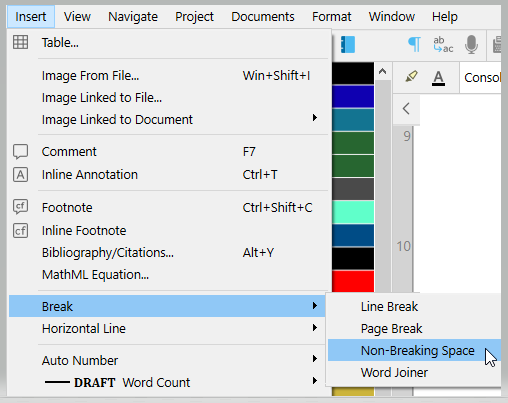
Thanks. How do I do that?
ctrl + shft + space.
Or
3 Likes
This does not appear to work.
I add ten lines of non-breaking spaces into the document, but Scriv still strips these lines out when it compiles the page.
And the option you pointed out at the top of the thread is to remove trailing whitespace. It’s leading whitespace that Scriv is stripping out.
How do I prevent this?
If it is the same for all your documents/chapters, if you want empty lines above the title for all or many of them, you could try adding those lines in the title’s prefix of your compile format.
This said, the non-breaking spaces should work. (A non-breaking space makes the line look empty, while on the technical side it ain’t. It usually works.) Try with a period, just to see. (?)
There might be something else at play; but nothing comes to me at the moment.
. . . . . . .
This setting/option removes both.
The whitespace setting is unchecked.
The section type is set to ‘As Is’ layout, so surely it should just print the blank lines?
Are you compiling to PDF? (A guess, based on your new thread.)
If so, compile to RTF instead and see. That could be a fluke from the PDF converter.
If RTF works, convert it to PDF in LibreOffice or any converter.
I am compiling to pdf, and it looks like this problem is related to the one in the other thread.
The pages on which I thought the blank lines are being stripped out are all pages that follow an image page, which should be filling the page, but is not.
I put some dots in as you suggested, and they all got compiled onto the previous page. So actually the problem is not that Scriv is stripping out the blank lines, it’s that it is not putting a page break after the image on the previous page, and the blank lnes at the top of the next pages are actually padding out the image page before.
Maybe that’s not too clear.. but anyway, one problem resolved, another one now to fix.
I understand. (I can’t tell you why it is doing this, but I understand the nature of your issue.)
If your images are in the editor, I guess you could manually insert a page-break right after them; in the editor.
I think that the part that concerns the size of images when compiled to PDF has already been reported a while back. So, perhaps search the forum for a potential solution. Keywords : PDF - images - compile - image size - etc etc. You should be able to find the thread(s).
… Now that I think of it, iirc, the solution is to compile to RTF, then convert to PDF in a third party app. LibreOffice, for eg.
So, back to :
You images should come out fine, and you’ll have your PDF.
. . . . . . .
Just make sure to check this option :
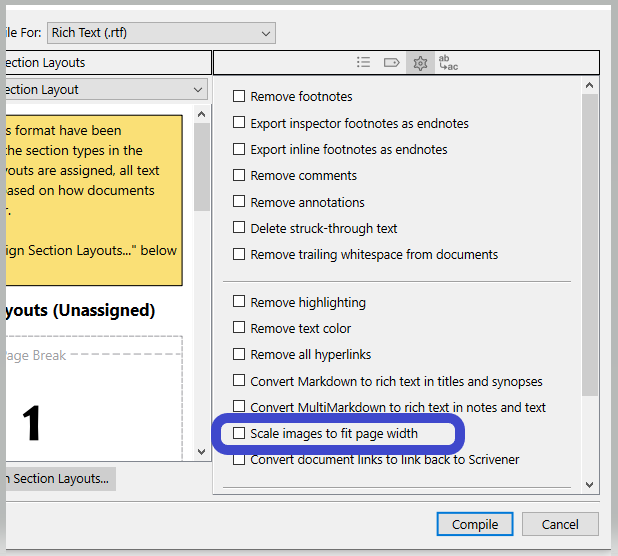
I would normally tell you to make sure it is unchecked, but you said you want your images full page.
And if it messes up the height, then uncheck it. Scale them right by hand, in the editor.
(Scrivener is not built to handle images so much, by the way.)
I’ve added page breaks under the images but compile is ignoring them!
Most peculiar.
I’ll try comiling to rtf.
That option to scale images does not appear if you compile to pdf.
..and why did the font size suddenly increase???
Right. But it does for RTF, which is the format Scrivener handles best.
. . . . . . .
Remove the hashtags from your post.
There are no hashtags.

*Hash. I meant hash.

1 Like
I see.
It is because of the hyphens.

I’ve got Queens full. 
1 Like
Thanks again.
and again because the post has to have 20 chars..
1 Like