Thanks to you, I now have three FR-CA voices working in Scrivener: Nathalie, Caroline and Claude:
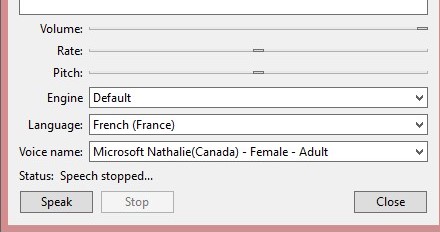
I’ve Installed the Français-France language pack as well as the French-Canada pack and put FR-FR above FR-CA in the language list in the Windows Language Settings, Set French (Canada) as Speech language in Windows Speech Settings
Remember to copy the block text in the Registry File TWICE and remove “_OneCore” from the first two textblocks and add “WOW6432Node\” to the second two textblocks. Double-click to Import. Log out and in to load the voices in Windows. Start Scrivener and set Language to French (France) and Voice to Nathalie (Canada).
Here is a ZIP with Registry files, screenshots and my list of actions:
FR-CA Voices.zip (159.9 KB)
Hope this helps