Note that Scrivener can show keyword and label colors in both the Outliner and the Corkboard.
1 Like
The issue with the keywords specifically is that they’re lumped in a single column. I don’t see how I could achieve this “lane view” and compactness (like in my screenshot) using the Outliner or Corkboard. Maybe there is a way and I just haven’t figured it out.
I stumbled onto a YouTube video by an author who, like me, has been building a writing system with Obsidian. Unlike me, he plans to offer it as a paid product.

I’m of two minds. I do think he’s onto something by building a full writing system with Obsidian, and sure, it’s going to appeal to certain writers. I wish this developer well, especially since you couldn’t pay me enough to have to please a customer base.
On the other hand, the whole point of starting this thread was putting forth the idea that a writer can create a writing system that is individually taylored to the writer’s own needs–even down to the needs of a particular writing project, as I’ve done. If that’s the case, we aren’t locked in to what a developer thinks is best for us; we can just create the feature ourselves.
I don’t want to make my point too forcefully, though, as we’re each on our own individual writing journey and honestly, it’s hard to suggest that my own approach makes sense for anyone but me. That’s why I made my video at the start of this discussion as a kind of “show and tell,” to spark discussion. I’m not Obsidian evangelist, I promise.
1 Like
That’s great, provided the individual actually enjoys creating code.
(This is, essentially, the great fallacy of the open source movement. The vast majority of people not only aren’t developers, but don’t want to be.)
2 Likes
I tried to anticipate this objection in the video and in my posts here. I think I fell on my face in that regard. 
I do like writing code, so guilty. That said, these days one does not have to write code to make just about anything in the software realm, and that includes extending the features for Obsidian. I’ll just leave it there. (And just to be clear, I’m not a fan of AI. I just wrote a book from my AI-skeptical perspective.)
I am, if anything, less interested in writing prompts than in writing code. YMMV.
5 Likes
I like what was done by SCN and is impressive. I use Aeon Timeline, Simplemind Pro (I have also used Scapple) and Scrivener. I find looking at my novel in each different way gives me clarity as I complete my novel, especially with complex timelines. However, I have a multimonitor setup (3) and find that Scrivener open on the main screen and Aeon and my mindmap software open on the other two screens allows me to glance at the other configurations without leaving Scrivener. If you are confined to one screen then SCN solution is elegant, but beyond me as never learned coding and use AI in minor ways.
2 Likes
P’ah. His is nowhere near purple enough!
2 Likes
I love this! I use Obsidian for my Zettlekasten and my personal journaling. I tried to create something like your dashboard with Scrivener metadata, but it wasn’t as pretty as this. I’m going over your video thoroughly and setting up my Obsidian with the same properties, etc. and see what Datacore can do for me. Did you use Claude for the Datacore pages? I’m trying to decide where Datacore came in - I have the older Dataview and I see Datacore but I’m wondering specifically how you were able to set up the Subway View, etc. - is that where Claude helped?
Love this!
1 Like
Hi Monica,
Since I have decent coding skills, in the beginning I built some of the Obsidian Datacore views myself. But doing so took me away from writing, especially that Subway view which was going to take me a lot more time to tackle. So I tried Claude Desktop in Cowork mode and it finished building the Subway view for me in minutes. Though I’m an AI sceptic (and recently wrote a book from this perspective), this was an effective use of it as it enabled me to get back to (human) writing much sooner. So sure, you can have Claude access your vault and then build anything you want.
I’ve used the Dataview plugin for years, and still do for some things. But if you want to build a view where you can easily change the display criteria, or if you want to do something as interesting as the Subway view I show in the video, you’ll need Datacore.
I know, right? We can’t have too much purple!
2 Likes
The second novel in the Oz series doesn’t have Dorothy as an active character. But what if L. Frank Baum wanted to quickly find those few scattered references to Dorothy?
The empty circles denote a reference to Dorothy in a scene, even though she’s not in the scene as an active character:
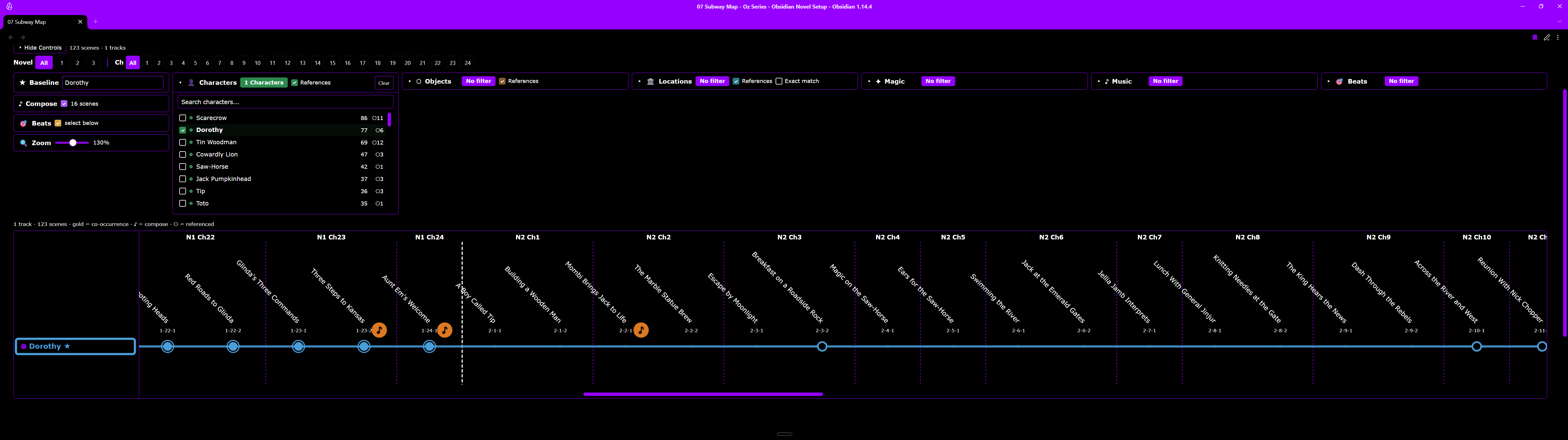
That thin vertical line denotes the division from Novel 1 to Novel 2 of his series. In Novel 1, she’s in every scene as an active character, denoted by solid circles. In Novel 2, we see only empty circles.
If Mr. Baum wanted to quickly visit a scene where Dorothy’s mentioned in Novel 2, he’d simply click an empty circle and up pops that scene:
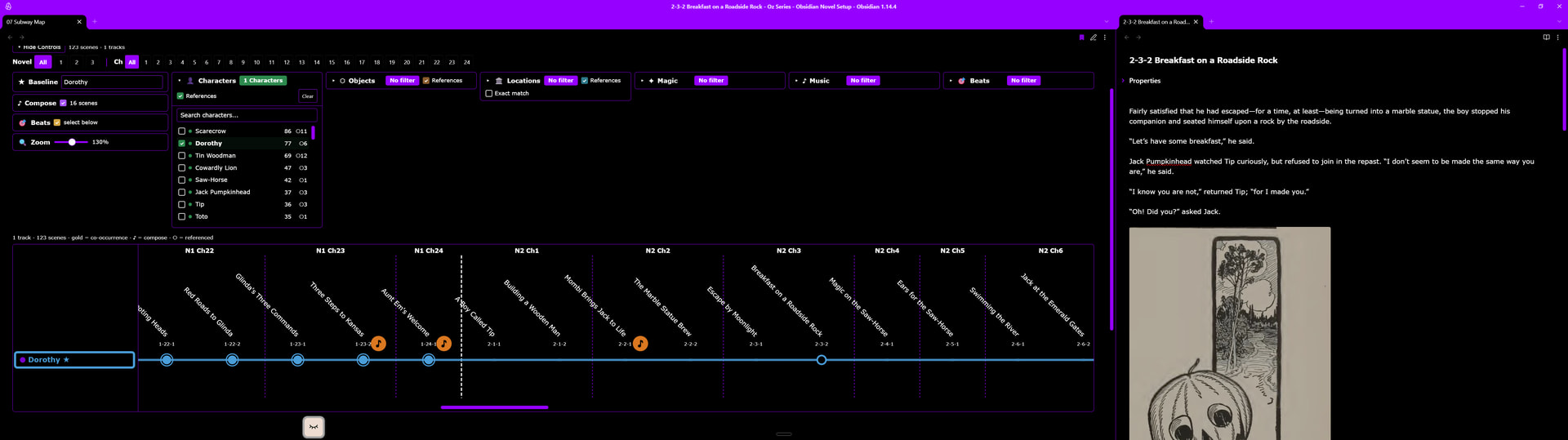
This is just a show and tell. I admit I might be the only person in the world who would want to quickly see, in a novel or especially in a novel series, where a character, location, or object is mentioned in a scene but the character, location, or object was not per se in the scene. Across a seven-novel series such as the one I’m writing, this has already proven to be quite useful.
2 Likes
Another of my occasional show-and-tell installments:
I use Stream Deck for work in my DAW for composing, but thought to use it for my bespoke writing app. (I also use Stream Deck for commonly needed Scrivener functions.)
I only add stuff I frequently use, to keep it as simple as possible. The whole idea is to remove friction as I write and revise. (Do you think it needs more purple?)

PS: That “Binder” button that’s lit up is an interesting one that I just added. I’ve been building a binder that works differently than any of the Obsidian community plugins for similar functionality. Pressing it once lights it up and replaces the usual Obsidian file navigator with a Scrivener-like binder that works with drag and drop. Pressing the button again turns off the light and returns the view to the default file manager that ships with Obsidian.
One way mine is different than what I’ve found in the community plugins is that mine is “destructive,” meaning that it runs a script that ripples through all the .md files in my manuscript folder to update an ordering value in a Properties metadata (YAML) field, plus it updates the novel-chapter-scene number (such as 1-4-2) at the beginning of every .md file name.
From what I can gather, having a “destructive” plugin that works directly to change an .md file is frowned upon among community plugin developers (or maybe the Obsidian developers) because it leads to too many issues from end-users who lose file content. So Obsidian community plugin developers contort themselves devising ways to do what I’ve done in a non-destructive manner, which is understandable, of course.
But in my case I’m creating features just for my own use. I’m comfortable with my “destructive” script, particularly since I added in backup that is written every time a scene is dragged to a new location. I can roll back instantly if anything bad happens. By not having to think about how end-users might interact with this feature or that, I can make decisions based on my own use case and risk tolerance, not someone else’s.
If anyone would like to see a brief video on this in action, let me know, as I have it working not just in my actual novel project, but in my Wizard of Oz demonstration project that I can show. I don’t want to drone on about all this unless someone would find it valuable or at least interesting, as I do.