iPad version under iPadOS 26 with Windowed Apps Turned Cannot Keep Find/Find Replace Open

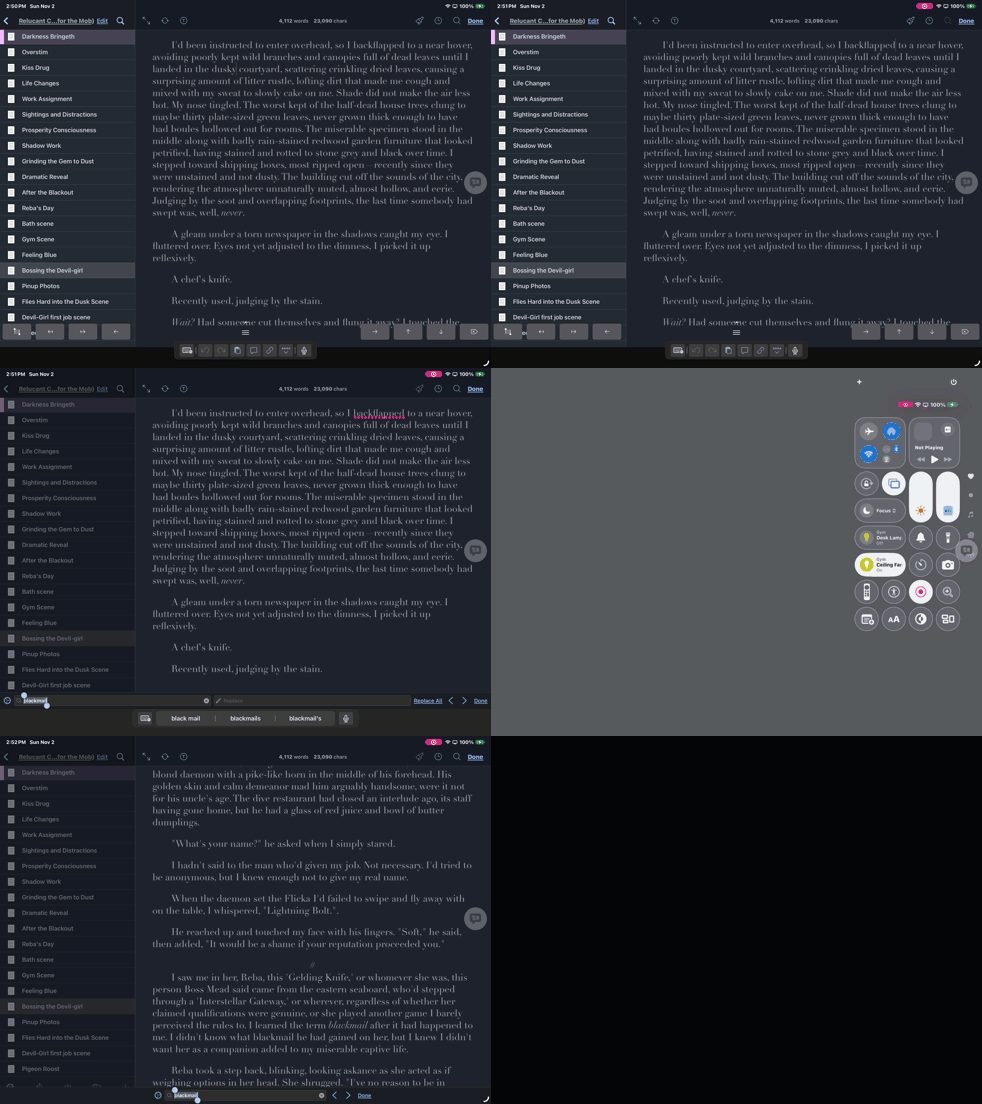
Even with the Scrivener App full screen, if Windowed Apps is turned on the Find and Replace dialog process opens, shows on screen, then in seconds dismisses itself. It is fully reproducible. Please see the attached screen recording and duplicate it yourself. A bug fix release is sorely needed. Little things like this make authors unease about losing text or being unable to work. The only suitable workaround is turn off all Windowing, but that causes other usability issue with other apps on the machine.

PS: I have also submitted feedback to Apple, in case it is only an iPadOS issue. It is issue that existed all through the beta release period when developers should have seen this and created new versions. Expect to be contacted.

Find Replace Won't Stay Open

Thanks for the report, there are a few weird things going on here when one has an external keyboard in use (at least it seems more stable without that). I’ll get them all written up together as I feel they are at least interfering with each other (the large black bar at the bottom of the screen, for instance).

It looks to me as though all (or most) can be avoided by disabling the auxiliary keyboard row, which is the button with four dots and an arrow pointing up to it, on the right side of the standard Apple floating widget thing. So that’s your workaround for now, just toggle that on and off more as needed than always having it on.

It’s what you’re supposed to do in theory, but you have no idea how much time was spent just trying to get the Mac fixed (time that is still being spent cleaning up their mess). We’ll get to iOS, but we can’t do everything at once.

4 Likes

This happens to me as well. Using the four dots to minimize it doesn’t work because it just reappears as soon as you open search. Sometimes I can get search to open after minimizing scriveners floating keyboard panel a few times but it’s very hit and miss and pretty frustrating. I use my ipad often to write when I travel or at a cafes. My workaround when I need to search is to disconnect the ipad from the magic keyboard and use the onscreen keyboard.

Same problem here, same lack of help with the floating keyboard gizmo disabling.

On the other hand, Apple’s Preview app has some real problems with windowed mode on the iPad, so Scrivener isn’t alone in this regard.

I solved it by switching back to full-screen app mode. It would be great if iPadOS consistently handled windows better. Maybe now that Alan Dye has jumped ship to Facebook, Apple will get a UI design head who enforces quality and consistency across the board.

Thank you for acknowledging this. It is now January and 26.2 has been out for weeks with multiple Mac releases under your belt, but the iPadOS bug isn’t fixed. Not only that, disabling Windowing app mode in 26.2 nolonger reliably fixes the issue. I am hoping that it wasn’t Apple’s updates to the frameworks and XCode making it difficult to update Scrivener that’s the reason you haven’t attempted to fix this one very egregious issue. I’ve already seen one developer abandon their software over that.

Regardless, I cannot revise on my iPad, which is where I do most of my work. I even had the app lock-up when I succeeded in getting the ⌘F to bring up the search box. I failed on the Find again. I didn’t lose work, but the app crashed after about half a minute.

I did check your internal keyboard workaround. Yes, Find fails with both the Magic Keyboard and an external Apple Keyboard, but as you say, not with the internal iPad keyboard which I never use. For me, this is an awful workaround because I use an external monitor half the time I am on the iPad, but as you say, I should be able to make it work. As a retired long-time developer, I’d advise this: If developers were strictly sticking to the frameworks and best practices, they may have found a bug in Apple’s frameworks. They ought at minimum investigate the bug now so that they can to report it ASAP. If not, they can get a head start on the fix.

Most of your iPad user base is likely dealing with this bug, and are not happy. Apple’s Magic Keyboard is a must-have accessory for professional writers using an iPad, and Find doesn’t work with it.

Nevertheless, and I know it isn’t helpful, I posted a review on the app store. I will revise it or remove it when you either post a schedule an ETA for working on the iPad app, or preferably fix it.

Thanks for pointing out that this is not Scrivener-specific and also affects some of Apple’s own apps.

1 Like

@sfwrtr, it might be well to be a little patient here, actually.

For one, there’s been a holiday period much of the time over which you register discomfort,

For another, as just above reminds, this doesn’t look like a Scrivener problem, and if Apple can’t fix their own apps, no workaround is likely yet.

In fact, the kind of interface element Find appears in is almost assuredly a simple and should be very reliable call for Scrivener to use, to make it appear and controllably disappear, 99% managed by Apple’s software.

To complete, I’m running the same iPadOs version, on a getting-to-be venerable iPad Air 4, and I can’t make the disappearing act appear, trying a number of ways under windowing, smaller or full-screen.

Maybe it occurs only on M-series iPads? A clue there may be an event-related problem is that there is one way I could get the Find box to disappear, which was to overlap the Scrivener window with another, even a much smaller one. When back in front, Find had cancelled, though it remembered its contents when raised again (clover-F).

But again, this should not happen, and if it does, it wouldn’t likely be anything in what the Scrivener code contains which could cause it.

In short, holding your water, using your writing practice to imagine just how difficult and long the travels involved in arriving at a cure for something like this often is, could be recommended.

With fortune, and holidays enjoyed, Apple will get themselves to a new release soon, which could include a fix.

p.s. the reason for the flagging above is that I at first had mixed up the testing a bit….

1 Like

@narrsd Maybe TL;DR, but I am annoyed, partially as a professional author and partially as retired professional developer. Scrivener is a great product, but the iPad version feels like abandonware. Below, except for the first section that specifies the hardware I use, the rest is me talking about my frustration.

Maybe it occurs only on M-series iPads?

I recently switched to the M5 13ā€, but at the time I originally posted I was running a late 2019 Apple Silicon iPad Pro 12.9ā€. Same problem. My problem started with the 26.0 first public beta, and I should have reported it then, but I figured, you know, professional developers run the betas, too. When release 26.0 showed up, removing the legacy features available all through beta, the search bar went completely FUBAR breaking the workarounds I’d been using.

the kind of interface element Find appears in is almost assuredly a simple

Nothing in programming is simple, programmers know this, except for maybe fixing a typo—but then increasing a literal string length might overflow a variable, and, you know… boom! I understand Apple is a real pain to program for, maybe not as hard as Windows ActiveX was, but testing against each beta is SOP, even if for an hour. The ⌘F bug would have shown up.

using your writing practice to imagine just how difficult and long the travels involved in arriving at a cure for something like this often is, could be recommended.

Really, I’ve no choice other than to register my ā€œdiscontent.ā€ I can’t log in remotely and do overtime to fix the bug for them.

Authors aren’t necessarily patient. Nor developers. I was what they now call a full stack programmer, everything from the UI to the backend, including the interface to the IBM mainframe version of the app. Panic happens. Good programmers work to prevent panic.

I am not saying I never missed things. I put out my share of fires. I do know that my company reacted immediately when they got a nasty-gram. I’ve ignored various minor Scrivener issues and Mac-app parity needs—like a text document diff to disambiguate conflict documents being paramount, and I’ve requested that in this forum. I simply adjusted my writing practices, but a ⌘F failure is bad. It’s like not being able to use the insert signature feature in a PDF app for a business user. So yes, nasty-gram. Since it’s unlikely to bubble to the surface in the app store interface, it isn’t likely to impact the company much, but I know the developers will read it.

I hate to admit this, but I’ve been trialing other software, but Scrivener has capital-F Features I’ve grown to view essential, especially Dropbox sync which beats all iCloud solutions other products use, even Apple’s with which I’ve lost pages of work. The ⌘F issue is so serious for me, I’m very close to buying a bottom-of-the-line Mac Mini ($599) to use where I Airplay my iPad, simply to bypass this bug and get on with getting my work done!
1 Like

If it’s any (very small) consolation right now, Apple utterly f’d-up so much UI in the 26 updates. Easily the worst I’ve seen it in a decade. As UI/Front End engineer, I’ve been fighting issues right through the betas, and it’s still biting me now. I mostly have to deal with Safari 26’s quirks, where I can at least code around some of of those quirks, but not all. Apple really lost their way recently. We’re what… 4 months into 26.x releases and there are still fundamental broken things.

Hopefully the new change at the top of that division will sort things out going forward, but it’s going to take time.

I feel bad for any developer having to deal with this. I know it has cost me sleepless nights.

3 Likes

@Shell Yes, I ran into one more oddity this morning, an ordinary app completely lost in its way, only recoverable by a forced stop and restart.

@sfwrtr …and there you have your evidence for who to complain to….

Since you know things about programming, it must be clear that the windowing system is in charge of what happens to its widgets. The search field and its enclosing dialog are widgets.

Scrivener instantiates the widgets, which the window manager puts on screen. They won’t disappear intentionally unless you close the dialog manually. In particular, they won’t disappear on a hiding or exposure of their visible area. And they certainly won’t just ā€˜disappear’ if things are working correctly.

That I couldn’t see your problem just points to the instability behind it – in the windowing system.

That I could generate a similar disappearance, by covering and afterwards exposing the Scrivener window using another app, points very strongly to a deep fault in the windowing system, compared to what it is supposed to do. Any dialog should stay up, no question of principle there. But it doesn’t.

Again, trying to get ahead of such a ghostly occurance like this from outside Apple’s windowing system, not anything likely to be possible whatsoever – and they’ve tried…for the iOS Scrivener construction that’s been remarkably troublefree and capable, for years, thanks to @KB and crew.

Cheers, then.

1 Like

@shell Agreed. Dealt with Microsoft’s similar mistakes in Windows, so I agree. I am so glad I’m retired and only worrying about characters in a novel!

@narrsd I fully support your assessment of the situation and your findings by manually overlapping windows. I hope it helps the devs fix the issue or to report it to Apple. It may be necessary for them to build a typical modeless dialogue to replace the fancy ā€œwidgetā€ they employ currently. I fully support that type of fix. Working is better than non-functional elegance any day.

3 Likes

(Just now I had one of Apple’s own dialogs, via a quick action, display black text on a dark background, rendering it illegable. These are such basic things to mess up. You can only imagine the horrors lurking behind the scenes too.)

2 Likes

@Shell @narrsd @AmberV The ⌘F bug on the iPad became more than I could deal with professionally. I went and bought a Mac Mini to use Scrivener desktop where I formally used the iPad, which clues you in to how critical I consider the bug. I do hope you fix the iPad bug eventually, or use a simple find / replace dialog instead of a complicated UI element for the functionality to prevent future failures when Apple decides to change their UI design again. Please do tell me when it gets fixed so I can test it. I do consider Scrivener essential. I could not find anything that could adequately replace it.

2 Likes

Yes, we probably will have to move it. I wrote it up in the ticket that it might work better to display it along the top, as that isn’t too uncommon anyway (like how TextEdit’s works). I’m not sure if it’s terribly complicated, or more just a matter of how the area right above the keyboard has become overloaded and fragile over time. There is already a point of awkwardness with custom toolbars these days, and how Apple inserts their own blob below it, without an option to suppress it, which pushes things around. While you can technically augment the blob, it’s way less powerful than our own toolbar and it would be a pretty big downgrade to have to do away with it.

3 Likes

I’m glad to hear that the developers have a handle (no pun intended) of the find dialog issue. I’d not even complain if it were a plain floating dialog, but I don’t know your internals so take that as I will be pleased however you fix this.

I will say I am very happy to have a second Mac at the workstation using Scrivener desktop (ignoring the money I made for it) filling in for the iPad Pro using airplay. Still keenly interested in the fix because I use the iPad for travel and use at random places in the house. Yours is a good product.

1 Like

@sfwrtr, new iPadOS upgrade is available, 26.2.1 I think. Did you install it (or find it overnight installed automatically), and try your issue against it?

We can hope for a cure. I couldn’t seem to arrange my cover-expose test, something else changed (…), so without clues from here this time.

Will check on Sunday PST. I’ll get back to you.