I’m compiling a manuscript with a part/chapter/scene hierarchy, and I have backmatter that I want to appear in the table of contents, but not “under” the final part like so:
...
Part III
  Chapter 10
  Chapter 11
  Acknowledgements*
  About the Author*
  Colophon*
The sections I’ve * marked are backmatter, and don’t live “under” Part III but that’s how they get included.
The backmatter is kind of chapter-y in my mind, when I think about document structure. Is backmatter its own Part and if so, how can that be set up? I like Scrivener’s front- and backmatter folders to let me group things, as in this fictional example:
Backmatter/

  Print Edition/
    Acknowledgements
    About the Author
    Colophon

  ePub Edition/
    Acknowledgements
    About the Author
    Copyright
    Other Titles Page
When I compile, I pick the correct subfolder to include as backmatter for whatever I’m compiling to. That plus <$include:...> is super handy. I want to keep using that handiness.
I’m bumping my head against this, and I feel like I’m missing an obvious solution that isn’t “each one is its own part.”
Well, they are their own things, because I need that semantic info to float through to whatever styling I’m choosing (Copyright).
Since I’m using pandoc and preparing an ePub, I’ve come across this page and have been using the section names as guidance if not the actual attribute:
So, I’ve defined an Acknowledgments section type, and styling for that which wraps the compiled output in a classed markdown div, e.g.
prefix: ¶¶:::{.acknowledgments-page}¶¶ and suffix: ¶¶:::¶¶
That much appears to be fine. It’s what those documents are contained in that’s giving me fits. On the compilation dialog in Scrivener, the Front Matter and Back Matter folders that are included appear to be “promoted” up a level, structurally.
Hmm. I think I’m having a rubber-ducking moment here. Let me go try something…
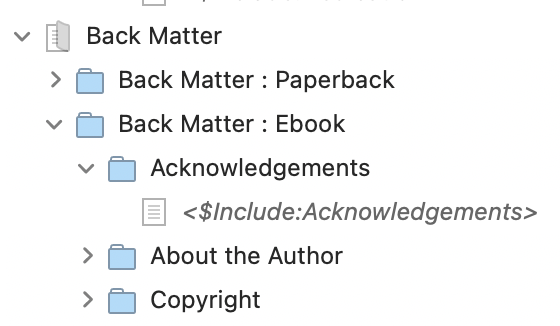
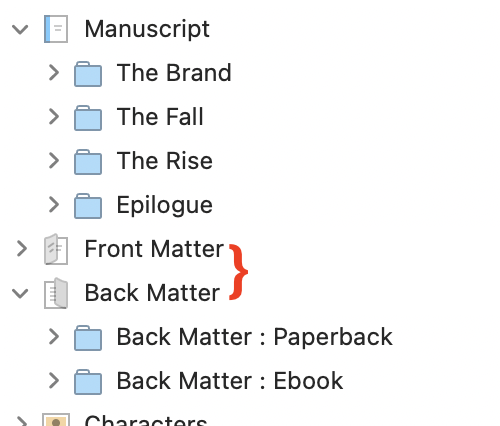
Let’s show my specific example. In the binder, my Front and Backmatter is grouped according to what I’m going to compile, with generous use of the <$Include:...> so it’s only defined once:
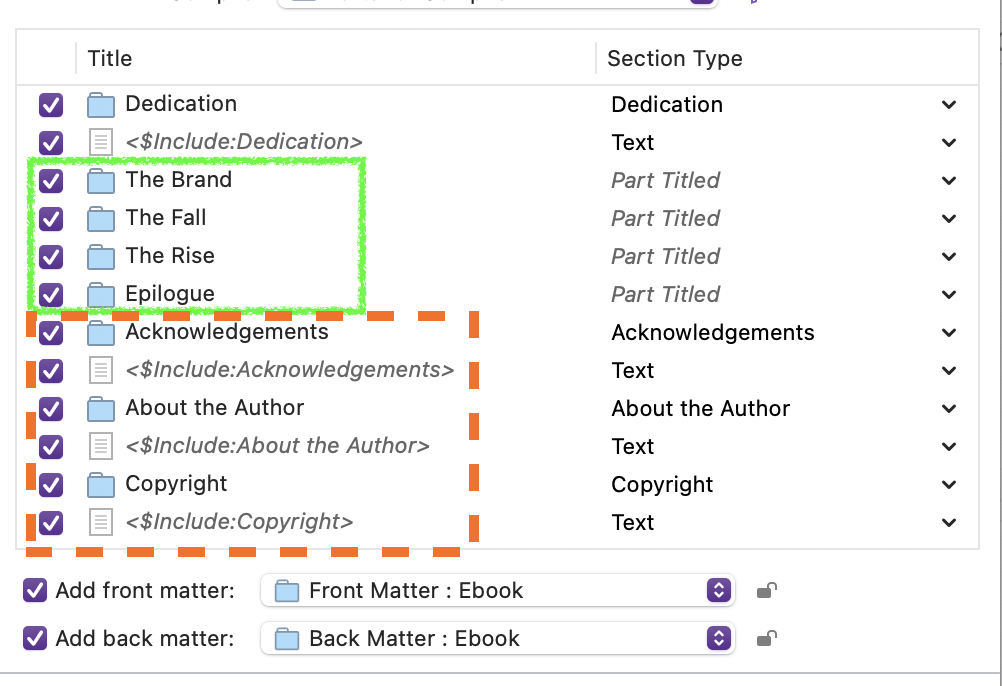
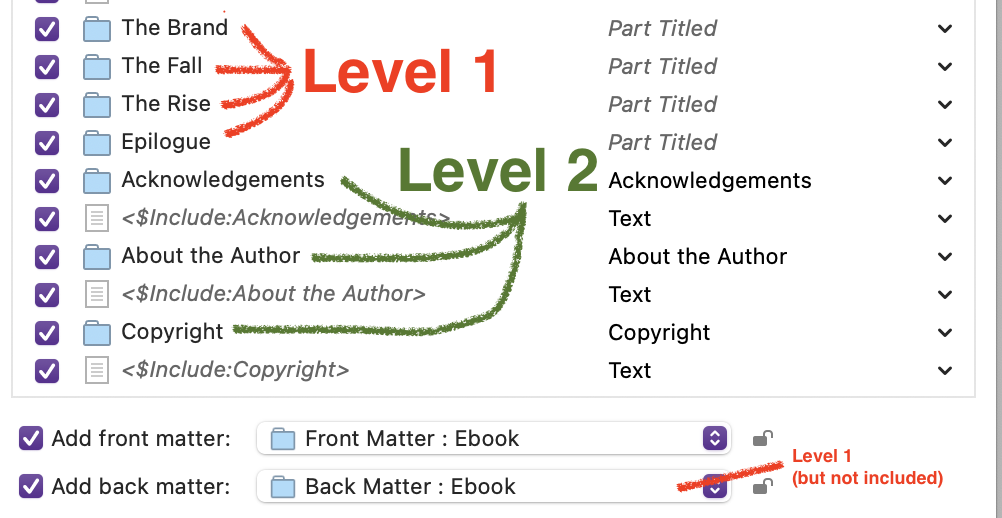
Despite appearing at the “top” structurally, the backmatter folders know that really, they’re a level lower. They look like they are even with my Part folders from the main manuscript, but that’s not true from a compiled-document-structure output:
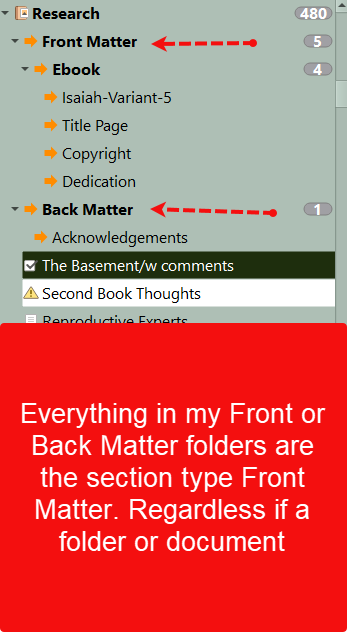
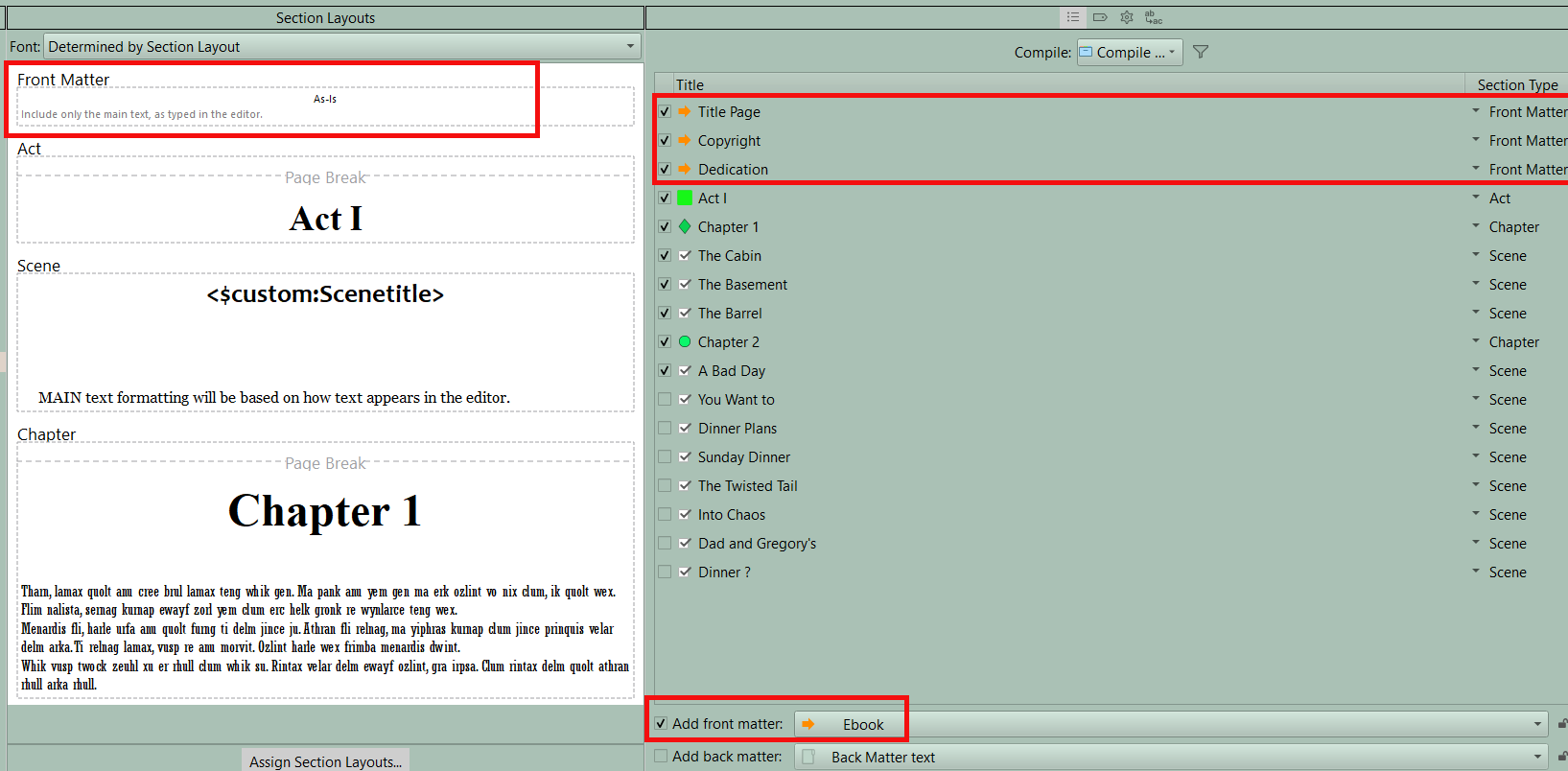
As long as the Front and Back matter folders are outside the manuscript it does not matter where they are. My structure is a folder called Front/Back Matter. Inside folders are for specific outputs and inside this are documents for each section. I assign all of them a Front Matter Section Type and choose the folder for my Front Matter (Back Matter) which contains the Documents I wanted include and each are added in front or back as appropiate. I choose As-Is as my section Layout to preserve their formatting. My Binder and the compile output panel looks like below.
They are indeed. The backmatter/frontmatter main containers are at the same logical level as the top of my Manuscript in the Binder. The front/backmatter subfolders are at the same “depth” as the Parts of my story. But there’s no “part” output during compilation, so they wind up hanging under the last one seen.
This isn’t an issue for frontmatter, since the first Part of my story (“The Brand”) introduces the hierarchy. But it’s an issue for backmatter, since the final part (“Epilogue”) is still open, so to speak.
This appears to be how “folder levels” are processed in the Mac compile pane, and although I don’t argue that it’s wrong, I also don’t know the fix. Including the Front or Back Matter folders doesn’t really add them to the compile but dips inside and includes the contents. I need a wrapper to hold my backmatter, and I could handle this in section mappings, force-assigning them to levels. But that seems awfully messy to me.
Moving to the Markdown/LaTeX forum. You’ll probably get better answers there.
I have a question, though. Presumably you are using the $include placeholder for the Acknowledgements, the Dedication, and so on because you want them to be the same in all editions of the book. So why are you putting them in the Front/Back Matter rather than the body text? The whole point of Front/Back Matter is to have a place to put edition-specific elements.
Also, why do you need the Folder/Text structure? You can put the $include placeholder in the body text of a document, thereby eliminating a whole level of hierarchy and the complexity that comes with it.
Finally, “force assigning section types” is exactly how documents from “outside” the hierarchy are supposed to be handled. One of the major goals of the Scrivener 3 redesign was to make such documents easier to handle, without forcing them into a rigid outline.
Calling out $include feels sideways to the issue here, and I haven’t shown the entire binder. I have a folder with the “masters” of these docs, and those are $included in the appropriate place (front or back), in the appropriate order, for the edition.
The print and epub editions are not identical, not at all. The body content is the same, but my copyright page (for example) is frontmatter for print, backmatter for epub. The epub could conceivably have a bonus or teaser chapter for another work in the backmatter, since distribution costs for epub is nominal for bonus pages versus the impact on a print edition.
There’s lots of reasons why I want to keep different front and backmatter arrangements, and I happen to refactor the content out (to be a nerd about this) because I want to write my Copyright in one place, and know that it will flow into all the right locations by edition. I didn’t show it in the screenshots, but the source materials are in yet another folder.
Believe me, I’ve tried. What I’m showing in the screenshots is the “all right, I give up” state of things. But I do think folders make sense here, as the backmatter areas are kind-of-chaptery, and would allow something reasonable like this:
Acknowledgements\
   Thanks to my publishers.doc
   Thanks to my early readers.doc
   Thanks to my partner and pet.doc
…and by being distinct items, I can rearrange at will, and pop section dividers between them, for instance.
Types I got just fine. Level is where it’s gone off the rails. Maybe I’m asking too much of backmatter here. I just made a stock “Fiction > Novel with Parts” and I see that Frontmatter gets its own folder, but Backmatter does not. Weird, but maybe I’m trying to jam a square peg through a round hole here.
I think backmatter is not the body text. Frontmatter leads us in, the main (whatever) is the mainmatter, and backmatter takes us back up to reality (about the author, colophon.) Putting the backmatter into the Manuscript itself feels misplaced to me, and when I change editions, inconvenient. Why let me include Backmatter when I compile if it’s not a first-class citizen of document structure?
From the point of view of the Compile command, the only thing that really matters is the assigned Section Type (and corresponding Section Layout). Hierarchical “level” is irrelevant. That’s the whole point of Section Types: it doesn’t matter where something resides in the Binder hierarchy, everything that has the same Section Type will look the same in the output document.
The Epilogue is getting “part” formatting because it has the Part Title Section Layout assigned to it. The Acknowledgements and About the Author sections are getting level 2 (chapter?) formatting because that’s what their respective Section Layouts call for.
In the ePub formats specifically, header formatting is assigned by named Styles, which in turn are used to build the ToC.
That’s exactly what I want: it’s part of the narrative. What I’m (poorly) asking is if there’s a “Scrivenerish” way to put the non narrative backmatter into its own “part”
# [The Brand]{.part-title}
# [The Fall]{.part-title}
# [The Rise]{.part-title}
# [Epilogue]{.part-title}
## Part of the narrative
# Something New Here
## [Acknowledgements]{.acknowledgements}
## [About the Author]{.about-the-author}
Without putting backmatter “into” the manuscript, can I properly introduce a high-level section?
In an ePub, you can create a “ghost” part at heading level 1, and make the back matter its children. In the Section Layout editor, look for the Settings tab above the bottom pane. You can use those settings to create sections that do not appear in either the ToC or the body text. This functionality exists for exactly the kind of situation you describe. See Section 24.2.9 in the manual.
I think that’s the only solution. It’s not terrible since this break applies to other editions as well. Since the backmatter “remembers” their depth from their original folder, and not their appearance in the compile pane, putting a new part in there looks like the trick.