I’m working on a game, a visual novel to be precise, and my script usually looks like this:
Fe "Have you seen the news on TV?"
#camera on his back/over his shoulder, the TV is on
Ma "Yeah, it’s wild out there!"
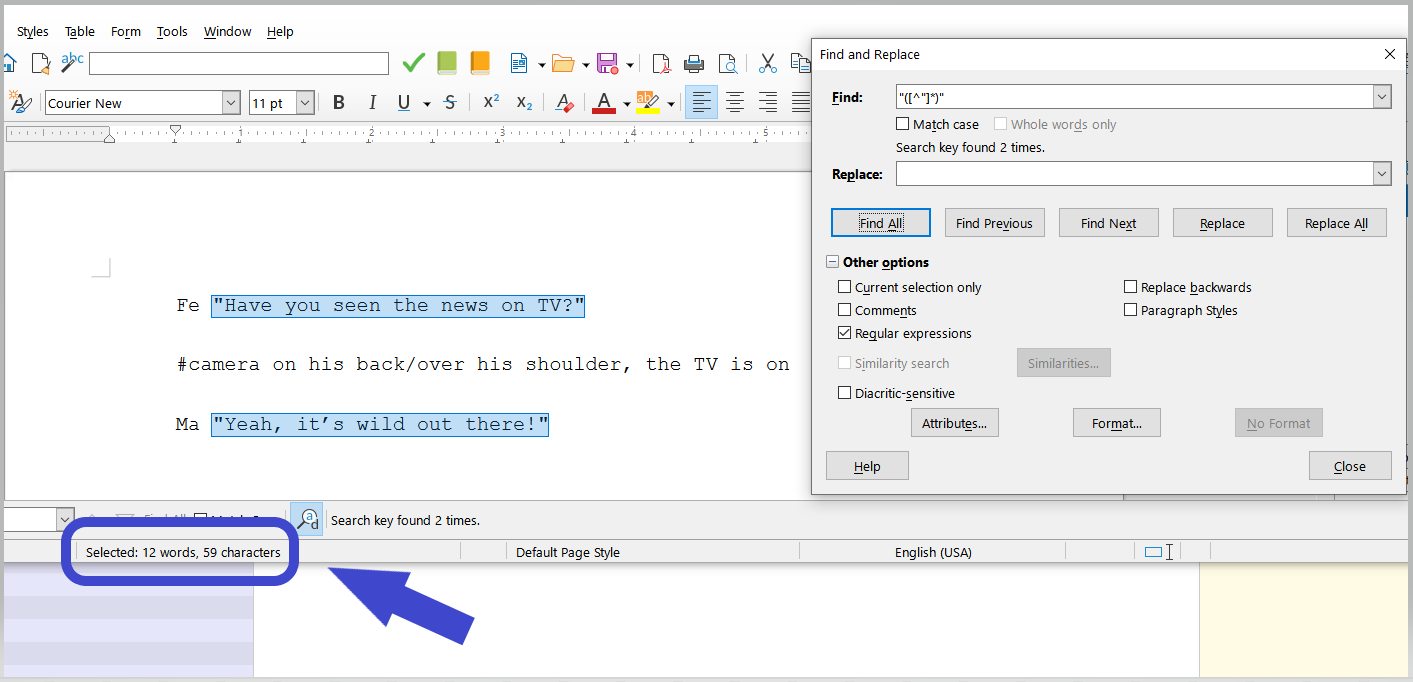
On my document, the word count below gives me a total of 25 words. I’m looking for a way to count only the words for the dialogues, the ones in quotes, which is what the player will read. Without the Characters (Fe and Ma) and the comment in the middle (everything in the line after the #), the total world count should be 12, not 25.
I’m on the trial period. I have been messing around with Scrivener for a few hours trying to find this myself with no luck. This word count thing is the main thing motivating me to move out from Word. Thanks.
Hi
A Regex, perhaps.
I can’t think of any built in way.
There is a function named “dialog focus”. It makes dialog stand out, but it doesn’t give a count.
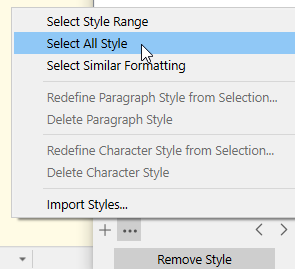
It is a bit sketchy, but should you apply a character attributes style to your dialogs, you could then use the styles panel to select all of this style, and then you’d get a word count. (It would be a trade off. This will either become an advantage or an inconvenient comes the time to compile. An advantage if for some reason you want your dialogs’ content to change formatting – not be like the rest, font, etc --, an inconvenient otherwise.)
Good news:
You could copy paste your document’s content into a blank LibreOffice document.
Then use LO’s Find and replace with this Regex : “([^”]*)" and click “Find all”.
You can leave that LO document open in the background, do your thing in Scrivener, and whenever you need a count, just Ctrl-A Ctrl-C in Scrivener, Ctrl-A Ctrl-V in LO.
The compiling/formating out isn’t an issue for me because these things never get printed or exported to another software.
Correct me if I’m wrong, but, for what I could find out, the Character Style + Select All Text with Character Style combo only works for the current document selected in the binder, so if my binder has:
Chapter 1 Part 1
Chapter 1 Part 2
Chapter 1 Part 3
I can only count the words with that Character Style in one document, not all three of them, even if I individually apply that combo to all three documents, when selecting all three documents or the folder containing those documents, I can’t get the final word count with all documents. I also may want to add Chapter 1 Part 4 and count the word for only parts 1, 2 and 4, something that is possible with the normal word counter that includes everything.
For the second method, I think the problem is, overall, the same.
Unfortunately, the available functions in a scrivening (that’s when you see the content of multiple documents in the editor) can’t reach across documents’ boundaries in the Windows version, no.
You’d have to repeat per document and do the final math yourself.
Is by any chance possible to add the word count for words with that Character Style as custom metadata to have the numbers for each document listed in Outliner mode? Or anything similar? I’d need for the number to update itself every time I add or delete dialogue, without me having to change it manually.
On another topic, besides other issues I was having before, right now with the sample text I wrote above the word counter in giving me a result of 7 words instead of 12 like it did before, for some reason it’s selecting but not counting all the words with that Character Style, it’s only counting the first part of it. If I delete the first part, it count the second part (5 words).
There has been discussion in this forum about getting word counts for dialogue. Might be worth a forum search. To my recollection these discussions were typically about scripts (I am thinking the OP is not using scriptwriting mode, but is just freelancing the format.)
It would not be hard to write a macro to count only words within quotes on the clipboard/pasteboard — which looks like all you need. Assign that macro to a keyboard shortcut and that would probably give you the simplest-in-use workflow. ((I once wrote a macro that counted dialog words but also gave subtotals for each character. The way you are typing up dialog elements, this would be possible for you too, if relevant.))