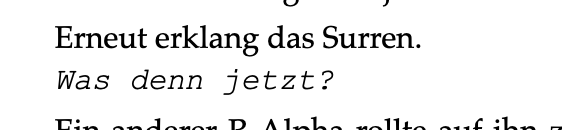
Since today, my text does not compile into the same format anymore. The screenshot shows the compilation result of using Palatino regular and what should be italic.
Nothing changed on my machine over night afaik.
Running MacOS 26.4.1, Scrivener 3.5.2 (re-installed it bevor writing this post).
Anyone have any idea what went wrong?
Is this segment simply italics, or is it a style?
And, if you reload it in a document and remove the italics, does it still look different? Perhaps the font face is designed like that, as unpleasant as it makes it look. (?)
[Maybe you only noticed just now.]
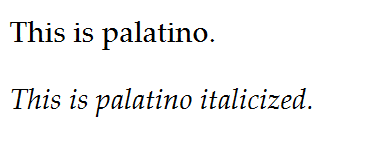
[Palatino linotype (on Windows)] – it looks different than yours. The letter “z” makes it obvious. But yet you can see the bold of it is gone when italicized.
Yours looks like courier new when italicized. (If you are using a style, go and have a look at the styles tab of your compile format.)
Problem solved. Your answer was very helpful. Thank you 
I indeed use character styles. I did not change the definition from yesterday to today. Anyways, I defined the emphasis style anew and made sure that the font was not included, and, for whatever reason the compilation produced the expected result again.
1 Like