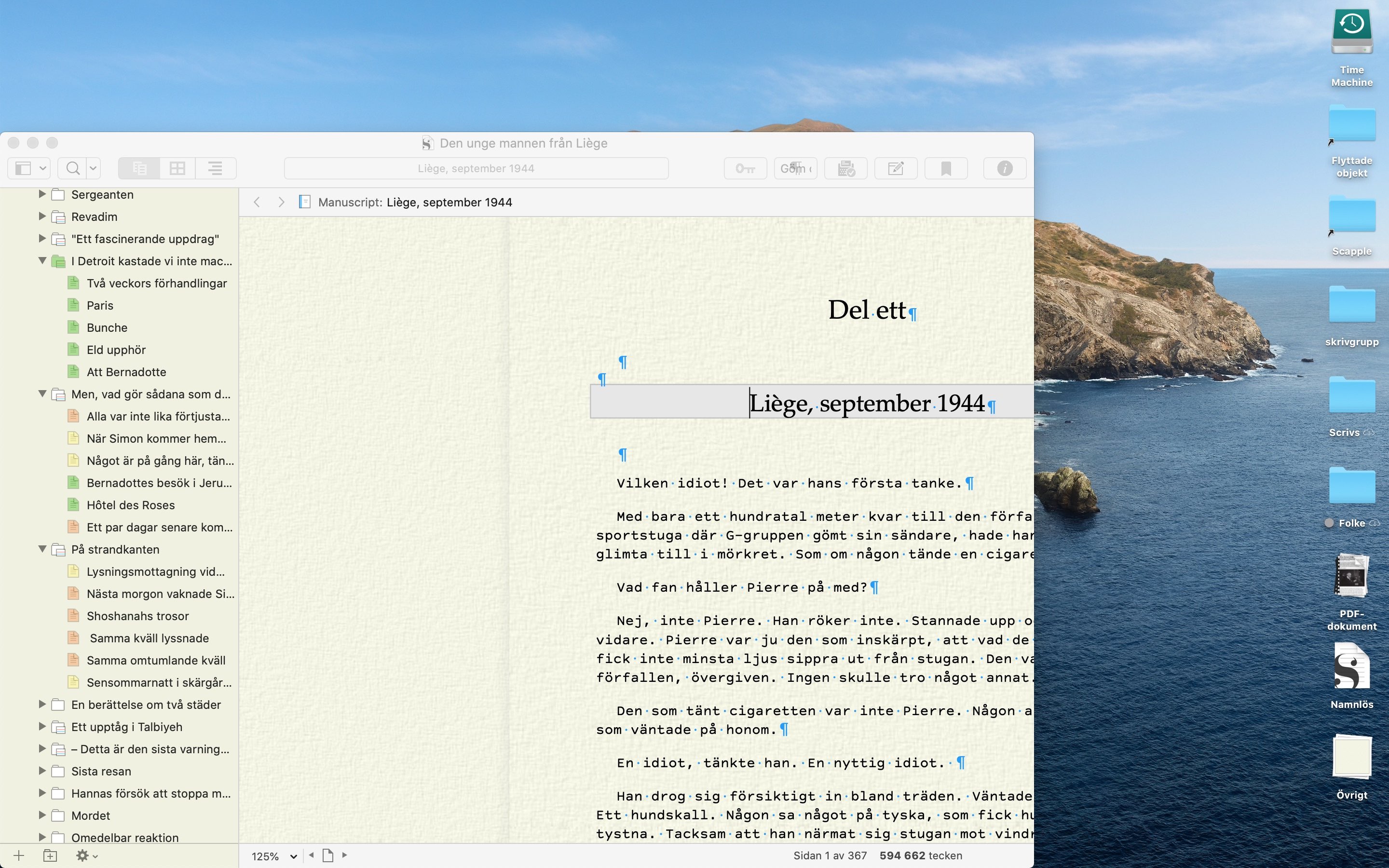
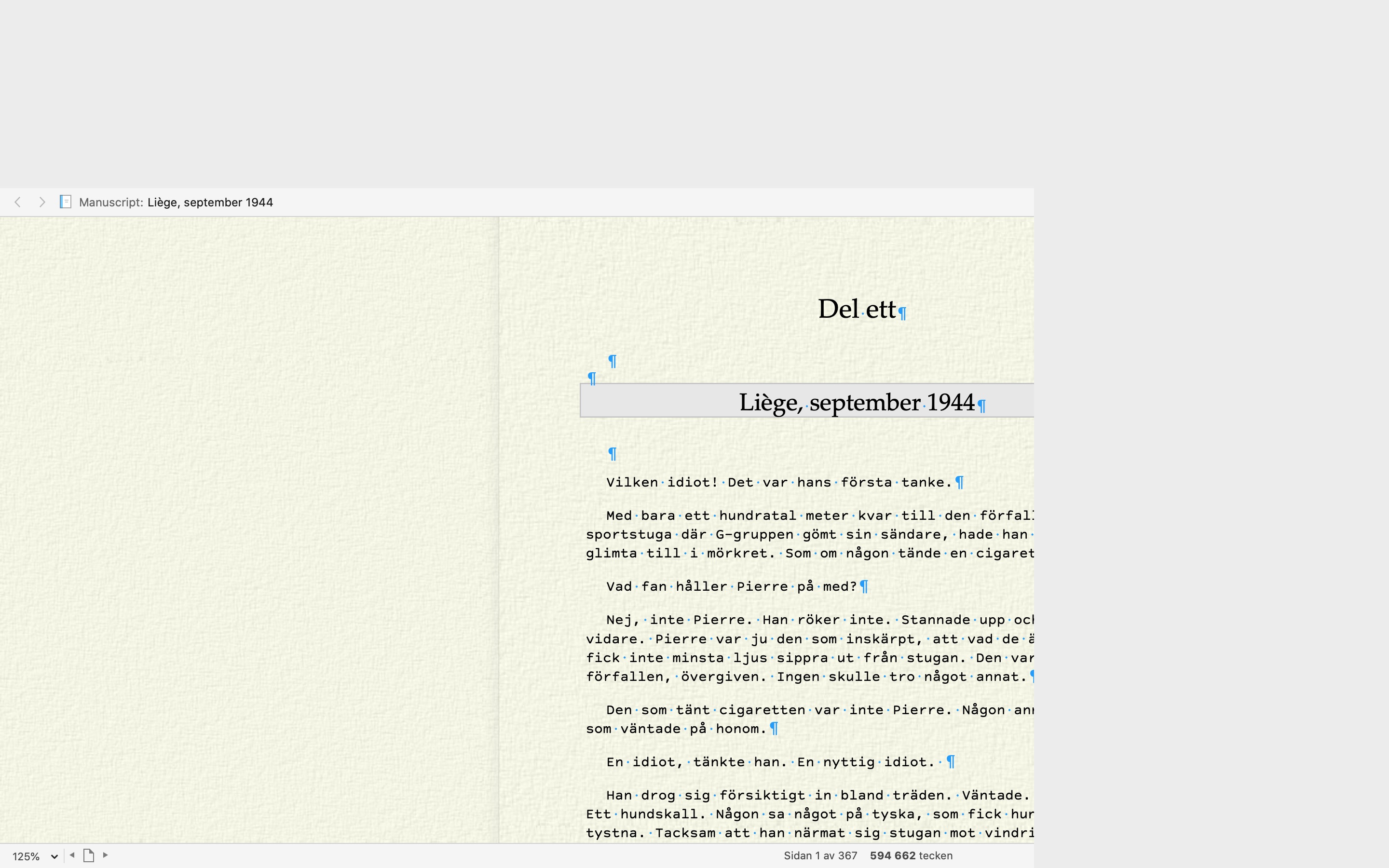
Hard to describe, but if you have the problem you’ll know what I am talking about. Both the upper and rightmost part of the Scrivener window have some blank sectors that should not be there. Is it only me or it’s a known issue?
I should also say that I was traveling and haven’t used Scrivener much in the last four weeks or so and perhaps the issue is not with the latest beta? (Which, btw, seems to have solved all those pesky iCloud issues…)
Scrivener looks fine to me on build 19A558d — and yes they completely reverted iCloud system code back to the Mojave version to fix major sync issues, and catastrophic data loss (even installing a beta on the iPhone wiped files in an unrecoverable way from desktop machines):
Cloud storage makes running beta software on any linked device a potential for disaster… Apple should have had a mitigation and backup strategy for this, as developers are still probably likely to use their Apple ID when running beta software, and certainly public beta testers will…
I haven’t lost any data (that I am aware of) but wasted so much time on the iCloud issues of Catalina betas that is not even funny.
I have two types of issues on two different machines (MB12 and MBP13), as you can see from the screenshots. I got this empty sector on the right side and either I can’t see the top of the binder or I see that but I also have another empty sector on the top of the window. Can’t figure out where this stuff is coming from. I see it in full screen or not, and switching from ‘dark’ appearance to ‘system’ appearance makes no difference. I believe it started with the latest build. Very puzzling. Curious to see how it looks on the iMac 27 5K retina sitting in the office, but that’ll have to wait a few days.
FWIW, this kind of anomaly is pretty common with Mac OS beta releases. The Scrivener UI is pretty complex, and it seems to take Apple some time for all the components to get hooked up correctly.
Considering the severity of the problem, and that you seem to be the only one reporting it thus far, I’d eliminate whether or not it is just a mundane broken UI plist file, the likes of which can happen on any system.
Run through this checklist and see if that fixes it. You might also want to reset the main prefs plist as well.
Thanks. Doesn’t seem to solve the issue, which now that I have spent a little more time observing it, happens only when I go to full screen. Funny thing is, if after I go to full screen I exit full screen, display is still pretty screwy. If I close the project and re-open it, it’s all fine and dandy, as long as I don’t go full screen (which is my preferred way to work, btw).
I assume full screen is something controlled by the OS, isn’t it?
When you say it doesn’t “fill the screen”, does that mean there is space around the edges of the window, or that the interface doesn’t fill the window? If it’s the latter, as you can see, we know about it. And yes, it is a beta OS problem.
We don’t actually know of a way to reproduce it though. Simple tests work fine, so if you can dig up a trigger from a blank starter project (and if that reproduces it, from your settings most likely), let us know!
Does it happen with default settings in a new test Mac account?
How do I set up a test account? It happens with default settings in my usual account.
In your main account, do similarly complex windows in other software exhibit oddities when show in full screen?
Not that I’ve seen. Scapple for example works as it should.
Scapple would have a fairly simple window by comparison. I’m thinking of all the split views that Scrivener has—it’s complicated enough that it is frequently broken by macOS betas in the earlier phases (kind of concerning to see a break this late though). So something more along the lines of the main DEVONthink window, Xcode even—windows with a lot of subsections within them.
As for creating an account, it’s in System Preferences: Users & Groups. Just make a quick non-admin account and give it a quick check. That will eliminate most third party influences and system preference settings that might be involved. I do this kind of check all of the time, especially since my main account is very heavily modified.
You wanted me to check with “something more along the lines of the main DEVONthink window, Xcode even—windows with a lot of subsections within them”. Don’t have any of those. The closest I could get was Evernote, that behaves exemplary.
BTW, heard that Catalina goes live in less than two weeks. If you are not on it, don’t upgrade yet. Def not ready for prime time. If you use iCloud Drive (not for Scriv, for other apps), don’t even get close to Catalina. Still such a mess. I thought the latest build fixed the issues, but it did so only on one machine out of three I use.
Okay, now that I do have a functional testing setup, the good news is that I can reproduce this easily enough. For me, the main editor view itself is locked to a specific size, probably the size it is when the project was loaded. So if you resize the window normally at all, the editor doesn’t resize with it (neither to contract or expand). Full Screen is just another way of doing that, and is not integral to the problem. It’s a little more complicated than that (toggling binder and inspector on and off reveals more clues into what is going on).
I’m seeing this still, and just updated to beta 9. any ideas how to fix or limit this behavior? Yes, I know it’s my own fault for installing a beta… I did this to myself…
Yup, still on β10 as well. It doesn’t appear to be something you can get around, short of using different hardware. It might be an external monitor, or an iMac may not display the problem, but obviously that’s not much of a solution if you don’t have either of those.