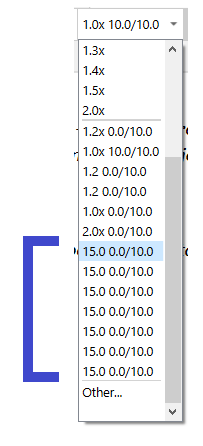
Each time you apply that formatting in the editor from the line spacing/space before/after drop-down selector in the formatting bar, it adds a new instance of it at the bottom of the drop-down list.
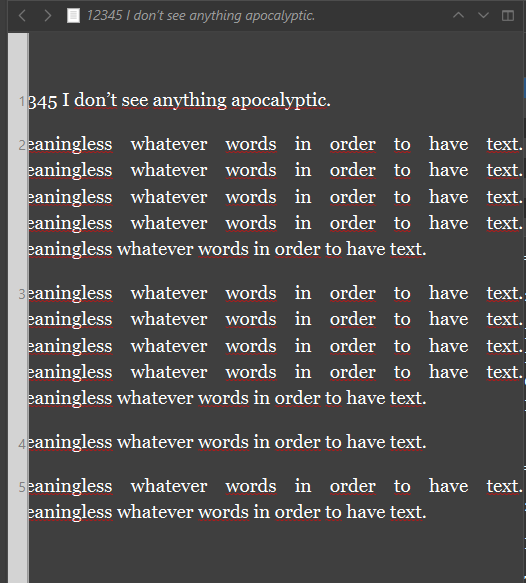
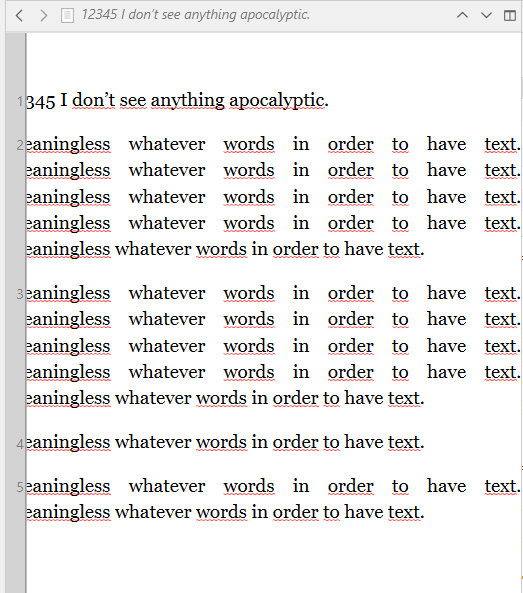
I tried to produce a screenshot with multi-lines paragraphs that would better show how the numbering drifts from one paragraph to the other, more and more the longer the paragraph is. But… the bug no longer happens. It must have been caused by some sequence of I don’t know what, but I no longer can reproduce it.
Magic !
As for the duplicates in the drop-down list, this still happens, but I noticed that the list cleans itself up on a project quit-reopen.
I think this bug can safely be disregarded.
I’ll update again if ever it manifests again – should I then have new observations to share.
Yes, I don’t think we should be recording identical entries, and I also noticed that it appears to apply two or even three entries at once sometimes. That all should be easily fixed. As you note it at least is not a permanent problem.
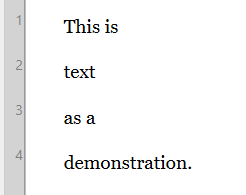
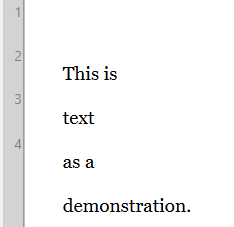
With line numbers, you might very well hit conditions where they get messed up. The ticket for that has about a dozen different conditions that can disturb or damage their layout. Lots of fun there. I think the most basic problem that is very easy to see though is that they start at the literal beginning of the line, not the visual beginning, when line-spacing is different than the font height. It’s more noticeable with large heights, like double-spacing. I don’t see any drift with that particular problem (we could say it is consistently/predictable wrong), but other conditions might cause drift, over overlapping—tables for example, wreak absolute havoc.
If it is of any hint to you, what I was doing when the bug appeared is that I was considering the use of “Exactly” for a line height to stop the word joiner from increasing the apparent line spacing of the paragraphs in which I used it.
(So: I had characters forcing up the line spacing, while an “Exactly” setting was hammering it back down.)
Was this being applied to a portion of the text rather than the whole of it? I am getting some odd reactions to using “Exactly” in the middle of some paragraphs that are formatted to a multiple. The line numbers are a bit out of shape then, but probably what more people would notice is how the paragraphs can collide with each other.
Overall that setting looks more stable if all of the text in the local context is set the same way.
I applied it to the whole document.
Exactly = 15.0 pt – for a 11 pt Georgia … (looks just about like 1.2x)
Perhaps could be that I applied it first to the top paragraph (setting it up), and then to the whole document. – Two steps. (?)
But then I went in my dummy project (the screenshots) and got the same result as in my real project. (No word joiner involved this time.)
Okay, I’ve got nothing either, other than getting some semi-deterministic looking shifts with tortured settings.
I have added notes to the ticket though, as to how any kind of line spacing causes the vertical position to fall out of sync. It doesn’t look like that one had been noted before.
I wish I could use this feature, but it is not very pleasing to use in dark mode (stays bright), and overlaps the text if you prefer narrow margins. So that’s two strikes against it for me.
What feature?
The “Exactly” line height? How can this relate to dark mode?
(I am not challenging your saying, but I find it quite odd.) … (Also: I don’t use dark mode.)
Anyways, that’s that. (Meaning : it is ok if you don’t reply to this, as it – my question/curiosity – is not so much in line with the topic.)
Try turning line numbering on with a dark mode theme, and a very narrow editor margin set, and you will see what I mean. It cannot really be used, no matter the line spacing type.
All that I could notice is that the paragraph numbering vertical strip doesn’t take the margin into account and that an editor left margin of 5 pt has the text partially hidden behind it, but then it does it just the same in Default mode.

 It cannot really be used, no matter the line spacing type.