I thought I had lost some of my WIP. I remembered some unique words in those documents and then by doing a “Project Search” and then a “Reveal in Binder,” I found them. I had accidentally nested them some layers down.
Since Scrivener for Windows does not have a “Expand All” I’m turning up a number of documents that I have accidentally nested so that they got lost.
I want this heirarchy: Manuscript > Chapter Folder > Scene.
I heard someone say that it might be easier to do my scene re-arranging in the outliner, but I find this difficult.
Any hints? It would be nice if there was an “Expand All".
2 Likes

It works in the binder if it has focus.
2 Likes
I was only looking a the outline display and didn’t notice the binder expanded also. Exactly what I was looking for. Thank you very much.
1 Like
If you want to move documents safely in the binder, use Ctrl up/down arrow.
And Ctrl Left/Right arrows when you bump into a parent.
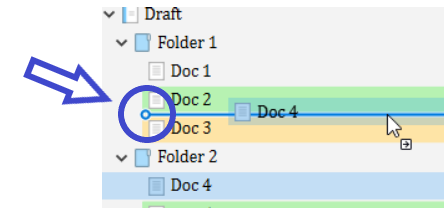
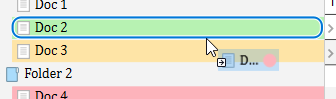
As I said in the other thread, moving files in the binder with a mouse or touchpad is tricky. You have to keep your eyes on the little circle at the end of the line. …and stop breathing comes the time to do the drop.
Good :
Not good (unless it is what you want. This will nest the file, not insert it inbetween.) :
3 Likes
Great hint, up and down arrow is much easier, again Thank You
1 Like