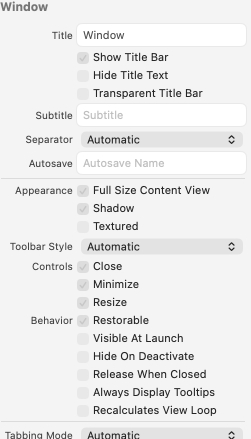
Perfectly readable unless you want to check the state of some checkboxes in a background window, anyway. 
3 Likes
Background windows in general have been getting more difficult to use and work with, in the past few updates. But I’ve even seen this condition on foreground windows in the beta, like the Finder view settings palette.
It’s like Apple forgot about Cmd-clicking to pass-thru clicks without raising or changing focus, and how background windows are supposed to still be useful.
3 Likes
Huh. I had no idea this existed!
1 Like
They’re so focused on phone-ifying everything that they’ve forgotten multitasking is useful?
1 Like
Good to know it will be usable for this elderly 4 eyed old codger with cataracts, one cornea transplant and another to come…
ewww! and some random text.
Well this ‘four-eyed old codger’ had cataracts removed on both eyes in the second half of 2024, and now he’s two-eyed most of the time!
I now have terrific distance vision, but need to wear specs for working, reading etc., whereas for 60 years I had worn them for distance and not needed them for computing and reading. So, even though it’s 7 months since the second eye was done, I still find myself walking around with reading or computing specs on because it just feels so natural to be wearing them that I forget I’ve got them on! I’m also much more sensitive to daylight and find I have to wear sunspecs all the time I’m outside in this English summer (of sorts!).
As for Tahoe, I watched the Keynote today. I’m happy to wait and see.
Mark
1 Like
Looks like they listened: macOS Tahoe Beta 2 Lets You Add a Menu Bar Background - MacRumors 
Can we have the option to change the look back to the current opaque style? (As much as apple lets at least)
Not to speak on whatever the scope will be of Scrivener’s modifications (it probably won’t be as much as you fear), but a desire like that is likely not going to be constrained to one program, so you might as well use the system setting for it, in Accessibility: Display, Reduced transparency.
Note that if you are using the beta OS, this setting is currently broken (at least it was in the first release, I haven’t updated yet) in such a complete fashion that I can only presume they haven’t started working on it yet.
1 Like
Current release Reduced Transparency works on Apple menus, dock etc, but no change to the way apps, including Apple’s display menu bars etc.
Just a very quick check and didn’t go beyond opening apps and toggling the setting.
1 Like
I might need to manually update, I tried running the check and it’s still at the initial release. At least it sounds as though they are working on it. In the initial build, with it on, each menu would be a different colour with some backgrounds—and not in a subtle way! I hope that by launch it is restored to how it has always worked, to completely remove all tinting and translucency everywhere. It makes taking screenshots much easier. If it is your preference, then without it working like it did, you would have to live with a solid black desktop background just to get a decent contrast and consistency.
We may need a compact mode in macOS 26. Merge titlebar with main toolbar, less margin in binder.
Reduce transparency works now in most places. Just a few side bars on apple apps like system settings are a little wonky. It also reduces the amount of gpu used to draw the screen by almost 2/3. Now about those curved corners…
Yeah, that’s why I won’t be updating for a while. I suspect in a year’s time things will look a little more sane. I can hope. Atm, I’m planning on skipping Tahoe completely.
Also transparency, as a design choice, baffles me. It can only make things harder to read. It’s more like an anti-design pattern. Perhaps that’s the point. Shakes fist at cloud.
1 Like
I’ve been testing various web things in iOS 26 & macOS 26 (mostly in the beta of Safari, but also Chrome) over the last week and it still feels very much like a mess. It’s better than the initial betas, but as an UI software engineer who spends a lot of time working on UX and accessibility concerns, I remain concerned.
It all looks very pretty though.
Sigh.
1 Like