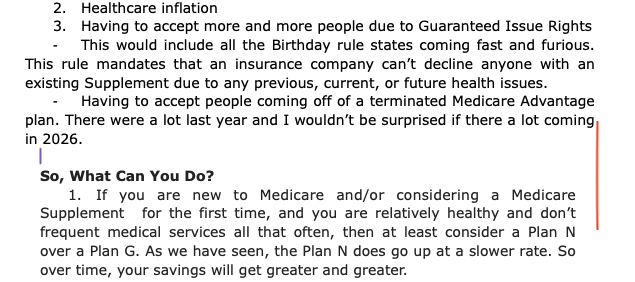
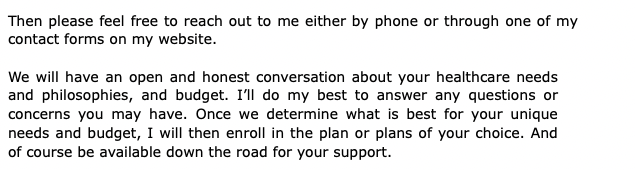
Trying to figure out why as I go further down in a document/text that suddenly the margin changes on the right side. I’ve tried dragging the right margin all the way to the right and that doesn’t work. I’ve tried copying the formatting from the part above and that doesn’t help.
In the editor click in one of your paragraphs of different “margins” and then in the other while looking, in your formatting bar at the top/middle, at the styles selector.
Is there a difference between the two? (Does one have a style and the other not. Or each a style but different.)
If they are the same, then click in your bold header/question that’s in between.
Again, look at the style selector.
Pretty sure the formatting with the wider “margins” (narrower text) comes from it, cascading down.
Did you use a line-break instead of a carriage return after your bold question, so that it remains right before (no space) the following paragraph?
If so, you should use a style for it instead – your bold question(s). Without the space-after you have set to your normal paragraphs in the default formatting : Options/Editing/Formatting.
You can see the indents (“margins”) of your bold question by having your cursor in it, then Format/Paragraph/Tabs and Indents, the first three values.
The space after is in Format/Paragraph/Line and Paragraph spacing.
If you don’t use a style, you’ll lose the the formatting of your “questions” at compile. (I mean the font size that looks to be bigger. – It should remain bold, though.)
Otherwise, if it is only bold, to some extent you could just not care, as compile will set it all the same in the end. (Assuming there is no style(s) involved. … And that your screenshots are of the editor, not post-compile.)
. . . . . . . .
P.S. I keep putting “margins” between quote marks because they are not margins.
Margins are a value relative to the outside border/limit. A sheet of paper, for example. “How far from the edge”.
In Scrivener, there is no right edge. Everything is relative to the left side only.
And, Scrivener not being WYSIWYG, the editor (unless in page view) does not represent a sheet.
So, there are no margins. Only indents. Left indent, right limit relative to the left side – how far from the left side is the text allowed to go before wrapping.
Assuming you’re a Windows user, I recommend you turn on the Ruler, Alt+Shift+R.
Click on the first instance of point 3, “Having to accept more and more…”, and note your Right Indent reading on the Ruler.
Then click on the point on “If you are new to Medicare…” item and look for a difference in the Right Indent reading.
If there is a difference, and this is an isolated instance, you can click on the Copy Formatting icon (I assume it’s added to your Format Toolbar by default, I don’t know; mine is there) in the first instance, then click into the second instance and click on the neighbouring Paste Formatting icon, which should fix things.
If it relates to your wider project with many disparate indents, use the menu item, Document → Convert → Text to Default Formatting.
Anomalies generally creep in when you paste in text from external sources for whatever reason, even single words.
It may also have to do with you initiating a list, though in my experience it doesn’t result in difference to right indentation.
It was on there twice. I’ve attached another example.
I have no idea where the formatting came from. I was typing along and it just started doing it. It eventually does it on every page I create now. As in if I’m in a project and I add a new text and then start typing away, it will eventually have the margin issue.
No, I’m on a Mac. I do have the ruler on. When I click on the different sections, there’s no difference unless it’s some of the bullets and the right margin never changes. I even tried the Text to Default Formatting and it doesn’t change a thing.
Maybe I’m just missing something, but I’m stumped.
I think it’s a known recent error with the latest OS version on Mac. Something to do with first item in a list following a heading, though I understood it affected the left indent.
Look around the forum, there is a thread on a workaround.
I do have a word count at the bottom. As I’m playing around with it, it may stem from cutting and pasting from one text in Scrivener to another. I have things/paragraphs I repeat, so I just cut and paste.