Hello everyone!
I want to create a compile format that creates something like this:
BOOK ONE: TITLE HERE
CHAPTER ONE: TITLE
BOOK TWO: TITLE

CHAPTER ONE: TITLE
So on and so forth. Any tips?
You could start from scratch, but you might want to try one of the existing Formats first. They will use the word “Part” instead of “Book”, but that is a fairly easy fix.
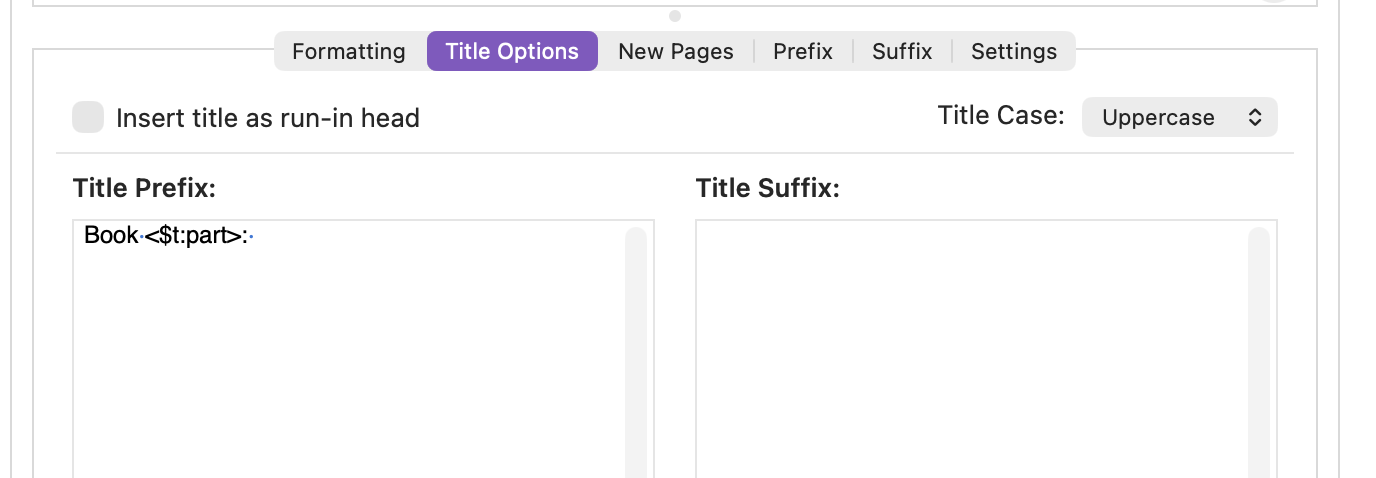
After assigning your section types to the appropriate layouts, try double-clicking on the “Part One: Section Title” preview tile in the centre column to jump into the Section Layouts editor. From there, in the Title Options tab, you can change the word being used here from part to book.
But if you do want to start from scratch, playing with a stock format first can give you some ideas.
Great tip, Amber! Thank you!
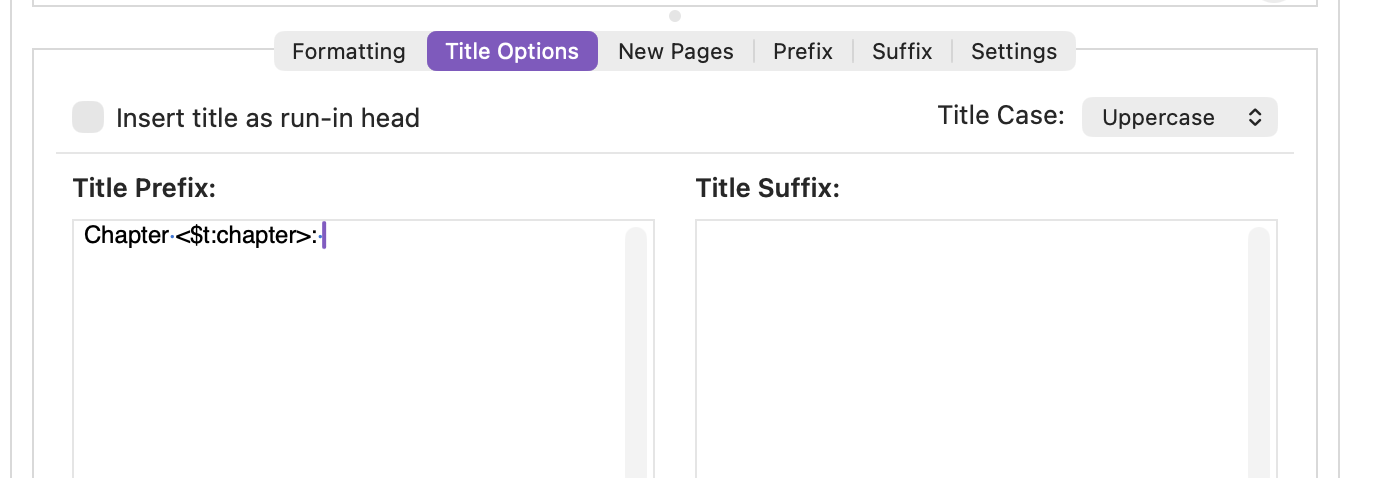
I should add that if you do want “One” style numbering for both, you will need to use separate numbering streams. I think most of our examples use different numbering types (numeral vs spelled, Roman vs numeral), which are naturally on their own counting streams. To have two separate streams using “One”, you would want to use a placeholder like, <$T:book> and <$T:chapter>, respectively.
I left <$part> and <$chapter> alone, will that work?
No, I’m not sure what those would do, precisely as you wrote them. If you mean leaving the counters alone though, without changing the names, that’s fine. It is purely an internal naming convention. You could make one of them <$T:avocado> and it would work fine. 
Hmm, now I want to make guacamole.
Yes, that’s how it should be, then, all good. In your previous post, the t: part was missing, which wouldn’t work at all. The first letter before the colon indicates the numbering style. In this case “t” is one/two/three, and “T” is One/Two/Three (at least in English, it will adapt to system localisation), but the capitalisation doesn’t matter when you use the settings to force uppercase.
I’m still having an issue with these.
The compiled document is making this:
BOOK ONE: THE MACEDONIAN
CHAPTER ONE: THE BASILEUS’ FRIEND
CHAPTER TWO: CO-EMPEROR
BOOK TWO: THE PURPLE-BORN
CHAPTER THREE: BIRTH
Is there a fix I’m missing?
You will need to add a reset placeholder to the book Layout, if you want chapter numbers to restart for each book. You can find this documented in the placeholder list in the Help menu. But you can also find an example of it in the Paperback formats, under “Chapter Heading” (for example) where it resets the scene numbering. <$rst_avocado> for instance!
Which placeholder do I use? I know about $rst_n…
Since you’re using named auto-numbering streams to differentiate chapters and books, you’ll want to use a named reset, as described in the Placeholders help doc[1]. Based on the screenshot, you should place <$rst_chapter> in the Book layout (just add it to the title prefix line, for instance), so each new book item using that layout will reset the following counters with the “chapter” name—thus your next item using the <$t:chapter> counter will be back to “One”.
“Restarting named auto-numbering streams” ↩︎