One button to rule them all - using Stream Deck

I write with Scrivener and Aeon Timeline 3, which share my screen as I write. The idea is to turn on my PC, press a single button, and dive straight into writing without manually launching and then positioning Aeon Timeline 3 and Scrivener.

To accomplish this, I have set up automation via Elgato Stream Deck to:

  1. Open and position Aeon Timeline 3 on my screen;
  2. Open and position Scrivener on my screen; and
  3. Navigate Scrivener to where I left off in my writing project.

I succeeded, but something unexpected is going on, which is why I’m posting about it. When I boot up my PC, the first time I launch Scrivener it takes 20 seconds to launch (with or without launching from Stream Deck). I have to set a 20-second delay in Stream Deck to account for this:
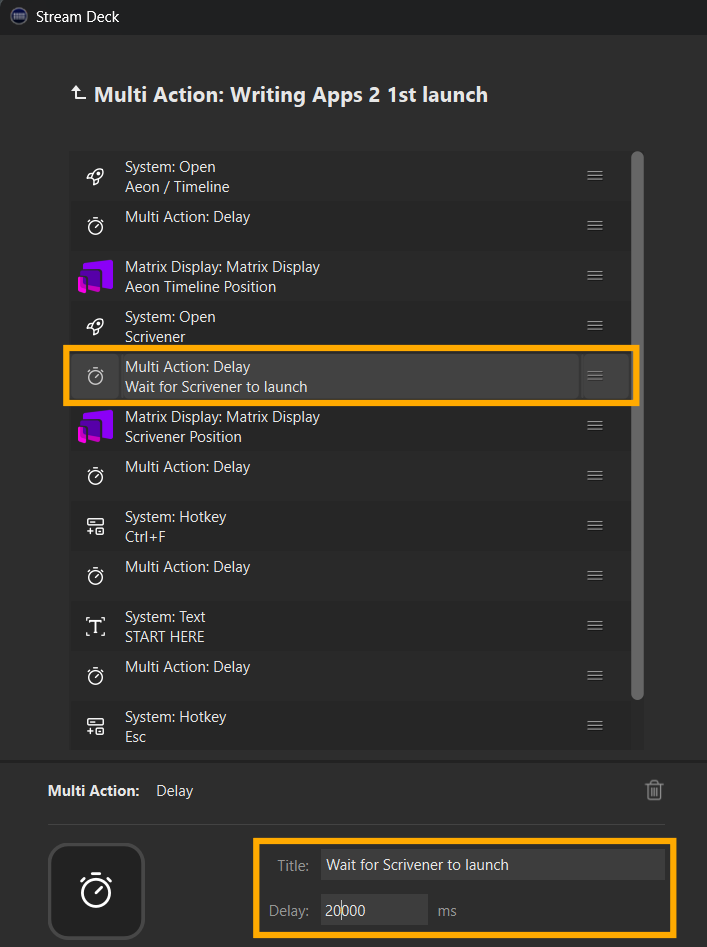
This makes it hard to set the Multi Action Delay timing, because sometimes I want to relaunch Scrivener later in the day without turning off my PC. But if I have just one button, it has to be set to the longest it would take to launch Scrivener after booting up (20 seconds), defeating the purpose of quickly getting down to writing in the afternoon. (Why wait longer than needed for Scrivener to launch the second and subsequent times?)

My workaround is to create two buttons: one for the first launch of Scrivener after booting my PC and the other for subsequent relaunches. So, here is the timing for the second button:
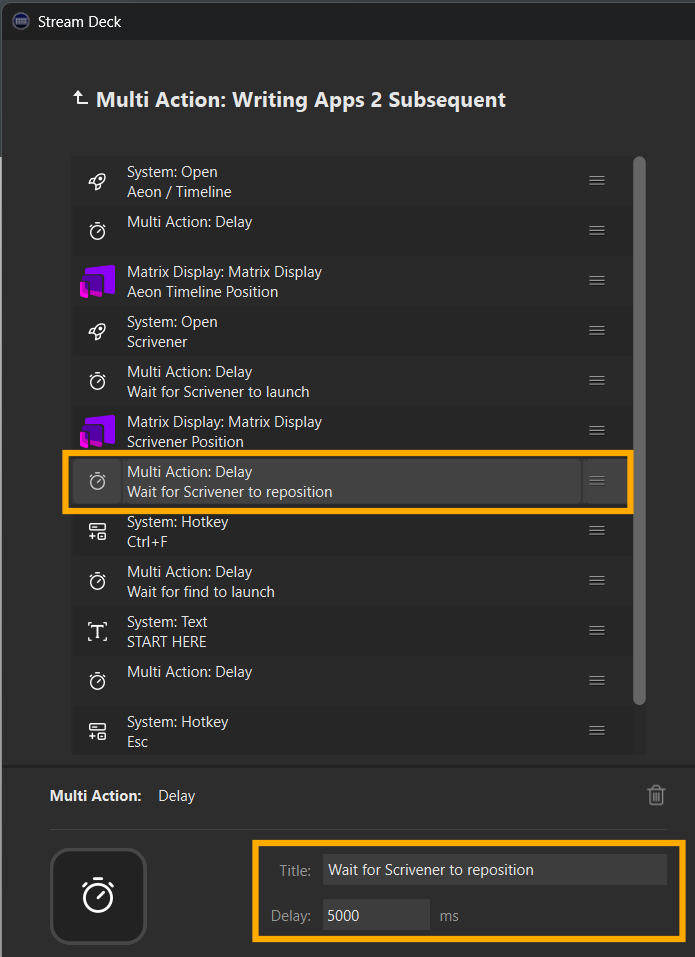
I can live with this, though it defeats my goal of having one button to rule them all. :rofl:

But it makes me curious about Scrivener:

  1. Why does Scrivener for Windows take longer to launch the first time following a PC boot than it does if closed and reopened?

  2. Is there anything I can do to reduce the time for Scrivener to launch the first time following a boot of the PC?

FYI, in case it matters, here are my machine specs: AMD Ryzen 9 5950X 16-core/32-thread processor at 4.9 GHz | 128GB RAM | NVIDIA GeForce RTX 4090 GPU | 2TB internal SSDs | Samsung 49-Inch CRG90 Curved Monitor | Elgato Stream Deck.

I checked with Copilot about this. Here’s what it came up with (which seems valid):

Why Scrivener Takes Longer to Launch After a PC Boot

The first launch of Scrivener after a system boot takes longer due to several factors:

  1. Cold Start vs. Warm Start – When you first boot your PC, Scrivener isn’t cached in memory, meaning Windows has to load all necessary files from your SSD. Subsequent launches benefit from caching, making them faster.
  2. Background Processes – On first launch, Scrivener may be initializing dependencies, checking for updates, or verifying license information.
  3. Antivirus Interference – Some antivirus programs scan applications more thoroughly on their first launch after a reboot, slowing things down.
  4. Windows Indexing & File Access – If Scrivener stores project files in a cloud-synced folder (like OneDrive), Windows may be indexing or syncing them, causing delays.
  5. Scrivener’s Auto-Load Behavior – If Scrivener is set to reopen the last project, it may take extra time to load large files or complex projects.

I believe this is more or less down to Copilot’s reason #1. Scrivener loads a bunch of stuff (technical term) at first launch; subsequent launches then pull from a cache.

If nobody with actual technical specifics happens along, you can possibly figure out the difference yourself between first and subsequent launches by enabling and studying the output from File > Options > General > Startup > Warnings > Show internal log console.

I doubt it!

However – If nobody comes along with something more elegant, something to try is

  • Create a very lightweight Scriv project (empty except for 1 blank doc)
  • Create a script that launches the LW project, waits the 20 seconds or whatever, then closes it
  • Launch the script automatically at Windows startup
  • Then, once your PC is up & running, you can press the magic button (you should be able to remove the 20 second wait)

Probably not exactly what you were looking for, but maybe it’ll give you ideas for something better?

Best,
Jim

3 Likes

Hey, Jim. I think your idea of launching a lightweight project at startup is interesting, though I’m not sure it really gets me anywhere. If I’m sitting here waiting for it to launch (and close) at startup, I might as well just launch the actual project, right?

So, I shall have two buttons to rule them all. :joy:

It’s all down to the result of your cost / benefit analysis: some extra seconds on the front end vs freeing up a button. (Plus the one-time cost of writing the startup script.) Only you know what an extra button is worth to you. :nerd_face:

One extra factoid to add to that equation -

I have a lightweight Scriv project that I use to test changes to themes.

My LW project takes 12 seconds on first launch, 5 seconds on second launch.

My old Lenovo laptop is far underpowered relative to your PC, which makes me wonder how much faster a LW project would start on your machine, first launch. And how fast it would close, if that project was set to turn off auto-backups.

I bet a lot faster than 20 seconds. This would be easy enough for you to test.

2 Likes

I’m happy to report that each morning for the last seven months, I pad to my desk, fire up the PC, and press one button to rule them all.

While I’m thinking about my story and sipping my first Cup of Joe, Aeon Timeline launches and positions itself on the right quarter of the screen; Scrivener launches, positions itself to the left of Aeon Timeline, and scrolls to where I left off in Scrivenings mode; and Dragon NaturallySpeaking launches. I begin writing.

Sure, I could easily do all these steps manually, but there is something cool about pressing that one button.

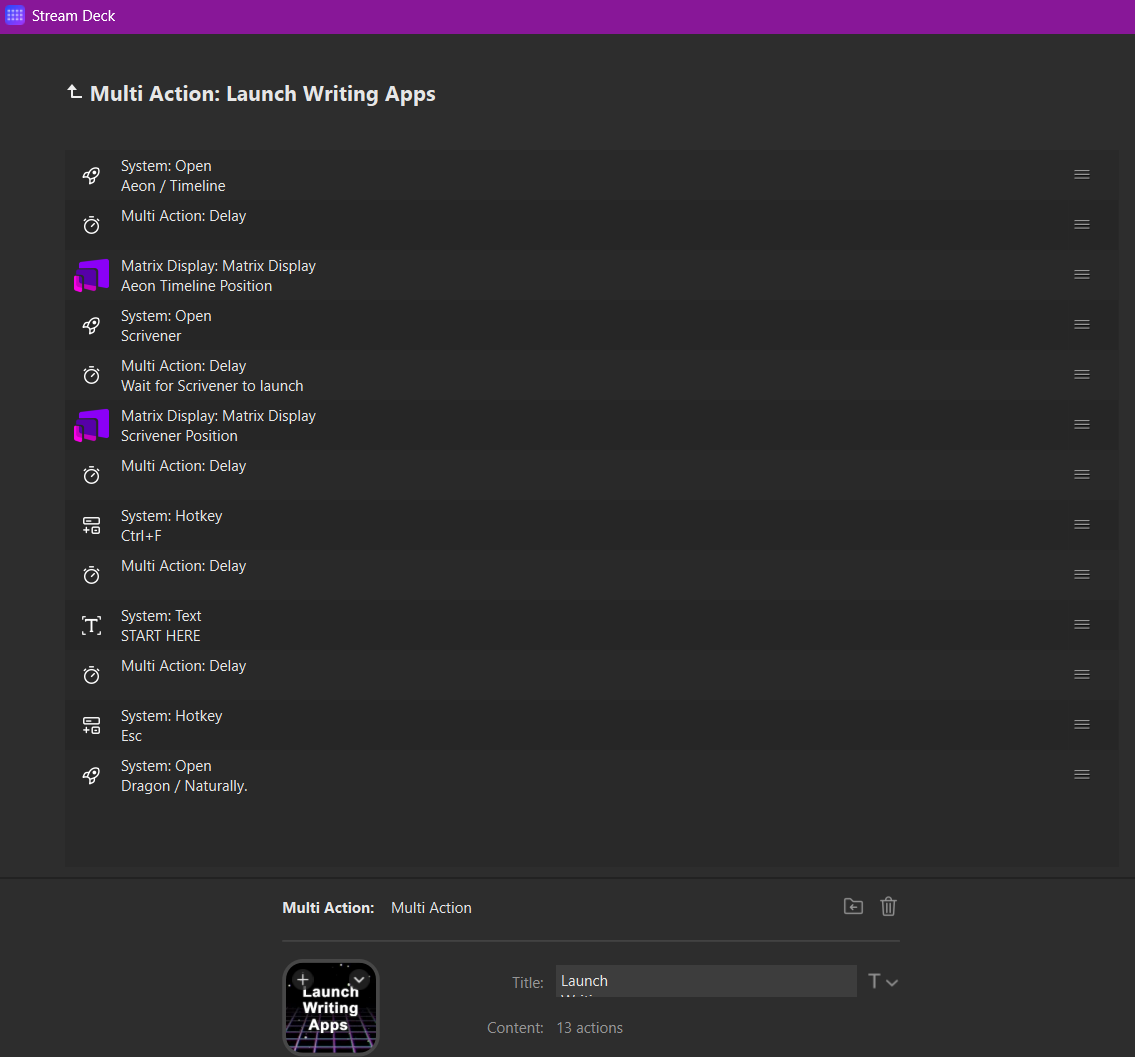
If anyone wants to set up something similar, here is the sequence of actions in Stream Deck:

Here is the .streamDeckAction file (unzip it first), which, under the hood, is just a JSON file. You can import it into Stream Deck, then modify the sequence to suit your needs.

Multi Action - Launch Writing Apps (5421).zip (360.0 KB)

Over and out. :nerd_face:

Get a Mac. Unless Scrivener auto-loads a very large project on launch, 20 seconds is alarmingly long.

Takes 5.6 seconds (after rebooting the computer), and 3.8 seconds for subsequent launches here. Auto-loading a small test-project. And this is on the “slow one”.[1] *

I’m aware you got the initial problem sorted out, but it would be interesting to find out what’s going on with that launch time.

* and a Time Machine backup running in the background


  1. 10th gen 6-Core Intel Core i5 @ 3.1 GHz, 32 GB RAM, AMD Radeon Pro 5300, yadda yadda yadda… In other words: A living fossil. With your specs I’d expect maybe 2–3 seconds max. ↩︎

1 Like

The performance hit was due to my bad habit of having all my novel’s manuscript documents selected in Scrivenings mode when I exited. Once I figured I should select a smaller number of documents (say, the chapter I’m currently writing), the problem was solved. The whole sequence runs rapidly now.

2 Likes

Great. So you eliminated the “where I left off in Scrivenings mode” (and selecting “too much”) step? How fast does it load now? That wasn’t clear from the description or I’m blind, as usual.

1 Like

At the end of a writing session, I press a button that types “START HERE” where I want to pick up the next day. It then automatically closes Scrivener (which in turn is set to save my project in a Zip backup). Next morning, I press the button we’ve been discussing; as part of its multi-action sequence, it launches Scrivener’s Find (Ctrl + F), inserts “START HERE” into the box, and executes the search. Scrivener scrolls to “START HERE,” and the Find box closes.

The Scrivener portion of the sequence, which includes launching, repositioning, and searching to reposition to “START HERE,” takes 9 seconds (fewer if I have selected only a single document in the prior session). BTW, I always have split windows up, side by side; if I eliminate one, it would probably be faster.

The bigger point is that I’m sipping my morning Java and thinking about my story as the sequence handles app launch and positioning. Frankly, it’s a bit too fast now. I might need to slow it down. I’m not kidding.

2 Likes

As a baseline, when I manually launch Scrivener with no split window and just one document selected, it launches in 5 seconds.

Switch to Mac? Okay, I'll take the bait.

I built my PC with decent specs:

  • AMD Ryzen 9 5950X 16-core, 32-thread unlocked desktop processor (water cooled)
  • 128 GB RAM
  • NVIDIA 4090 GPU (water cooled)
  • PCIe 5.0 NVMe SSDs

More importantly, it glows purple.

1 Like

Why not go back to the first method (load everything), with one important change:

Autostart all programs after Windows login. Get your coffee, run around the house, plant a tree, come back and then press your Stream Deck button. Which only arranges the windows.

Sounds about right. [1] You may remain on PC. :grinning_face_with_smiling_eyes: Unfortunately, Macs don’t glow anymore. The glowing Apple logo was the most important feature.


  1. Although the Walmart $599 M1 MBA with 8 Gigs still runs circles around it, first Scrivener launch after reboot: 3.8 seconds. Passive cooling, no fans, no water. Almost magic. ↩︎

2 Likes