Hey folks! I’ve seen multiple threads online about work-arounds for people that want to use Scrivener across multiple monitors, but can’t find a Wish List item newer than 2014 for this feature. (Though I am admittedly newer to this forum, and may have missed it.) Does anyone know if that is on the backlog or is it just something that will never be possible with Scrivener?
My use case is to open multiple pages that live within one Scrivener project on separate monitors. For example, a character sketch or timeline on one monitor, and a page I am actively writing on the other. I understand you can open both within a single monitor’s view, but that is not sufficient for me.
Yeah, as @kewms wrote, this is exactly the use case for Quick Reference panels. They are one of my favorite Scriv features. I may use them more than I do the main editors, depending on what I’m working on.
I agree with JimRac. I have a three monitor set up and will often have the Scrivener Project on Monitor 1, A QRP on Monitor 2, and another Scrivener project or my web browser open to something I am researching on Monitor 3. Works like a charm. Sometimes I will have two or three Scrivener projects open each one on a different monitor screen. I have an editor project with info and resources for editing and may use as edit the first draft of a novel.
The Quick Reference panels can be handy, but I seem to recall them having an issue where I couldn’t scale their text on my larger 4K monitor (too small to read for me). It isn’t true multiple monitor support, though, which I think the program would benefit from greatly. I’d love to have the Outliner view open separately as it’s own, ‘real’ window, or even the corkboard with it’s fun cork background.
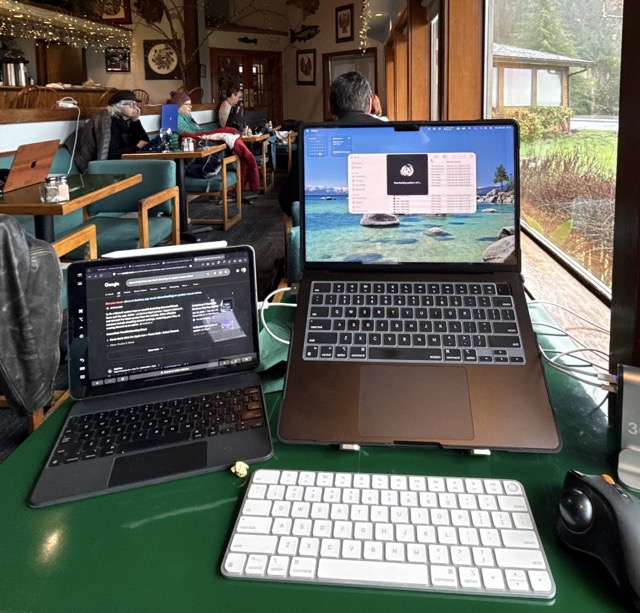
Recently at a Writer’s Retreat in Washington I spoke to one of the writers about his setup.
Scrivener on MBP and web browser on iPad via sidecar, rendering the magic keyboard just a stand.
For those that don’t know, Sidecar is the protocol for using a iPad as a second screen or even a digital drawing input. It doesn’t require internet to function and is free, baked into MacOS and iPadOS for awhile now. It improves on what used to be called “Target Display Mode” for certain models of iMacs, but is much more useful.
He was lamenting that there wasn’t an easy way to get the Research section of the binder as a dynamically updating floatable window so he could put it on a second display. Normally he would use Preview (screengrabs) and/or Notepad. I can commiserate because I cannot remember how many times I have invented new characters and/or places for previously defined roles that match the current need and had to turn around and concatenate them later and make sure it isn’t a massive snipe hunt…. I also seem to remember (vaguely) a software suite that would build a context option for character, location, or artifact names for rapid lookup, but for the life of me i cant remember what it was (yWriter maybe?) It was in my windows era 14+ years back.
Before I start whinging more… Since I caught him trying to un-snuff a snuffed-up Discord update, I got his permission and took this pic of his setup. I thought it looked clean and useful.
If you look in the background, there is another writer there that was using a second monitor, theirs being Portrait orientation and connected to a windows machine via USB-C cable with a second cable for power. This mode of mobile computing is gaining popularity as the portability of quality displays improves.
Since I am looking at using a similar configuration I’d like to see this given more consideration for future development. Having 6+ hour battery life on a wireless dual screen setup for writing is a game changer.
That looks cool. I write in the morning when most creative before my wife wakes up. I found a recent trick to help with the research issue while writing especially if a lot of research to plow thru. Collections. I created static research collections for latest book I writing (first draft done). I have a research collection for each main character with a character card, documents with backstory, flaws and strengths, and any other background like locations associated with the character. I set up the QRP on one screen for the scene I am writing and have the bookmark panel open. On the main program area I open my research collection and add files as needed. If for a scene a piece of the research collection is key, I will drag from the collection into the Qrp’s bookmark section. I did a collection on magic and worldbuilding, so it was easy to switch to the collection of information the scene needed.
On my third monitor I usually have my mindmap software open. I used Scapple, but switched to Simplemind Pro which is like Scapple on steriods and has a free trial and one time fee. This gives me another perspective to pull from. Or may open the windows explorer for images, I also use Aeon Timeline to help with organization as well.
Try the research collections. It becomes easy to add to a collection if you find you need more files for a character’s scene and the collection can be adjusted to move the most pertinent documents to the top of the collection.
On Windows, if you have disparate resolutions, the solution is to first make the app or QRP full screen on the primary monitor and then switch screens using Win+Shift+Right or Left.