Recently at a Writer’s Retreat in Washington I spoke to one of the writers about his setup.
Scrivener on MBP and web browser on iPad via sidecar, rendering the magic keyboard just a stand.
For those that don’t know, Sidecar is the protocol for using a iPad as a second screen or even a digital drawing input. It doesn’t require internet to function and is free, baked into MacOS and iPadOS for awhile now. It improves on what used to be called “Target Display Mode” for certain models of iMacs, but is much more useful.
He was lamenting that there wasn’t an easy way to get the Research section of the binder as a dynamically updating floatable window so he could put it on a second display. Normally he would use Preview (screengrabs) and/or Notepad. I can commiserate because I cannot remember how many times I have invented new characters and/or places for previously defined roles that match the current need and had to turn around and concatenate them later and make sure it isn’t a massive snipe hunt…. I also seem to remember (vaguely) a software suite that would build a context option for character, location, or artifact names for rapid lookup, but for the life of me i cant remember what it was (yWriter maybe?) It was in my windows era 14+ years back.
Before I start whinging more… Since I caught him trying to un-snuff a snuffed-up Discord update, I got his permission and took this pic of his setup. I thought it looked clean and useful.
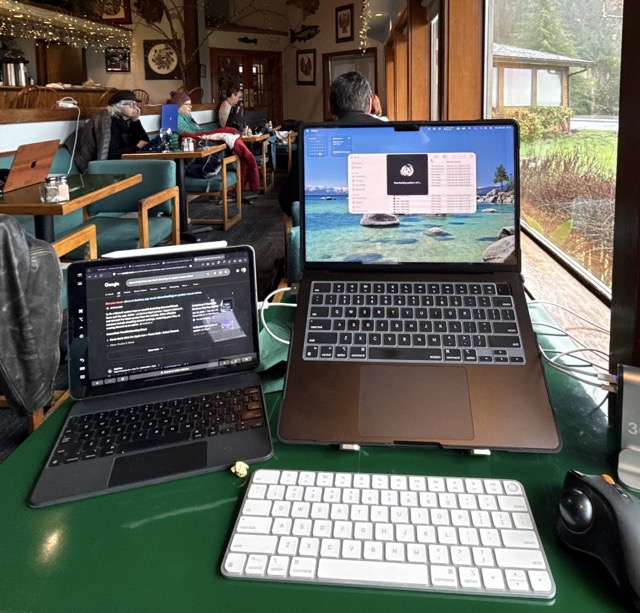
If you look in the background, there is another writer there that was using a second monitor, theirs being Portrait orientation and connected to a windows machine via USB-C cable with a second cable for power. This mode of mobile computing is gaining popularity as the portability of quality displays improves.
Since I am looking at using a similar configuration I’d like to see this given more consideration for future development. Having 6+ hour battery life on a wireless dual screen setup for writing is a game changer.
Maybe for Scrivener 4.xx I guess.