Page Setup not responding/inaccessible

Hi folks. New member here, although I have been using Scrivener since 2019.

I am trying to format my first finished novel for KDP, and the issues I’ve faced have compiled into dozens of hours of woe, which eventually led me to creating an account here.

I have been using Scriv 1.9 continuously since 2019 with no interest in upgrading for my purposes. I was comfortable with it and enjoyed it for many years.

Come to find out, I do not believe 1.9 supported gutter margins, which were becoming problematic for me with KDP. I needed to adjust the “inside” margin only, which 1.9 [seemingly] did not have any way of doing. I was only supplied with dimensions for “left” and “right” and upon compiling, the pages were never mirrored. I spent hours researching and trying to find answers to this, but EVERY solution I found simply pointed to Scriv 3, which seemed to have a clearly defined and easy-to-find option for “inside” margins. So despite my resistance, I eventually caved and upgraded, feeling like I frankly had no choice.

(side question: DOES 1.9 support gutter margins?)

Which brings me to tonight’s question…after downloading Scriv 3, I opened my project, selected “Page Setup” from the dropdown and promptly got a dialog box stating that the program was waiting for a printer connection? So I click “cancel”, and Scrivener crashes. No log, no nothing. Just closes immediately. Rinse and repeat a few times. I do not have a printer.

Thinking that maybe an old printer connection from a copy store or something could have been the problem, I go into my device manager and uninstall a few miscellaneous printer setups.

Restart Scrivener, click Page Setup, and now, nothing.

No response, no loading, no dialog box, no prompt. I just click Page Setup and it’s like it doesn’t even exist. Save as Template? Works. Print Settings? Works. Page Setup? Bubkis.

The program literally seems to do EVERYTHING EXCEPT give me the ONE PAGE I downloaded v3 specifically to use. Which seems like I am being mocked at this point.

I was supposed to submit my proof at 7:30 this morning and I am on hour 13 of endless troubleshooting. So this was the last straw, and now I’m posting this before I go to bed.

Help me, Obi-Wan Kenobi.
Hi. I don’t remember if Scrivener V1 for Windows has a setting to mirror pages. It’s been too long.

Scrivener V3 does. But you are looking in the wrong place.
It is in the compile format.
On such short delay for you, that’ll be complex to explain.
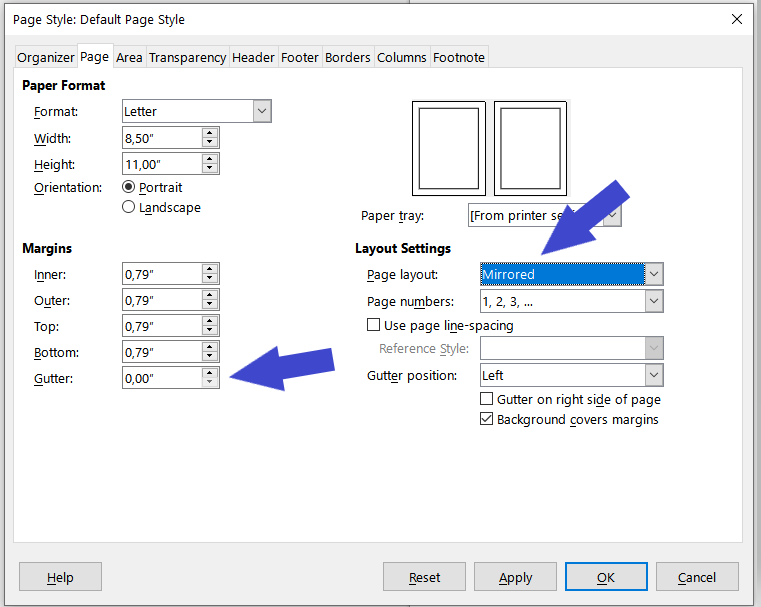
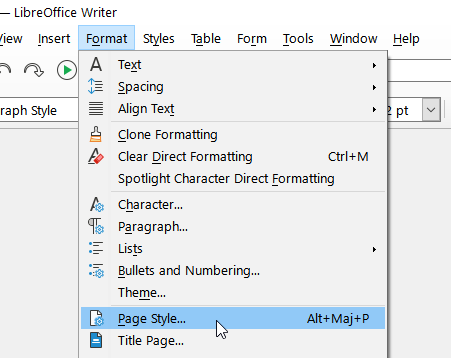
I think that you should rather stick to V1 for now, and maybe use LibreOffice for a quick fix. (LibreOffice is free, open-source.)

LibreOffice how to


If you had more time, I’m sure a couple of users (including myself) would be happy to help with the procedure under V3. But on such a short deadline, in the minus? it’d be something.

2 Likes

An alternative to LibreOffice.

I think you could simply import you final manuscript in their app and make your book match their (KDP) print requirements.

(I’ve never used it. I can’t do better than to provide the above link.)

Disclaimer: The PDF results of either Scrivener 1 or 3 are not suitable for publication! Not even close. This is a writing program, not a book making program. For that you need an entirely different kind of software. I suppose at the very least a word processor, but even then, those are more tuned for writing than design as well.

(side question: DOES 1.9 support gutter margins?)

It does not, and while v3 does, it isn’t something I’d ever mess too much with outside of giving yourself a way to create generous outside columns for notetaking, on proofing copies.

That said, you won’t find those kinds of margin settings in the Page Setup panel anyway. There is no need for that tool, it is just where you change the paper size, and compile settings can change that as well (although I don’t know, if your print setup is crashing Scrivener it might not work in there either, I don’t know what could cause that, the print setup dialogue is coming from Windows as I recall). Well, you might as well try one of the “Paperback” compile Formats, as they do have alternating margins already set up.

But again, I agree with the above, it is better to compile simply, to stylesheet-drive text and import into a layout tool for all final formatting. Even though I say simply, I think crash learning the compiler, even just to use styles, in a text that was never written with them (v1 had no styles), immediately, to get out an overdue copy is maybe too much? Maybe just get the text out in v1 like you’re used to, and start plugging away at it in a DTP or similar.

3 Likes