I have a large Scrivener project that includes sections in a style I’ve called “memoir.” That style increases L and R margins, basically making a text block set in from both sides.
It works great within Scrivener, but when I export to Word, the L indentation for the memoir-styled sections is preserved, but the R indentation is lost.
I can’t find a way to fix this. Is there one?
Of course I let this go too long – I have to output a 400+ page Word doc in a few days, to send to a reader, and I’d really like to have the formatting preserved for those sections.
Hi.
The right margin of a paragraph in Scrivener’s editor isn’t a “from right side of the page” distance, but rather a “from left side of the page” distance for starters. Both the left and the right margins are related to the left side of the “page”.
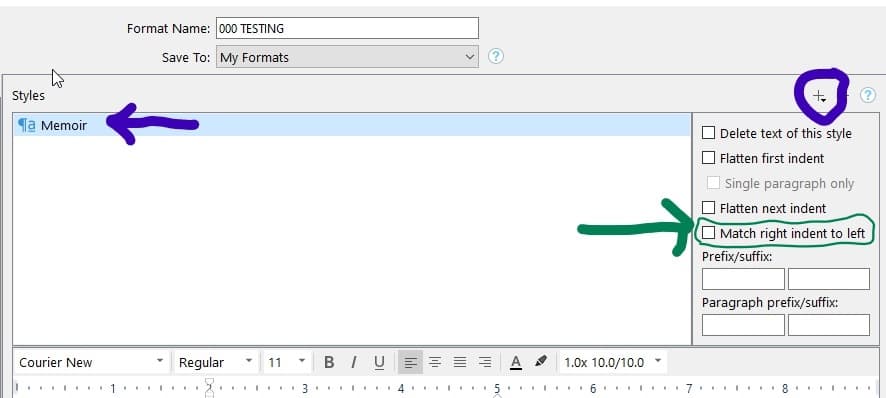
You have to add the style in the “style” panel of your compile format (using the + sign I circled here : )
I am curious as to why my style displays perfectly within Scrivener. I do understand how the right margin works, which is how I got my Scrivener style working.
I am pretty positive they can. By doing what we just did.
What do you mean ?
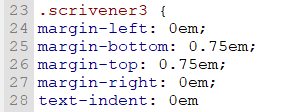
To have a different indent for the right than for the left, you may be right. It has to be done in Sigil or something like that. I never really messed around with that. I like my blockquotes centered.
But I am positive that it can be done. In Scrivener ? Maybe not.
But an epub supports it.
I remember pretty well experimenting with it in Sigil.
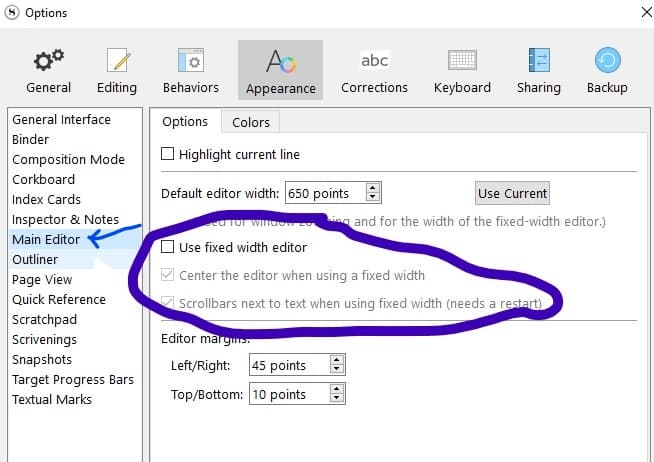
That is because you checked those options.
The text is not actually truly centered.
It just keeps its relative position to the invisible edge of the editor.
You most likely have the first two checked. (Which is perfectly fine.)
Do the test the other way around :
Make your editor very narrow. You’ll see.
There is no page in Scrivener.
Thus both margins being relative to the left side.
The non existent “page” starts somewhere, but ends nowhere… sort of speak. It has a top and a left side, but neither a bottom or a right side.
But don’t worry about it : after doing what I made you do, the text will be centered in the compiled output.