I separate sections with a custom separator, but have found that they can often be orphaned. In my word processor, I can set particular spans to follow the next paragraph, disabling any page breaks between the separator and the first paragraph. Is there something similar in the Compile settings, or is this one for the suggestion box? If not, could there be a way to assign a style to the custom separators so that I can change this setting for all instances of the separator by just updating the style?
Hi.
There is this formatting setting that forces the paragraph to stick to the next one.
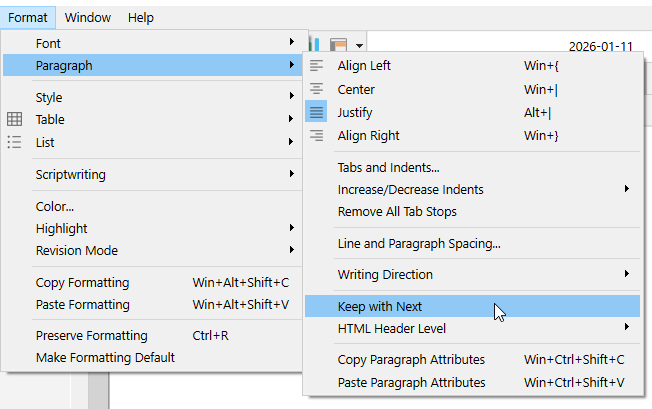
So, this could force your separator to stick to the previous paragraph, if applied to that paragraph, or to the upcoming one, if applied to itself.
(Use space before and/or after rather than an empty line if you wish to adjust the spacing.)
In the Mac version there also are controls (similar but not the same) on widows and orphans. (To prevent small bits from ending up isolated on a page in an unpleasant way.)
P.S. Keep with next is a setting that you use here and there sparingly. If you put it everywhere, it’ll have no effect at all.
Actually, overuse of Keep with Next can really mangle your page breaks, typically leading to huge gaps at random locations.
2 Likes
Where exactly are you putting the custom separator?