I’m working with a multiple POV manuscript in Scrivener, and each character’s sections is labeled with a different color in the binder. Is there a way to compile only the sections labeled with a specific color? (So if character A’s sections are all labeled green, is there a way to compile only those sections?) Thank you for any help!
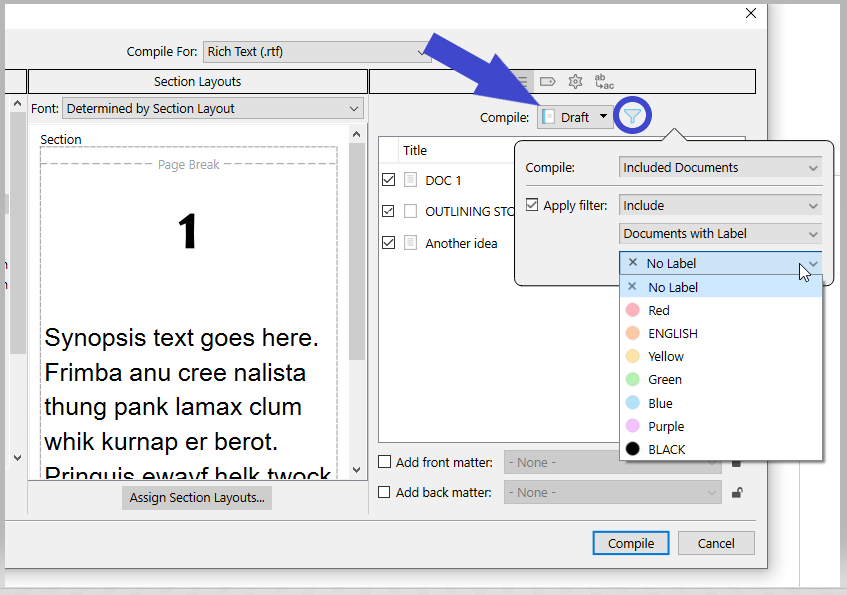
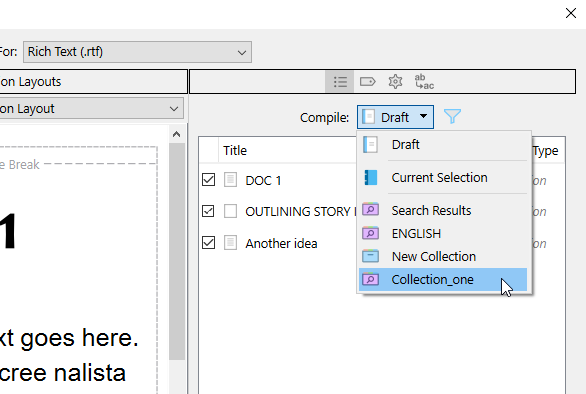
Either this, or create a collection based on the label, and compile that collection.
(This will turn out to be convenient if you intend to compile repeatedly.)
[Also note that using the filter (above screenshot) might have an impact on the wordcount reported by the software – depending on your settings.]
3 Likes
Thank you SO much! This makes tons of sense–I appreciate the help!
1 Like
I know @Vincent_Vincent has answered your question as posed exactly, but there is an alternative way of compiling only a portion of the draft, which you might find useful at some point.
Note that in @Vincent_Vincent’s second screenshot, in the dropdown menu, below Draft you have Current Selection. If you select the relevant documents in the Binder then go to Compile and choose that, then only those documents will be compiled; no need to create a collection and no impact on word count settings.
Just my ½p.

Mark
3 Likes
Thank you for your help!