I’ve been using Scrivener for a few months now, no real problems. Today, it has developed a bad relationship with the task bar. If I click on the icon on the task bar, it places another icon on the taskbar for the instance/document. However, it does not open the app on the screen, and it can’t be opened from the other taskbar icon, either.
This may relate to installing another piece of software, but I can’t find a way to contact the publisher, and I’m hoping someone has some helpful insight here. I’m in the middle of writing something!
Yes, I’ve unpinned, and I’ve tried to use the desktop icon. Also launching from the app launcher, same result. Do you think reinstalling Scrivener would help? Would I lose track of my files?
I’ll assume you’ve also rebooted your computer. (If you haven’t, I think you should.)
Try Ctrl-Alt-Delete and run the task manager.
In the top section, if you see that an app that shouldn’t is currently running, force it to shutdown.
Then try running Scrivener again.
You should also check and see if the problem occurs with other apps as well. If it does, likely a reinstall won’t help much ; so save that for last.
I would see if uninstalling the other app you talked about, then rebooting, fixes your issue.
Then it’d be up to you to decide if that other app is worth the trouble, and be reinstalled or not.
[EDIT] I must have had my head in the clouds, as I typed that following part of my post while completely not taking into account that the issue is that Scrivener won’t run.
So for the time being, ignore that part – from this point on – about a reinstall.
Last, in case you come to reinstall Scrivener :
Lose track of your files ? Not really. The recent project list would reset though.
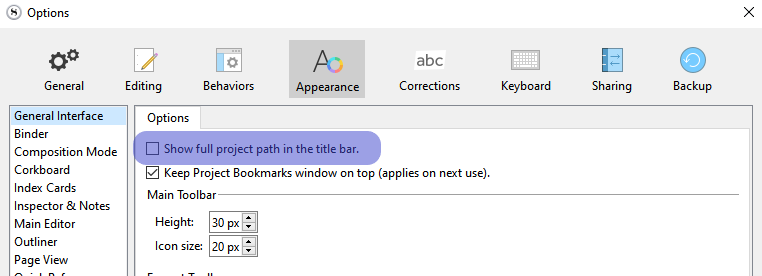
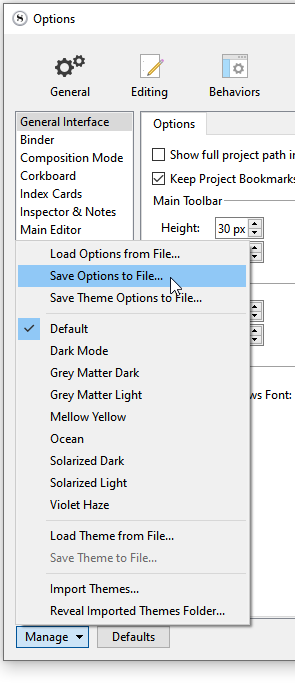
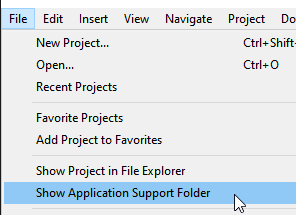
If you are not sure where the projects in the recent projects list are on disk, check this option below, open those projects and note down the location.
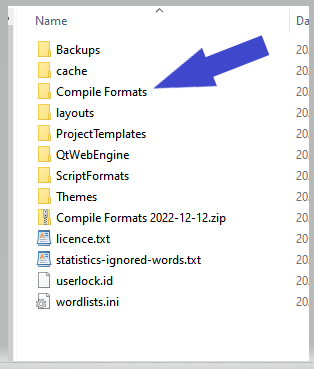
(Copy the content of that folder to a new folder, on the desktop of something. – Anywhere but in the Scrivener app folder. → You can simply zip that folder, then move the zipped version elsewhere.)
Once that is done, it should be 100% safe to reinstall.
My reply last night seems to have disappeared, so I’m repeating it. I want to thank you for all the help you have given me, on Christmas Eve, no less. Your last post solved the problem- I do indeed have a tablet connected to my computer, but it hadn’t been turned on for several months, even before I installed Scrivener, so it never occurred to me that it might be involved. I turned it on, and there, indeed, was my scrivener window. Apparently the installation of the Steam game moved a bunch of things that were open at the time around, but not apps that weren’t running. I still have no idea why, but I’m happy to have Scrivener operating again. You’re a lifesaver.
Best Holiday wishes,
One more thing to try in general cases like this. Sometimes Windows (or apps running in Windows) gets confused as to where the visible portion of the app is running. This can be very common if you have a variable number of monitors/screens (as in you sometimes run on your laptop only and sometimes you are docked and have any number of other monitors). When you change environments and launch the app, the app can “open” on a monitor that isn’t really there.
Fortunately there’s an easy fix. Just select the app/document with a single click on the icon in the task bar or press Alt+Tab until the doc you want is selected. Then hold down the Window Key and press the left or right arrow button, sometimes multiple times. This will move (dock) the app across the ‘current’ screen and then onto any other screens.
To see what effect this has, try it on any visible app now. Viola! Easy key-based moving of apps across your monitors!
Hope this helps,
Tom
Edited 12/30 (thanks @Vincent_Vincent): The rendering software didn’t like the angle brackets I put around “Window Key”. It must have thought they were part of the html. All fixed now.
That is very good to know! I just hope I can remember it the next time the issue arises- as it will, eventually, but probably right after I’ve forgotten your tip.

 ←
← 
