I had to install on a new laptop and it’s not working for me any longer, either. >.< Highly annoyed.
Many thanks for this, ardenhag.
Unfortunately this issue does not appear to be fixed yet (Version: 3.1.5.1), and this L&L workaround might work while typing, but not when importing or pasting text.
I’ve also noticed that, after gathering text from different sources, I want to convert all quotes to straight and then back to smart, in order to standardize the manuscript, but when doing so the quote conversion fails near em-dashes.
For instance, this text with straight quotes:
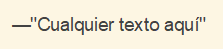
Gets converted to:

Is this considered a bug by the Scrivener Team? Can we expect it will be eventually solved?
Many thanks in advance.
I think it is worth noting that you are demonstrating a valid case where the desire is the opposite of what is being posted about above, in the thread. The symbol is different, but you want —“ while they want —”.
I.e. there is no one right answer to this, which is what we’ve stated on this matter before. When conveniences/automation isn’t handling the case the way we want, it’s up to us to type it in correctly (or use one of the methods described above to configure the software to work the way you need it to).
What’s interesting is that the Transformations commands work one way, with guillemots, but typing works another way. That kind of inconsistency is probably something we should check.
1 Like
Yes, indeed. There’s no such a construction —” in Spanish, and I wasn’t aware that it was popular in English. 
I guess that analysing the context would let the “smart” function of Scrivener handle the needed case while typing, perhaps checking if there’s an open " on the same line before.
Thanks a lot. That would be much appreciated.
Best regards!
1 Like