Hi,
I occasionally have dialogue in which the character is interrupted before completing the sentence, and I use a dash to signify the break/end of the dialogue, and want to follow the dash by a (closed) curly quote.
However, when I try this, I always get the curly quote displaying the wrong way around (i.e., it displays as an opening quote; the one that precedes and signals the start of the dialogue).
Is there any way to do what I am trying to do in Scrivener?
I’ve noticed this annoyance too. Don’t remember it doing this in V1, which makes me ponder whether it’s a bug in V3?
As a work around I’m adding the closing quote mark next to the interrupted word, then add the dash between them.
I noticed this when typeing dialog in an ordinary manuscript. While the double dash properly turns into an em-dash, when I’m closing a dialog, scrivener places an open-quote rather than a proper close-quote.
So dialog like
“But–”
goes open-quote followed by But em-dash and then ends with another open-quote rather than the correct close -uote to be expected from smart quotes.
Thanks! Glad to know its consistent. I’ve been solving it by typing a space and an ‘x’ after the dash followed by the close quote and then delete the space and then ‘x’ to force the correct glyph.
hmm. I stopped looking when noting the can’t-stop-cookies-funny-business-hard-sell-ads-first presentation of TextExpander’s website, and that they want a large fraction of Scrivener’s price…per year subscription.
Any indication whether a true fix is in the works for this? I was working on a document in Scriv1 today that I never exported and noticed–to my surprise, now that I’m used to Scriv3–that the closing quotation mark turned the correct way (when since making the switch, I’ve told myself I must have just started using the construction more and that’s why it was suddenly so much more annoying). I can’t find any difference in the settings between the two apps, making it pretty clearly a coding issue in Scriv3. Adding an extra character before the " has been my workaround, but I literally NEVER remember I have to do that until I’m glaring at the stupid wrong-way-round marks, so using a text expander to get the right marks the first time isn’t likely to be any more effective. LOL
We keep having this come up in the L&L forums - closing quote after an em dash doesn’t display, it comes up as an opening quote. This is due to a buglet(?) in the QT editor that has been in existence since the start of the Scrivener 3 beta process and has yet to be fixed. The buglet(?) was reported during the beta process and should be on file, but…
Using smart quotes:
“Help—“
Using a single dash:
“Help-“
Using a triple dash:
“Help—“
With a space:
“Help— “
With spaces:
“Help — “
Corrected (adding the em dash after closing the quotes):
“Help — ”
Using ellipses:
“Help…”
Using straight quotes:
“Help—”
Maybe switching off the “Use Smart Quotes” option and letting the compile do the correction is the best bet.
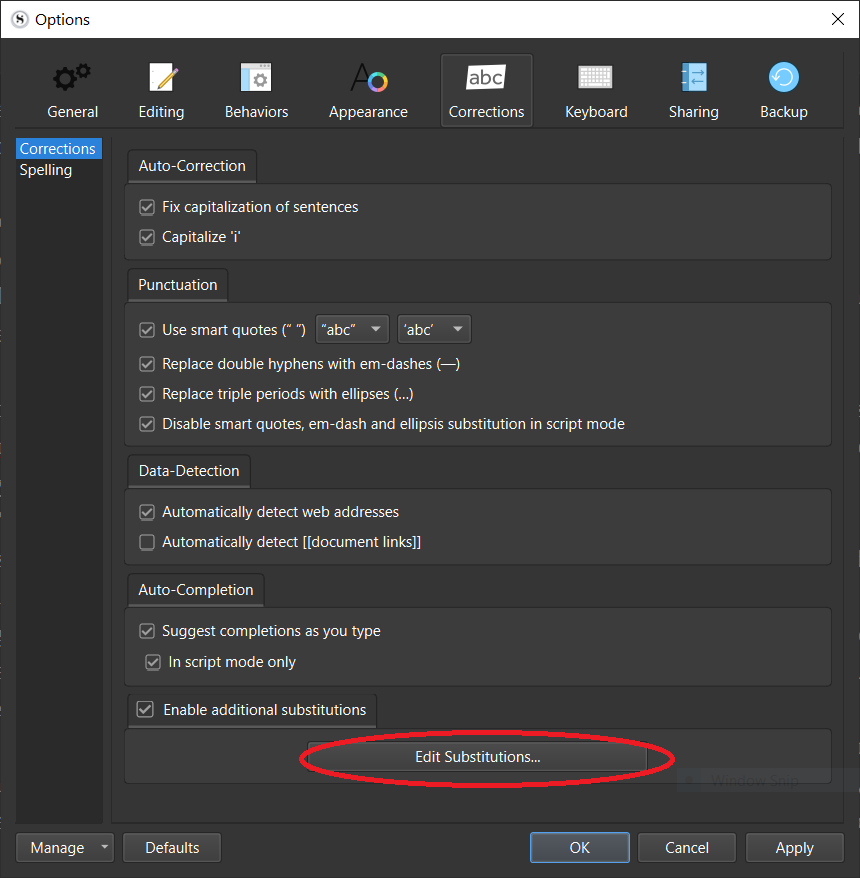
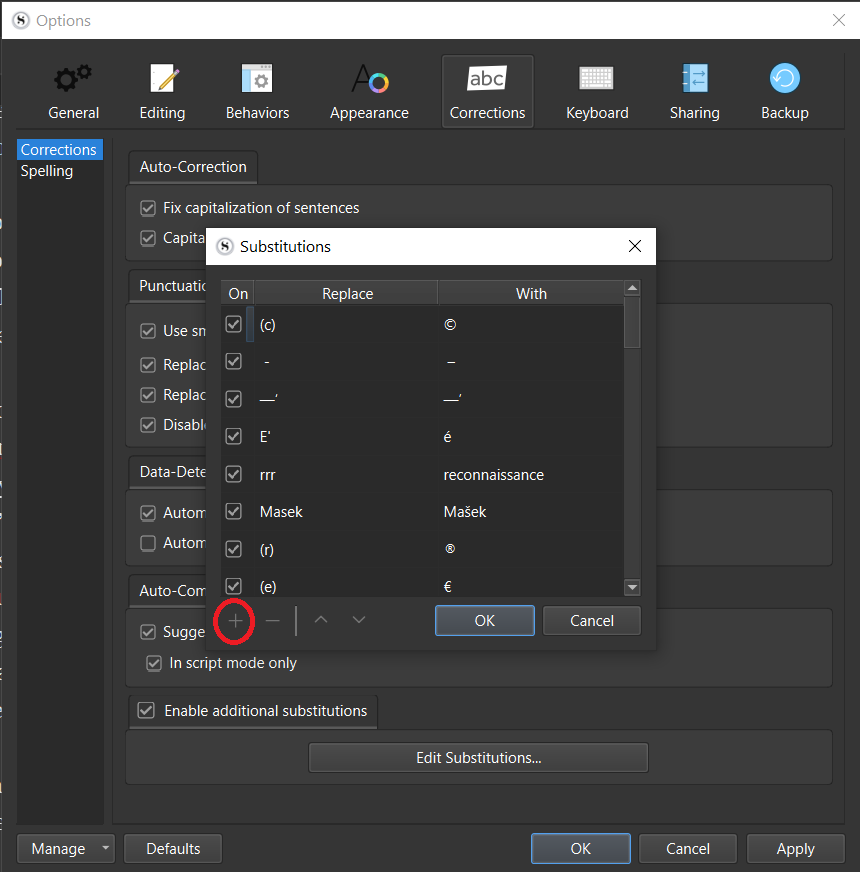
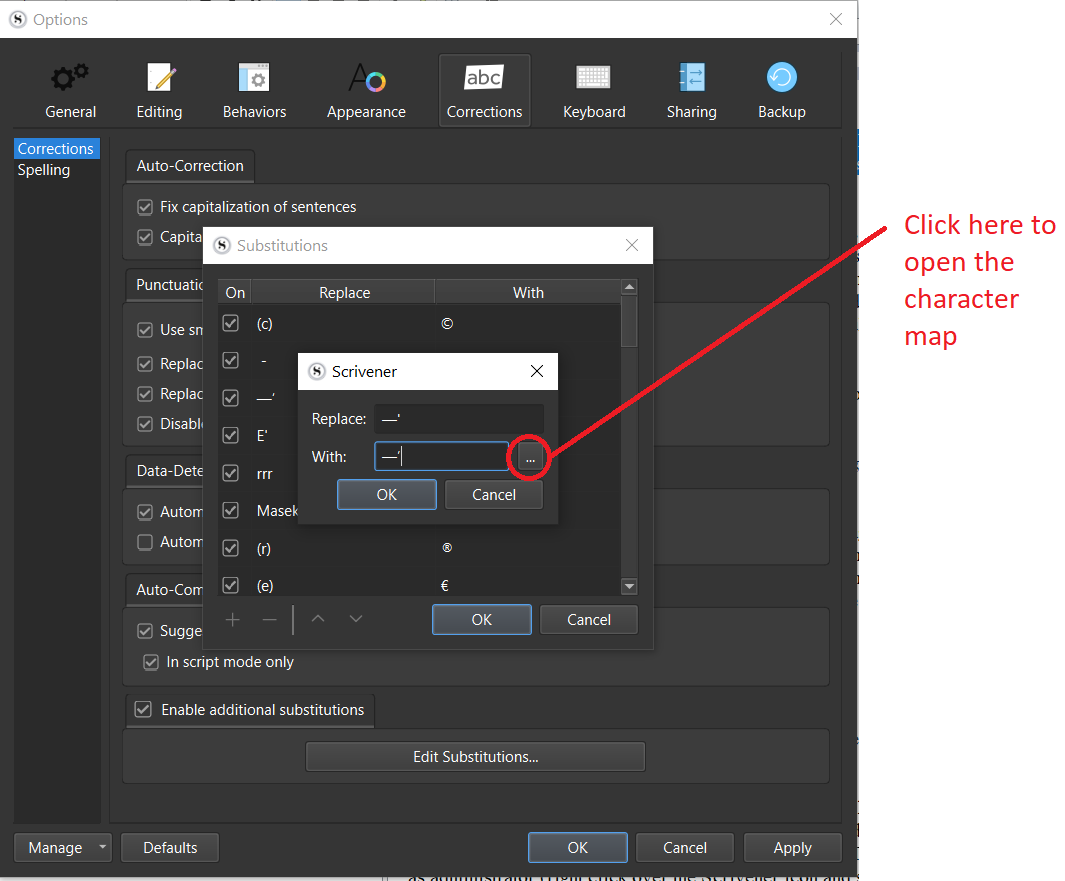
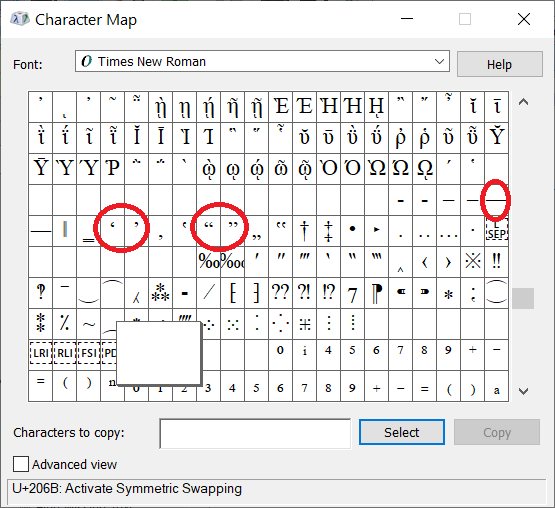
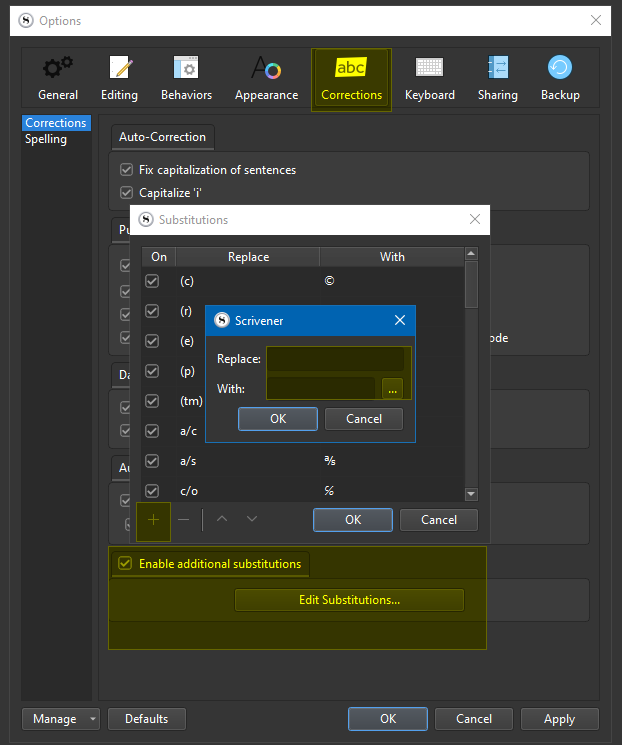
Copy and paste the correct characters into the ‘Replace’ and ‘With’ fields from the character map. N.B. make sure you choose the correct characters for the em-dash and quotes, as there are loads of similar characters. I’ve circled them in the screenshot of the character map. Obviously, choose single or double quotes depending on your preference.
Came here to report this same bug. Was hoping it would be fixed in the scrivener 3.1 update, but no luck. It’s a fairly common combination so I would think more people would be bothered by this.
It was a bug that was noted during the beta period, but I believe that it’s both a) relatively down the priority list (because there are workarounds) and b) buried fairly deep into the Qt text subsystem so would be hard to override programmatically and relies on getting the upstream Qt developers to fix in a later release of Qt which then has to be rolled back into Scrivener.
I don’t think this is a Qt bug. QTextEdit doesn’t have this kind of autocorrection feature built in. They probably override the QTextEdit’s keyPressEvent to insert the smart quote. All they need to do is add a check to the punctuation checks they already have, using QTextDocument.characterAt() to see if the previous character is any kind of dash.
That said, I know Scrivener uses a heavily customized textedit, so maybe it’s not so easy for them. There’s also the problem of text like “Dialog”—some interruption—“more dialog.” Though I think “Interrupted dialog—” is way more common.
Agree with Shaun that the mid-quotation interruption instance is an issue for the substitution fix.
Also, I just tried the substitution fix posted above and it doesn’t seem to be working for me now, I tried various instances of
—“
or
–“
And similar character combinations, copying both from my Scrivener text as well as non-rich plaintext editors and couldn’t get it functioning well for me. So still hoping for a software-level fix.
 I’ve been solving it by typing a space and an ‘x’ after the dash followed by the close quote and then delete the space and then ‘x’ to force the correct glyph.