Well, despite the steps described in my first post, my compile options are somewhat different from default:
Export as PDF
In the format settings (I’ve created a new one, named “Test format 1”), inside “Footnotes & Comments”, my configs are as the images attached:
and
So my Footnotes and Endnotes are using different formats (A B C and 1 2 3, the former to actual chapter footnotes and the latter for bibliography), and thats what I want.
Everything sorta works, but the REF1 text goes empty on pages with footnotes:
Yea, just by posting my previous reply I sorted out.
The reference text, ALSO gotta be an inline footnote (gotta be greyed out, as any default inline footnote) and the reference (in my case REF1, AND the actual reference text), gotta be inside the greyed area.
So it works!!
Now I just gotta find out how to restart the footnotes numbering, by chapter
In the example you show, the actual footnote is not formatted as an inline note, while in the screenshot you show in your first post, it appears to be formatted as an inline note. Is that, perhaps, the problem?
Aaaaaaand…where did the OP find format settings for footnotes and endnotes? I’ve searched every panel in Preferences, Toolbar icon > Settings, and Compile. Also did a word search through the user’s manual, but no joy.
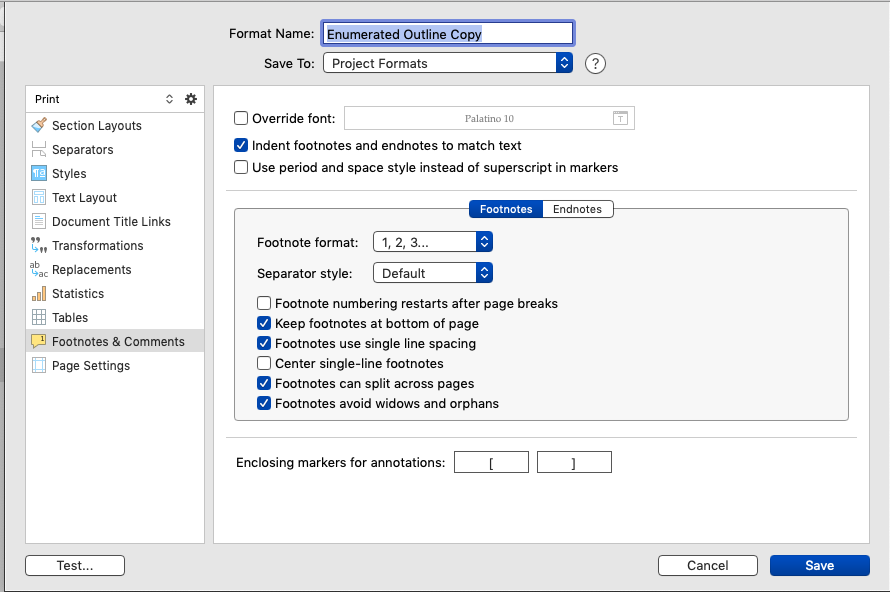
The OP’s footnote format pane screenshot is from the Compile Format Designer which is explained in chapter 24 of the manual; specifically 24.19 for Comments and Footnotes.
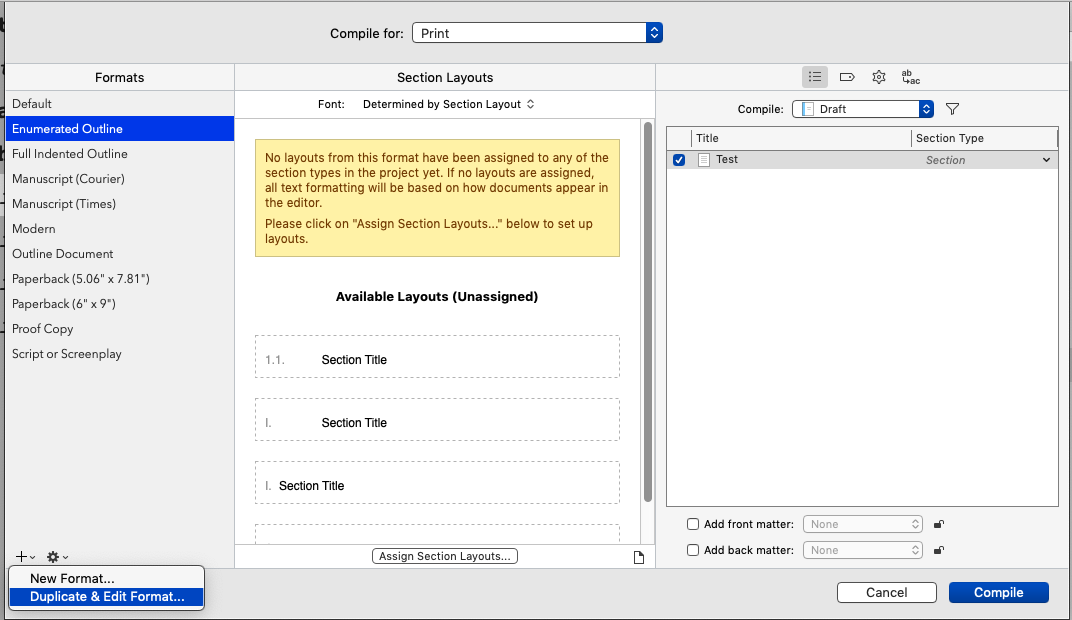
Example below after initiating Compile, choosing the Format in the left column, then clicking the + sign at the bottom of that same column. In this case, I chose to Duplicate & Edit Format for the Enumerated Outline format* which then opened to the Designer. In its left column, choose Footnotes & Comments for the footnote formatting options.
No–I’m trying to create a referenced footnote: 18.2.2 Referenced Inline Footnotes (directions on p. 459-60). Per step 2 in those directions:
Are you by any chance referencing an older manual? Mine–downloaded from the Scrivener site yesterday–shows section 18.2.3 as “Finding Inline Notation,” two sentences, no steps.
Ahhh. So the only way to access those settings is to duplicate + edit an existing format or create a new one from scratch. Thanks for the clarification.
That’s what it is––I used the manual accessed within Scrivener. I’m still on v3.1.3 as I’ve not upgraded to macOS 10.15 (I’m on 10.14.6). L&L changed the relevant notation of what the expected behavior should be. Thank you for the heads-up.
FWIW––I did test by placing the marker plus the content in and outside the marker document but could only get the desired compile result by placing it in the same document. Is the behavior Scriv and/or OS version dependent? Don’t know.
I’m still running 10.14.6 (and Scrivener 3.1.4). The manual embedded in the app matches what I downloaded from the website yesterday. It must have been updated for the -.4 bump.
Sounds like you’re seeing the same thing I am, drats. If the behavior is version dependent, one would certainly expect the manual directions and the output to correspond. Hmmm.
Hoping someone from Scrivener pops into the conversation to help out. Thanks for jumping in, @scshrugged.


 and
and