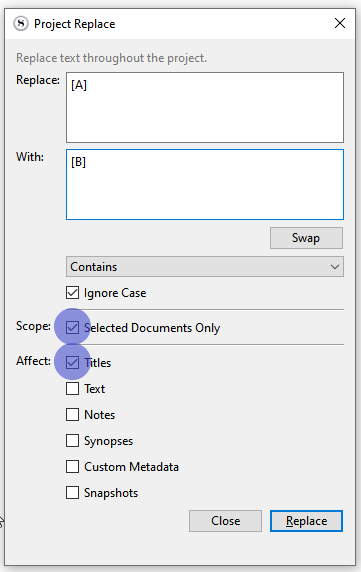
Hi, I am working on a book and wanted to know if there is a way to rename multiple files in the binder according to some logic. Example:
[A] Part 1-1
[A] Part 1-2
[A] Part 1-3
What I want is to just change the letter at the begining to: [B] 1-1, is this possible?
Thank in advancre!
Edit / Find / Project Replace...
Or replace [A] Part with only [B], if this is actually what you want as per your description. 
It’ll replace anything that matches, with what is in the second “with” box. Whether it is shorter, or longer, doesn’t matter at all.
1 Like
Fantastic! Works perfectly.
1 Like
is it possible?
ie: deleting prefixes or suffixes to file names to more than one file at the same time?
Hi.
It can be done if there is a clear pattern / redundancy.
Ex: your prefixes – and only your prefixes – between brackets. [[prefix]]
(Or, quite obviously, the very same prefix in all the concerned documents.)
If such a condition is met, then it is possible to use a RegEx to have Project Replace locate them. And you simply set the function to search only in titles and replace them prefixes (as per the RegEx formula) with nothing.
(In case it is the same prefix everywhere, no need for a RegEx ; just replace the said prefix with nothing.)
. . . . . . . . .
Whatever experiment you run, make sure that your project is properly backed-up first.
This is destructive editing, and there is no undo.
2 Likes