I have a question that spans two features:
- What is the intended mechanism for capturing snippets of text from Resources that I use for inspiration, quotes, footnotes? I don’t want these items to show up in compile or word counts.
- Where will Matching Text search apply or not? The manual says “any documents”.
What I’ve been doing, and has been working for me, as it keeps everything tidy in a single file and resources don’t show up in compile and word counts:
- Creating a new Document file in the Binder for each topic / chapter.
- Snippet of text from the associated resource into the Document Notes
- When applicable an External Bookmark linked to webpage of associated resource
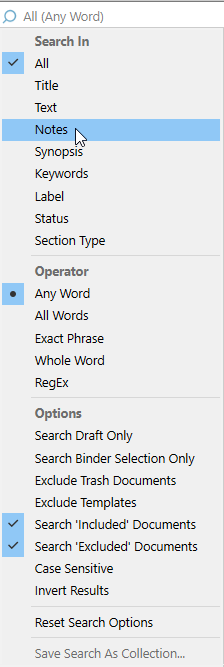
Where it has started to fall apart is my effort to make sure I haven’t accidentally plagiarized any of my resources. I was happy to find the Matching Text feature, but it does not appear it will look into Notes fields.
I think I know the answer, but I’m not loving it. I have to create a separate Document file in Research for every resource and then create Internal Bookmarks from the file I’m writing in to the resource file? Matching Text would work here. This would keep it out of compile and word counts. Unfortunately, I’ve basically duplicated the number of files in my project (assuming every topic has associated sources), and I have to open multiple files to compare things.
Have I misunderstood anything or overlooked a better approach?

 ..Often, the least.]