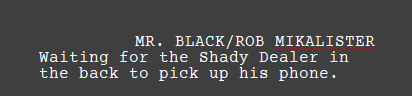
when typing or selecting a characters name it centers that text. but when you modify/add to the name it does not. is there a way to change this so it’s always centered whether the original name or the modified version?
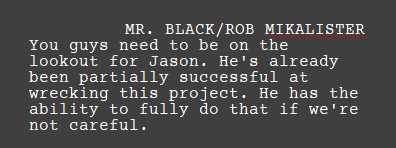
The “Screenplay” format we have set up uses the standard of indenting the character name 2.5in from the margin, flush left, and setting it to all-caps. It isn’t at any point actually centred (at least in terms of alignment formatting, naturally it might coincidentally be so, in isolation, at certain lengths).
If for some reason you need a different standard, that’s certainly up to you in the Format ▸ Scriptwriting ▸ Script Settings... panel:

1 Like
When I make these adjustments do you know if it will do it instantly to the whole screenplay or just from here forward?
Changes to formatting will update the existing text, yes. I do recommend running File ▸ Back Up ▸ Back Up To... prior, just to be safe. For a minor change like this it should be fine, but as they say, better safe than…
1 Like
Actually, it doesn’t center the text. The standard Hollywood screenplay format has a indented left margin for the character’s name, and it’s written left justified.
FWIW, if you are writing your screenplay to submit to a studio or production company in North America, you’d be better served to leave the default settings as they are. Script readers are sensitive to non-standard formatting. There are so many people trying to get into the business at any given time that they are looking for excuses to dump your screenplay just to cut down their own workload.
if you’re not submitting your script to a buyer in North America, just ignore what I said and do what you like.
2 Likes
Yes, this is what I’ve learned from my film mentor lol. So I was thinking that a script reader would want the whole name centered regardless of it’s length or 1 character turning into 2. What we’re actually talking about here is the programs ability to decipher that you’re taking something that has been one way for 40 pages and now is another way so you need to adjust as well. Almost like it needs to be AI or something. Intuitive.
I think I’m going to try your recommended save and then adjust method… I really think the script is going to be best with the whole name centered… just putting myself in the shoes of a script writer, as it is right now is really distracting.
These standards come from the days of typewriters. While you can certainly tab to a centre stop, and then do the math to figure out how many characters to the left of the page centre you should backspace, before typing in the name—having to do that over and over and over for 90 pages would be masochism.  Such things become preferences over time, and I’m sure most readers would be jarred to see “floating” character names rather than a single stable column.
But you’re absolutely right, Scrivener’s setup makes it fairly easy to use your own personal aesthetics during drafting, and then swap back to the standard preset before export. Be sure to click the little gear/dots button along the bottom of the Script Settings panel to save your setup as a global preset, as well, so you aren’t having to do this over and over.
1 Like
ahh yes, global presets… Amber… you are a Scriviner vetern 
1 Like
Looking all over the script writing > character settings and I’m just not understanding why this is happening. What’s even more odd is how it even got to this setting. The whole script it has been in “normal” mode and then somehow switched to this. 
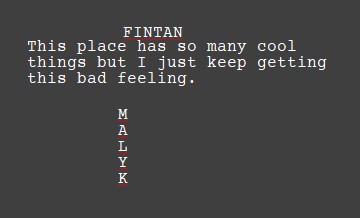
The Paragraph tab is going to be more applicable to oddities such as this. To me that looks like the result of an incorrectly reckoned indent pairing. For example you might have been thinking of right and left indents as being measured from the respective page edge, when in fact they are all measured from the left margin (which should be 1in from the edge of the page).
You probably don’t want any indents though, as centre alignment is relative to the local indent placement, not the sheet of paper or margin settings. Or, maybe you want it centred to the Dialogue column, in which case you’d want to copy its indent settings precisely.
1 Like
I’m spending way too much time trying to get characters names, their dialogue and the spacing in between actions lines and multiple characters… Are you saying that there’s a way that I can just switch the whole screenplay to industry standard and I won’t have to worry about doing all these adjustments manually?
Because I thought before I wrote any lines that I went into that template but then something needed adjusting… this was a while ago so I’m struggling to remember. But if this is possible wouldn’t that solve all my problems?
I’m spending way too much time trying to get characters names, their dialogue and the spacing in between actions lines and multiple characters… I think there is 2 ways to go on this, correct me if I’m wrong. I can continue fiddling with these indents and such or isn’t there a way that I could just change the format of the whole document back to scriptwriting defaults or something? Industry standard, so I don’t have to worry about doing all these adjustments manually?
Because I thought before I wrote any lines that I went into that template but then something needed adjusting… this was a while ago so I’m struggling to remember. But if this is possible wouldn’t that solve all my problems?
The easiest way is to just create a project from the Screenplay template and write. That project is set up to export Hollywood standard FDX, ready for layout in a more capable and dedicated scriptwriting program. Unless you have house rules to work against, you shouldn’t have to modify anything.
And if you do have to, it is something that can be resolved whenever. You certainly don’t have to address it up front. You can change things in Scrivener, or wait until later in another program. That’s one of the nice things about scriptwriting, since all of the text is assigned into semantic types, they can be easily bulk changed at any point.
1 Like
I started a new screenplay and copied the whol e previous one into the new and it translated it perfect. The only thing off still is the name that got added onto in the middle of the script. If that’s the only glitch I’m happy with that just given how sideways things went. I’m not submitting this to Hollywood or I would have to figure that out so… I think I’ll just let it be lol. Thanks for all your help.