I read a post on the Reddit scrivener group about someone who had submitted a book to a publisher, in Word, as was their requirement.
The book came back with a bunch of changes marked. Now the user had to do one of two things: Transfer all the changes back to scrivener, or work in Word.
I have a similar problem. My copy editor wants to markup on paper. So I print her a PDF. But then to enter the stuff in scrivener, I have to find the passage in my document. I needed a temporary coodinate system that would help me find the same spot in my document that she had marked in the PDF.
So I, with help from Claude, came up with Scriv_marker. Scriv_marker puts a line in every 5 paragraphs in lighter grey. Each document is numbered from the start.
The idea for the workflow:
- close the project
- Run scriv_marker from a command line to mark the document/project.
- print/compile the project and send to your collaborator. They do whatever, and send their copy back.
- Now you can find that spot in your project, and work on the modifications.
- run it with –denumber to remove any markers
I did not like using Scrivener’s built in numbering for a few reasons:
- Numbering and denumbering hve to be done one document at a time.
- denumbering did not return a document to the format it had before.
- If, in my editing I added a paragraph after par 27, then all the numbering following changes.
- With Scriv_Marker, I can number a document, and add or delete what I wish. Para 025 remains para 025
Example of after scriv_marker has run.
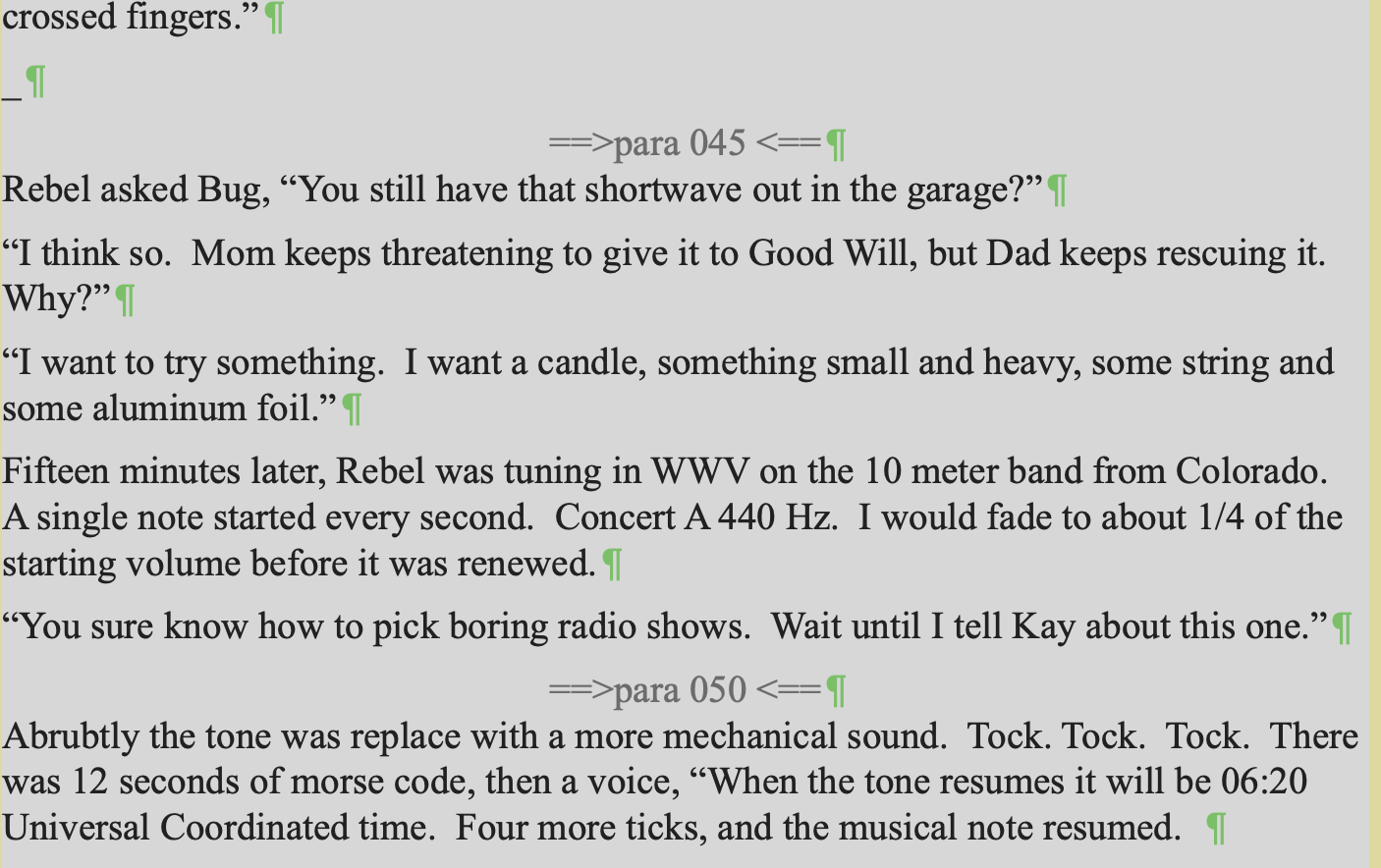
This is a command line tool. On mac, you run it in a terminal window.
It requires python 3
It requires the script inself.
It requires an external file scriv_common.py which has stuff used by this and other scrivener utilities.
This has been tested enough that I’m using it with my current WiP. However I have not tested it in every combination. I do not know if files have any as yet undetected sentinels for Scrivener itself.
I have not tested on windows.
I have scrivener set to make a backup on project close.
I offer this script to the community at no charge and with no warranty. If L&L wish to incorporate the functionality of this script into the next version of Scrivener, they are free to do so, however, while I did my best to shepherd Claude’s work, I am neither a professional python programmer, nor an expert on Apple’s (per)version of RTF.
Thiis is the help accessed with the --help option, or a shorter version if given a missing or bad option.
usage: scrive_marker.py [-h] [-v] [–scriv-dir SCRIV_DIR]
[–walker-path WALKER_PATH] [–renumber | --denumber |
–repair] [–regex REGEX | --folder FOLDER]
[–every EVERY] [–width WIDTH] [–color COLOR]
[–dry-run] [–no-confirm] [–ignore-lock-check]
[–title] [–binder] [–debug-dir DIR]
[project]
scriv_marker.py – insert or remove unobtrusive paragraph-count sequence
markers directly in Scrivener content.rtf files, so a compiled/printed
PDF carries a coordinate system (light-grey, centered “==>para 005 <==”
lines every N paragraphs) that maps cleanly back onto the binder when
re-entering an editor’s corrections.
Two operations (mutually exclusive, exactly one required):
--renumber   Strip any existing markers, then insert fresh ones at
             the current paragraph counts (use this any time the
             text has changed since markers were last inserted).
--denumber   Strip existing markers and leave the prose clean --
             this is what you run before your own further editing,
             or before a mirror/diff pass, so markers never get
             treated as real content.
Scope (mutually exclusive, optional – default is the whole manuscript):
(none)              Entire Manuscript/Draft subtree (--manuscript-only
                     walk, same root scriv_mirror.py uses by default).
--regex PATTERN      Match PATTERN (re.search) against each item's
                     Path, as scriv_walk.py reports it (relative to
                     the Manuscript root).
--folder REL/PATH    Restrict to this one folder, relative to the
                     Manuscript root, and everything nested under it
                     (exact path or a '/'-prefixed descendant).
Markers are matched/stripped by their own fully-deterministic literal
RTF structure (MARKER_GROUP_RE below) – see the note further down for
why this replaced an earlier hidden-sentinel design.
Paragraph counting walks the raw RTF bytes tracking brace depth.
CONFIRMED by byte-level inspection of a real Scrivener content.rtf
(Dart, 2026-09): scenes contain NO literal \par at all – every
paragraph break is written as Scrivener/Cocoa’s own shorthand, a bare
backslash immediately followed by a raw newline. Both forms are
recognized as paragraph breaks; only a top-level (brace depth == 1)
occurrence counts, so one inside a nested group (footnote text, an
embedded picture/object, etc.) is not a scene-paragraph break and is
deliberately excluded.
RTF tables (\trowd … \row) are NOT brace-nested – a table row’s
cells sit at the same depth as ordinary body text, so a paragraph
break inside a cell would otherwise be miscounted as a real one and
could land a marker in the middle of a row. Table ranges are detected
separately (matching \trowd starts to their \row ends) and anything
inside one is excluded from both the count and the set of valid
insertion points.
Scrivener inline annotations are ALSO confirmed (same real-file
inspection) to be excluded from the count, but for a different reason
than tables: they are not real RTF groups either. Scrivener encodes
them as literal ESCAPED text – { and \ (an escaped brace, an
escaped backslash) rather than real { } grouping – so they sit at the
same brace depth as surrounding prose and get no protection from the
depth check above. A multi-paragraph annotation was confirmed to use
the same backslash+newline shorthand internally as real prose, so
without an explicit text-pattern exclusion its internal breaks would
be miscounted, and a marker could end up spliced into the middle of
the annotation’s own literal text field.
Marker insertion restates whatever paragraph formatting (alignment,
indentation) was actually active at the insertion point, rather than
resetting to RTF’s bare spec default. This matters because RTF’s
group-scoping is asymmetric: character formatting reverts
automatically when a {…} group closes, but paragraph formatting does
not. A first real sample showed a scene relying on a single \pard
declared once, never restated per paragraph – in that case, without
this restoration, the marker’s own centering would silently bleed
forward into every subsequent paragraph. A second real sample (Dart,
2026-09) showed the OPPOSITE convention is also real: Scrivener
restates a full \pard, including a completely different \tx tab-stop
layout, on a single paragraph that had its own character style applied
by hand – interleaved with literal <$Scr…> pagination/style-state
tags (see scriv_common.py’s own OUTPUT_TEXT_FIXES, which strips these
from unrtf’s plain-text output; they’re inert here, since they contain
no backslash or brace and can’t be mistaken for RTF structure). The
lookback approach handles both conventions without needing to assume
either: it always captures whatever \pard actually governed the
PRECEDING paragraph, so when the following paragraph already restates
its own (as in the second sample), the restored text is simply a
harmless, immediately-overridden redundant \pard – never a
correctness problem, just a few wasted bytes.
Markers are matched/stripped by their own fully-deterministic literal
RTF structure (see MARKER_GROUP_RE) rather than a separate hidden-text
sentinel – an earlier draft used RTF’s standard \v (hidden text) for
that, but Scrivener choosing to invent its own escaped-text tag scheme
for its OWN internal metadata, rather than trusting \v, is a strong
signal \v may not reliably render as hidden in Scrivener’s own reader.
Since the marker’s exact bytes are already fully known and controlled,
no separate sentinel is needed.
Safety, per Dart’s spec:
–dry-run List files that would be affected – Type,
Path, and (for --denumber) how many existing
markers were found, or (for --renumber) how
many would be stripped and how many freshly
inserted. No files are touched. Read-only, so
this does NOT check Files/user.lock – safe to
run while the project is open in Scrivener.
(default) After listing the same summary, ask for
y/n confirmation before writing anything.
–no-confirm Skip that prompt and write immediately.
–ignore-lock-check Skip the Files/user.lock check (see below) on
an actual (non-dry-run) write. Off by default
– this check exists specifically because Dart
routinely has several Scrivener projects open
at once, so it checks THIS project’s own lock
file, not whether Scrivener itself is running.
Diagnostics (read-only, never touch content.rtf or check the lock
file, usable alone or alongside --renumber/–denumber):
–title Print what Scrivener would DISPLAY as each in-scope
item’s title – its binder if manually set,
else the RTF-derived fallback (the same value
scriv_walk.py uses to build Path).
–binder Print the RAW binder XML value with nothing
filled in – items with none print ‘(not set)’,
revealing which ones rely on the RTF fallback that
–title shows instead.
–debug-dir DIR
Copy each in-scope content.rtf into DIR, named by
UUID, so a flat set of sample files can be pulled and
shared without digging through Files/Data//.
Files/user.lock existing inside a .scriv package is exactly how
Scrivener itself detects “this project is already open elsewhere” (see
Literature & Latte’s own support notes) – its presence here means the
project is very likely open right now in Scrivener, actively
autosaving, which is exactly the condition under which we must not
also be rewriting content.rtf out from under it. No separate .bak
backup is written before modifying – Scrivener’s own snapshot/backup
on close already covers this.
Usage:
python3 scriv_marker.py Rebel --renumber --dry-run
python3 scriv_marker.py Rebel --renumber --folder Volume_2/Confession
python3 scriv_marker.py Rebel --denumber --regex ‘May_1967/.*’ --no-confirm
python3 scriv_marker.py Rebel --title --binder --folder Volume_2/Confession
python3 scriv_marker.py Rebel --debug-dir /tmp/scriv_samples --regex ‘Scene_(One|Two)’
Part of the scriv_* toolset (scriv_walk.py, scriv_mirror.py,
scriv_history.py, scriv_report.py, scriv_marker.py), sharing common
logic via scriv_common.py.
positional arguments:
project Project name, .scriv dir, or .scrivx path, same as the
other scriv_* tools accept.
options:
-h, --help show this help message and exit
-v, --version show program’s version number and exit
–scriv-dir SCRIV_DIR
–walker-path WALKER_PATH
Path to scriv_walk.py (default: same directory as this
script)
–renumber Strip any existing markers, then insert fresh ones.
–denumber Strip existing markers, insert nothing.
–repair One-time cleanup for files already damaged by a fixed
pre-1.4 bug (repeated redundant \pard blocks /
truncated ’ hex escapes from renumbering the same
file many times before the fix). Not needed on files
that never hit that bug – run --dry-run first to see
if anything is found.
–regex REGEX Restrict to items whose Path (relative to the
Manuscript root) matches this regex.
–folder FOLDER Restrict to this one folder and everything nested
under it, given relative to the Manuscript/Draft root
– e.g. ‘Chapter_One’ or ‘Chapter_One/Scene_One’,
WITHOUT repeating the root’s own title.
–every EVERY Insert a marker after every N paragraphs (default: 5)
–width WIDTH Zero-padded digit width for the paragraph number
(default: 3)
–color COLOR Marker text color as R,G,B (default: 100,100,100)
–dry-run List affected files and counts; write nothing.
–no-confirm Skip the confirmation prompt and write immediately.
–ignore-lock-check Skip the Files/user.lock open-project safety check
(only consulted on an actual write, never on --dry-
run).
diagnostics:
Read-only inspection – never touch content.rtf, never check the lock file, safe to run any time. Usable alone or alongside --renumber/–denumber.
–title Print what Scrivener would DISPLAY as each in-scope
item’s title – its binder if manually set,
else the RTF-derived fallback title (same value
scriv_walk.py uses to build Path).
–binder Print the RAW binder XML value for each in-
scope item, with nothing filled in – reveals which
items have no manually-set title at all (those print
‘(not set)’) as distinct from --title’s
resolved/fallback value.
–debug-dir DIR Copy each in-scope content.rtf into DIR, named by UUID
(e.g. DIR/.rtf) – makes it easy to pull a flat
set of sample files to inspect or share, without
digging through Files/Data//. Read-only: the
project’s own files are never touched.