I did a search first on the internet and then in the forums, and unless I missed it, it seems this is a new topic, but that actually surprises me (I would have thought this was the default already, or at least commonly asked for, but apparently not).
What I want is to be able to toggle scrivenings on permanently for some folders and page sets within the binder, because I find it to be the most useful way of looking what I am writing in context of the writing around it, but every time I switch folders it forgets that I had scrivenings selected in the folder I came from when I go back to it. I want to be able to have Scrivener remember whether each location in the binder was last set to Scrivenings, Corkboard, or Outline, rather than forgetting the moment I navigate away from it.
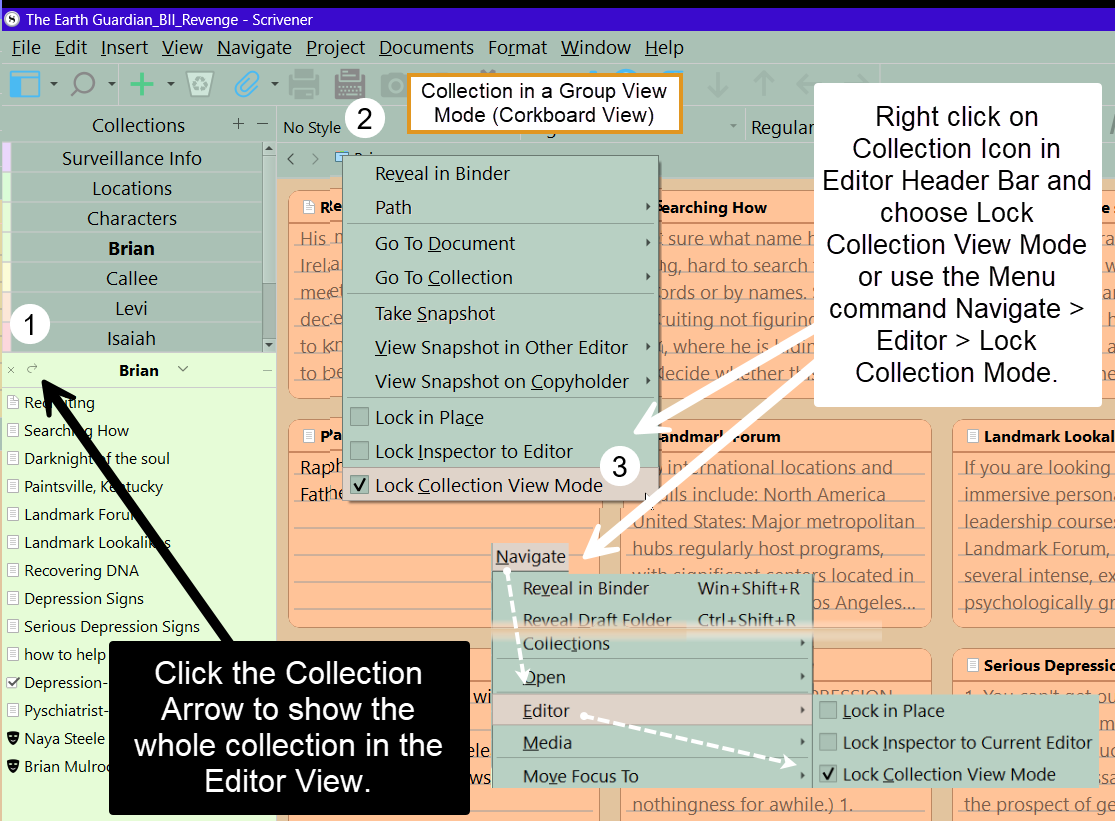
In the menu on the left side of a Title bar, you can find to option to “lock group view mode”. When you set that on a folder with Scrivenings enabled, it might do just what you want…
you are correnct this works for folders, documents with subdocuments AND Collections. So could create a collection of single files you want to view this way and lock the view. Add more documents as needed .
You need to go into settings, under Behaviours: Files and Folders, and set the option to treat all items with subdocuments as folders. This will remove the (in my opinion) very weird assumption that file groups aren’t “real” groups, and make the software in this regard behave more consistently. If something has other things indented beneath it, then it is a group, no matter what kind of icon it uses.
Oh yes!! Beautiful! Thank you, that is exactly what I needed! Thank you so much, I am not sure why this isn’t the default behaviour, but glad to know it can be made as such. Much appreciated.