I found something that I think could qualify as a bug.
I’ve created statuses for my documents with ‘to do’ ‘in progress’ etc
Then I created a collection that searches for ‘to do’
Now when the options are set to ‘search binder only’ the little arrow button on the search results that lists ‘Show the contents of the current list in the editor’ when hovering over, this works. f.e the corkboard will show me all the documents, so I can tell at a glance how many I still need to do.
Great.
However: when the options are set to ‘search binder selection only’ this doesn’t work. I still get the list of search results, but the arrow button does not load the results in the editor. Only when I manually select the results with my mouse and click the button it will load.
I can provide you with a screen recording if that helps.
I think what is happening is that you see the collection but nothing is chosen. Agree doesn’t happen with unrestricted Binder Search. If highlight files, or ctrl + a then with files highlighted can see corkboard etc. Also weird in can select single file in a collection of binder selection only files and see document, but if use back arrow see nothing.
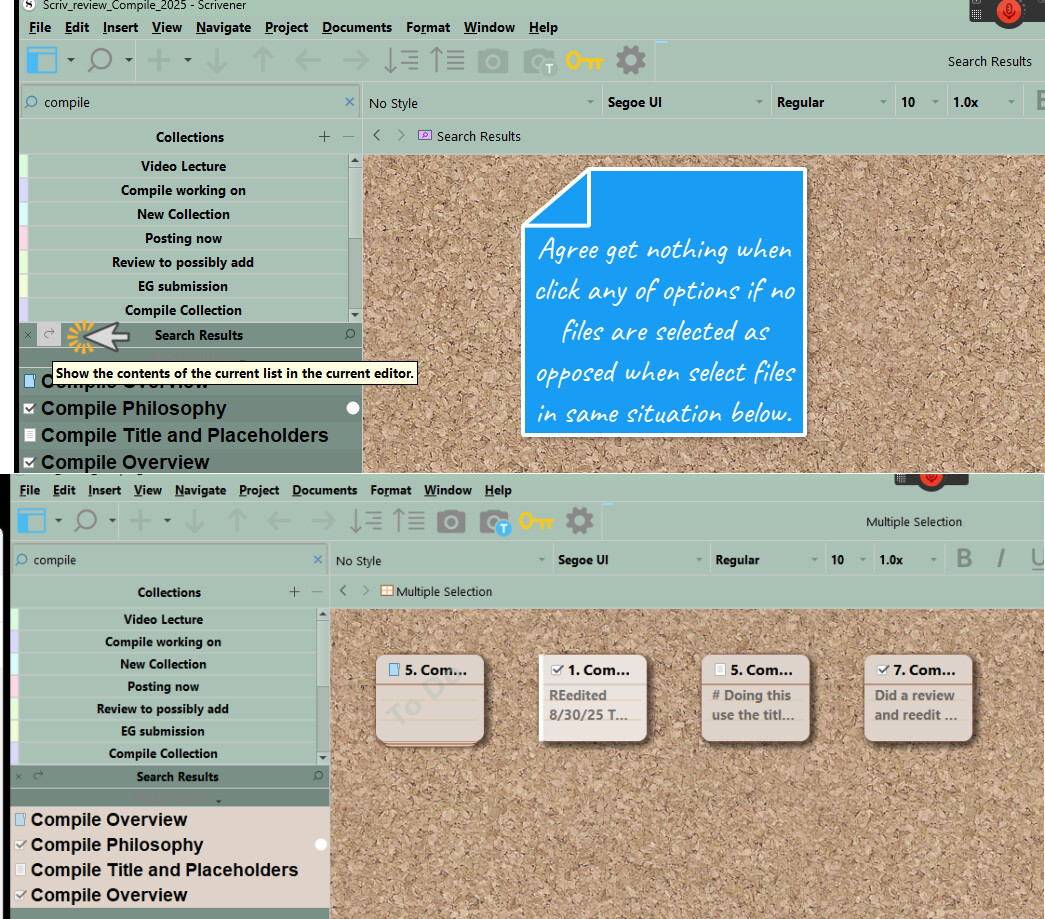
Thanks for the bug report! This is in fact a known issue, along with a number of other scattered issues that were never completed or resolved. For the most part the feature works as intended, but less so the further away you get from “normal” usage. It is obviously very confused in this situation:
- The editor doesn’t use the current group view mode. If I’ve been using outliners for example, and click the hook button, I should get an outliner view. Instead I get some view that seems to be treating the collection as though it were a text file.
- If you switch to Corkboard, which shows how many cards are in the corkboard in the footer bar, it will state the entire number of items that match the search, not the number constrained by the binder selection—yet the corkboard is empty. So it thinks there are three cards instead of two, for instance, when there are actually none.
There is a pretty big difference between a “multiple selection”, made by selecting results in the collection sidebar, and loading the collection itself into the editor. The latter is intended to act more much more like an actual group, where you can switch to freeform corkboard for example, and the card arrangements would remain, or you can lock the group view mode to a particular setting. Multiple selections don’t really “exist” in that sense, and don’t even allow some types of functions as a result.
You may note, if you try those things, they don’t work. That’s because there was a misunderstanding about what this feature was meant to be. It was thought it was just a shortcut for pressing Ctrl+A. So much of the issues and bugs with this feature stem from that.
I am not surprised this becomes confusing quickly. For me it came down to: I notice completely different behavior, even though I change only one setting: the scope of the search.
If you ever get around to fixing it, it will be greatly appreciated.
On that note: is Scrivener still under active development or is it considered feature complete?
Oh yes, it is still under development and very far away from being considered complete.