Styles in Plain Text
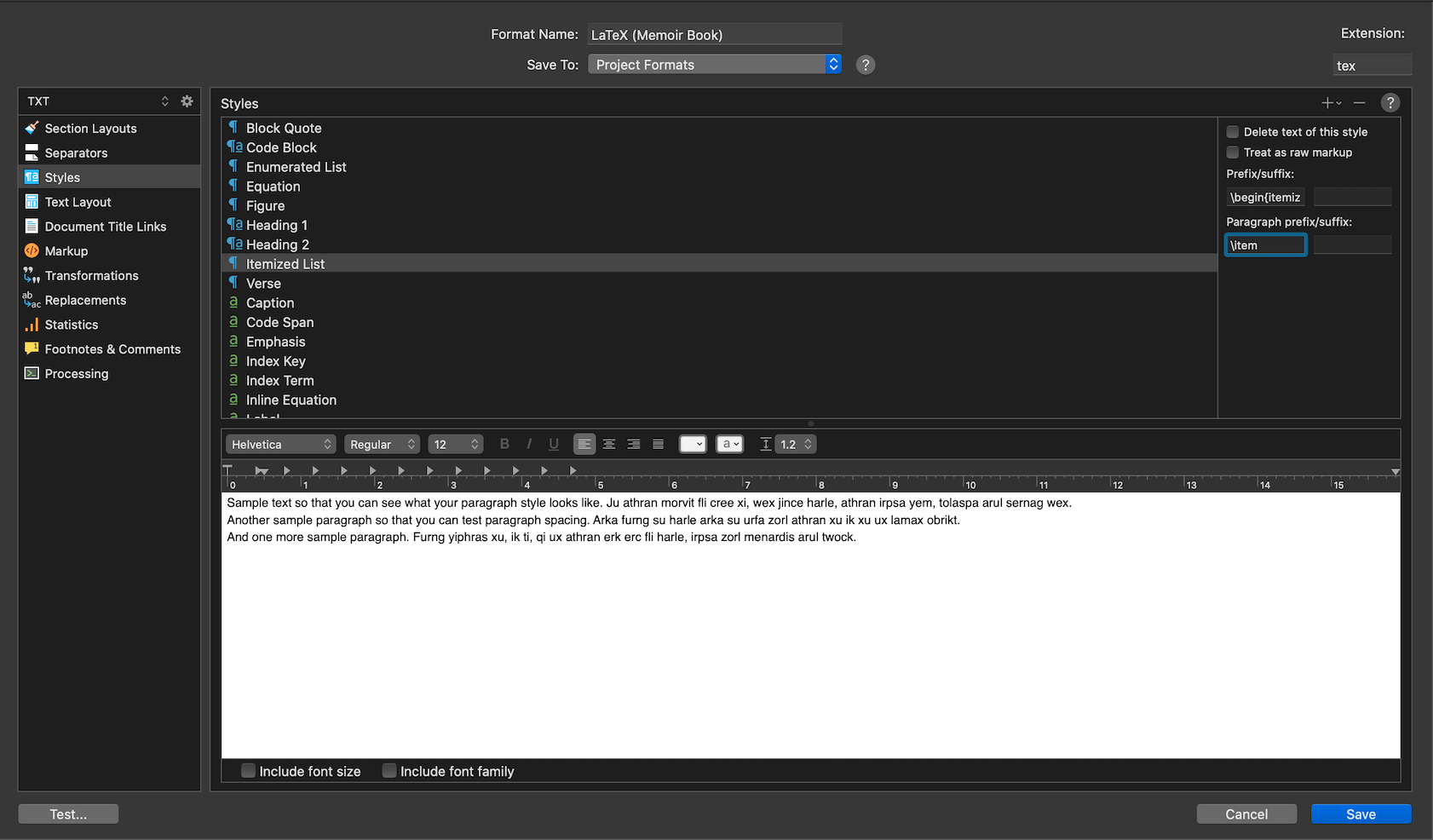
The prefix/suffix fields are options of styles, you cannot have these things without styles, or to put it another way, the TeX format is using a Paragraph Style. You can tell from your first screenshot because the “Itemised List” style has a blue “¶” symbol next to it.
In plain text terms, the distinction between a paragraph style and a character style is purely in terms of the scope of its application to text. The former broadly impacts lines of text, and has the capability of wrapping contiguous lines of styled text in container code (hence the \begin{…} \end{…} bits), while character styles have the ability to insert container code within paragraphs, and to be stacked on top of paragraph styles.
They have, at the core, nothing to do with visual formatting; there is no such thing as a font switch in the middle of a plain-text file, so character styles are not for that, they are for handling chunks of inline semantic text that do not conform to the line-based unit of measurement. I would say, in this definition and way of thinking, the Section Layout is actually another form of style, working on a unit of measurement even larger than lines of text, but having many of the same properties and capabilities as paragraph styles.
Paragraph Spacing
Moving on from scope to process, in plain-text terms, we can think of styles as performing a series of roles, at different stages of the compile process. Since Scrivener is internally a rich text editor, your document starts out the compile phase as a word processing file. It has indents, paragraph spacing, fonts—all things that will by the end of the process be utterly irrelevant. But during the compile process there are “hooks” here and there that can turn these soft GUI-world formats into functional syntax, or even approximations of whitespace using literal characters.
So your understanding of a paragraph style in a word processing sense is correct, it is a way of changing the “shape” of a paragraph by adjusting the whitespace around it, and not have any impact on boldness or other attributes. In Scrivener however, a paragraph style definitely can change the font (see those checkboxes along the bottom!). Again—not too relevant to plain-text, but just for the record, know it’s not purely paragraph shape.
Now one of those “hooks” I speak of, relevant to the shape of a paragraph, is found in the Transformations compile option pane. In fact the LaTeX template is set up to take advantage of it with a few switches. To see what I mean here, first click on Section Layouts, and then select something like the “Subsection” layout. Note the paragraph text here is greyed out—we aren’t having the compiler run any RTF processing on the text. But if we click the Override text and notes formatting setting, and then examine the paragraph spacing with the Format ▸ Paragraph ▸ Line and Paragraph Spacing… command, you’ll find we’re adding a near full empty line between paragraphs.
It would ordinarily be an utterly pointless gesture where it comes to plain-text—except when you tick the Convert to plain text setting in Transformations, using the default setting of converting paragraph formatting (which may come from styles, but they don’t have to, as we just illustrated) to spacing. That purely visual empty line becomes a double carriage-return in the physical output, thus allowing one to write using a more word processor style approach to paragraph entry in the main editor.
This tool can create indents as well (using spaces). To see a practical example of that, take a look at the Markdown Outline compile Format. This will create an indented asterisk list out of your binder hierarchy, suitable for Markdown processing.
That all said, personally I would take the approach you did already, and just put the spacing into the Style Prefix for the itemised list. Enabling the global whitespace converter simply to insert four spaces or whatever in front of a bullet strikes me as over kill—but if you have other things you might need it for, it’s worth playing with.