Tricky question. Usually what you enter on a keyboard is ' (ASCII 39 / Unicode U+0027). Let’s call it the “typewriter apostrophe”. Don’t ask.
You could also directly enter (on a Mac) ⇧⌥' or let “smart quotes” convert your typewriter apostrophe to a proper ’ (U+2019). Results in the same character.
Confusingly U+2019 is both a “right single quotation mark” and a “punctuation apostrophe”. (But not the same character as U+0027!)
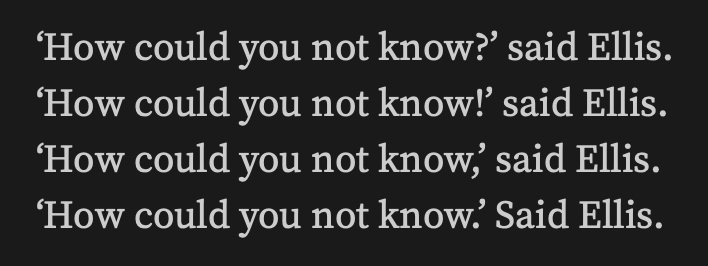
The video is interesting. Any chance you could make another one, but giving us a closer view of the quote marks? They’re too small to tell, but to me, it looks like two right single quote marks rather than a left and right one.
Also, it’s weird, but most (all?) of my other Mac apps recognise this fine. It seems to be a Scrivener issue here. I just spent some time trying to replicate this elsewhere and I can’t.
Yes, it’s the single quote mark, both left and right. Give me a minute, and I’ll try with a better video. I’m very new to making videos, though… one moment…
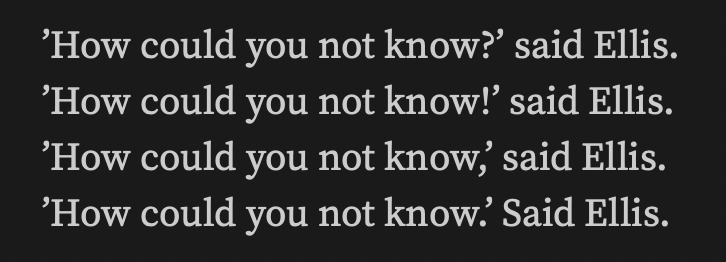
’How could you not know?’ Said Ellis.
’How could you not know!’ Said Ellis.
‘How could you not know,’ said Ellis.
’How could you not know.’ Said Ellis.
Crazy, huh. It’s almost as if the algorithm is too greedy when determining what to do. Otherwise it would always fail in the same way. But I have no explanation.
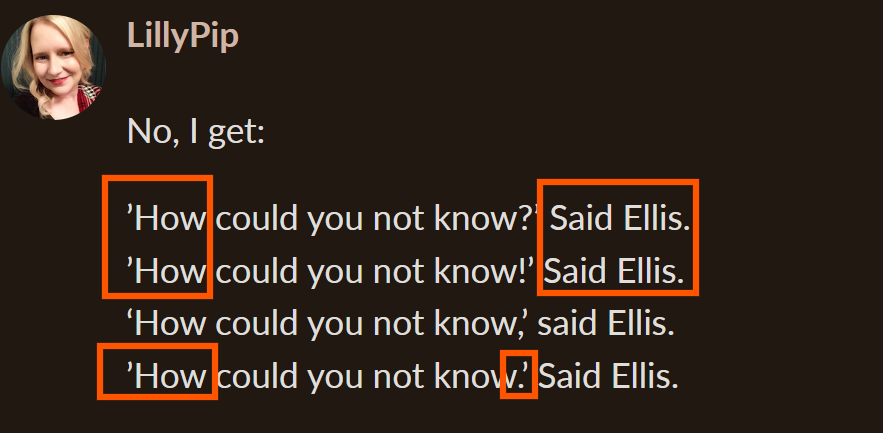
Do you see what I see? In lines 1, 2 and 4, the left open quote is actually a close quote mark, as it’s turned the wrong way. These incorrectly oriented quote marks correspond suspiciously with the capitalised attribution.
Also, in the fourth line of dialog, the quoted portion ends in a period; in such a case, the sentence is ended and I would expect a capitalised “Said” as it would be the start of a new sentence.
@November_Sierra, take a close look at that last line. It ends in a period, not a comma. That being the case, I would expect the “Said” to be upper case, as it is. Try it with a comma and see if that makes it behave.
@LillyPip, as lines 1, 2, and 4 of your sample dialog have wrong-pointing open quotes, while line 3 has the open quote pointing in the right direction, can you figure out what, if anything, you did differently when entering that third line of dialog to get the open quote to face the correct direction?
Maybe. But that doesn’t explain why we get different results for the same text. E.g. the “mixed” variant with varying opening quotes, that looks like it should break for all of us, but does only selectively for some. There’s more going on than meets the eye.