I have looked at the setting Sharing > import > OPML, and the find it very useful. However, what would help me even more would be a more sophisticated import process.
I do a great deal of plotting and lecture planning in MindNode. When I import a mind map into Scrivener, I would like each node’s title to become the title of the corresponding document in the Scrivener Binder. No problems here!
For some nodes, however, I would also like to divide the content of the MindNode note among several Scrivener fields. For example:
one part should go into the document’s main text;
another part should go into the synopsis;
and a third part should go into the document’s Notes field.
If this were possible, I could freely write down everything that comes to mind in MindNode and organize it automatically when importing the map into Scrivener. That would be extremely useful.
Could this be done with AppleScript? I am working on a MacBook Air with an M2 chip. For example, could a script use markers such as these?
Everything between # ... # goes into the main text.
Everything between > ... < goes into the synopsis.
Everything between another pair of markers goes into the Scrivener Notes field.
I have no coding experience, so I would first like to know whether this is technically possible and whether anyone has already created a script that does something similar. Otherwise, I may try to develop one with Claude Code or a similar tool.
Thank you for your answer!
An interesting solution, indeed. But I’m not sure I would like my writing to pass through AI at this point. I would need to think about it carefully first. I looked at GitHub and became confused, and I’m not sure I could make it work. I also have concerns about the security implications of using an MCP from an unknown source.
If Literature & Latte were to develop an MCP integration, that would be a different matter. For now, I’ll wait and see whether other possibilities are suggested. In particular, I would appreciate a comment from the Scrivener team.
Of the three things you wanted, this one is the only one I know to be doable, because I once wrote an Applescript to do it. Copying a tree-structure out of my mindmap software puts outline-indented text on the Clipboard. That’s where the script comes in:
This script expects outline-indented text on the Clipboard and converts it into a special-purpose Multimarkdown format. The result can be pasted and saved as plain text and imported into Scrivener as Multimarkdown. The hierarchy of nodes becomes a hierarchy of documents in the Binder – except that any outline node with the character ‘§’ will become a document whose content is the entire subtree under that node.
A valid concern, though note you can use local AI using LMStudio etc. with MCP servers ensuring data privacy. The Scrivener MCP server project itself is trivial to set up (get your agent to do it for you), and as it is open source and all the scripts are available, you can use AI to do a security evaluation if you are concerned (git clone it and ask for a security evaluation). The author of the MCP server frequents these forums, is a Scrivener user, I did not see any obvious issues in the code, but you are wise to not simply trust some online code.
I wish they would consider it, but I am extremely skeptical of that. We have requested Applescript / scriptability for a long time, but unless I forgot some comments from KB in some historical post, I do not remember this underlying extensibility was a ever a realistic development priority (MCP server would depend on some kind of scriptability layer so this matters; note I’m just an end user and so I may be very wrong). I vaguely remember official L&L representatives mentioned they are unlikely to jump into a lot of specific AI integration over and above the built-in Apple Intelligence tools, so probability of an MCP server ~= 0 …
Anyway, the option to write your own scripts are pretty approachable. You can use the MCP server as example code to see how to parse and process a scrivener project folder. The synopsis and notes are pretty easy:
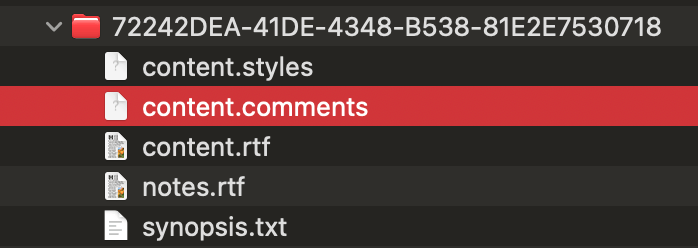
Each binder doc becomes a folder with a UUID as the name; in the folder the synopsis is a plain text file and notes are stored as RTF.
You can import the OPML first (gets you the main text and Scrivener creates the UUIDs for each entry), you could automate this using generic GUI scripting.
now read the scrivx XML in the project root folder, log the UUID (search with the visible title to find it) for the OPML imports
now create those two files into the respective UUID folder.
This text is cached by Scrivener, so you need to close/open the project to see the synopsis / notes in the inspector.
The major difficulties will be ensuring the GUI scripted import has completed so that the XML contains the actual new binder entries. Claude/ChatGPT/Deepseek can probably do all of this in one go with enough good context.
A valid concern, though note you can use local AI using LMStudio etc.
I have been thinking about a local LM for quite some time, but as far as I know, I cannot run one on my MacBook Air M2 with 24 GB of RAM, which would mean getting new hardware. As I have neither the money nor the time at the moment, I have abandoned this thought.
I wish they would consider it, but I am extremely skeptical of that. We have requested Applescript / scriptability for a long time,
What a pity! I would definitely love Scrivener to be more scriptable.
Anyway, the option to write your own scripts are pretty approachable
I have looked at GitHub, but I am still not sure I would be able to pull it off—and there is still the time problem.
Yes, this should be possible with AppleScript. A script could parse your markers and automatically send each section to Scrivener’s text, synopsis, and Notes fields. A ready-made script may be hard to find, but Claude Code could likely help create one from a sample export.
I use 2GB up to 12GB models on my 16GB macbook air M2 with little problem. It is amazing to have a condensed version of most human knowledge running on an ultralite laptop from several years ago. You have more memory than me so this will be even smoother. I am more used to LM Studio, but newer engines like oMLX are even faster / more memory efficient. I use Gemma 4 models, but suspect the newest Qwen’s are even better as they support cool new techniques developed by Deepseek to speed up local models etc.
Claude will do the heavy lifting for you – as long as you can specify the problem clearly and provide links to related documents and any other context.
You are suggesting to exclusively use Applescript GUI scripting (which doesn’t need the app to support applescript itself), which could work but GUI scripting is usually quite klunky and very dependent on using the correct delays to get the UI to a correct state. Note, a tool like BetterTouchTool can provide an alternative to Applescript GUI scripting…
This sounds great and is quite surprising to me! When I looked at this last time, the result was that I wouldn’t be able to run it on my MacBook Air M2. But now I am definitely going to look again. Things move fast with AI! When you write:
What does “little” mean here?
I am not sure what this means. Is it possible to create an AppleScript that does what I want? Or what is the problem here?
Some Mac apps are set up for Applescriptability. They have special coding that enables Applescript to invoke various internal functions of the program. Scrivener is not Applescriptable in this way.
Nonetheless, Applescript has the ability to control standard Apple interface elements, like menus and such. this means that you can control any app “from the outside”, i.e. by having Applescript simulate actions you would perform, like picking an item off a menu. This is GUI scripting.
As nontroppo says, Applescripts that work this way are notoriously fragile. Even if it is doable in principle this way, you may likely not get the functional reliability you want.
I also use some “heavy” coding tools like MATLAB and graphics software so the model constrains the overall remaining space — though I have successfully used all this on a 12 hour flight and was super productive…
@gr is spot on. However I do use GUI scripting regularly with scrivener, I have a “build script” which auto-selects all the dialogs for a compile automatically and it works well (but I took a few attempts tweaking the delays to work robustly and occasionally a dialog still opens too slow for the delay and the pipeline fails, fail is graceful as it just means I need to click buttons manually)…
Thank you @nontroppo and @gr .This sounds a bit like what you can do with Keyboard Maestro, which is used quite a lot.
Good to know that you can use AppleScript this way too. As I have no coding experience, I wasn’t aware of this possibility. However, I’m fairly sure this won’t solve my problem, and I wouldn’t want to use it if it’s unstable. Maybe for other things, but not for this kind of task.
I also wrote to Scraping’s support team about my question, but I haven’t received an answer yet.
I am looking forward to take a new look on the LLM stuff!
 – as long as you can specify the problem clearly and provide links to related documents and any other context.