Story Inventory Management System

I don’t think this is a feature, so I would like to know how other people handle inventory management within their stories. I will define an inventory manager as a method for tracking character’s inventory throughout the story without including that information within the story itself. The inventory tracking needs to maintain the history of changes for: what, when, and how much; rather than their latest current inventory so that you can visit any chapter and have a complete picture of that character’s inventory up to that moment.

I am currently using comments, but the problem is, if I make a change to the inventory numbers in a comment in an earlier chapter, then I have to manually change all the following comments that are tracking that inventory item(s) for the rest of the book. I am considering trying to learn an external program like airtable and link to them from within scrivener but wanted to see what solutions others have already come up to help with better ideas rather than reinventing the wheel.

A feature request for Scrivener: a way to document variables within comments that can respond to mathematical expressions that would update the value for every instance of that variable that appears “later” in the manuscript (ie: in any text file or folder that is lower in the compile format of the manuscript). For example: If I make a change to the variable for “Gold Coins” in chapter 3, I can select a section of text and create the variable with a mathematical expression “+150" and it will add it updating +150 to all instances after that. Then, if I need to change that inventory later during revision, I can change the “+150” to “+75” and everything linked to that variable item afterwards will automatically get updated. And if you’re going to implement this, you might as well create an option to alert the author if ever updating an inventory item would result in that item being a negative number (so they can fix it).
1 Like

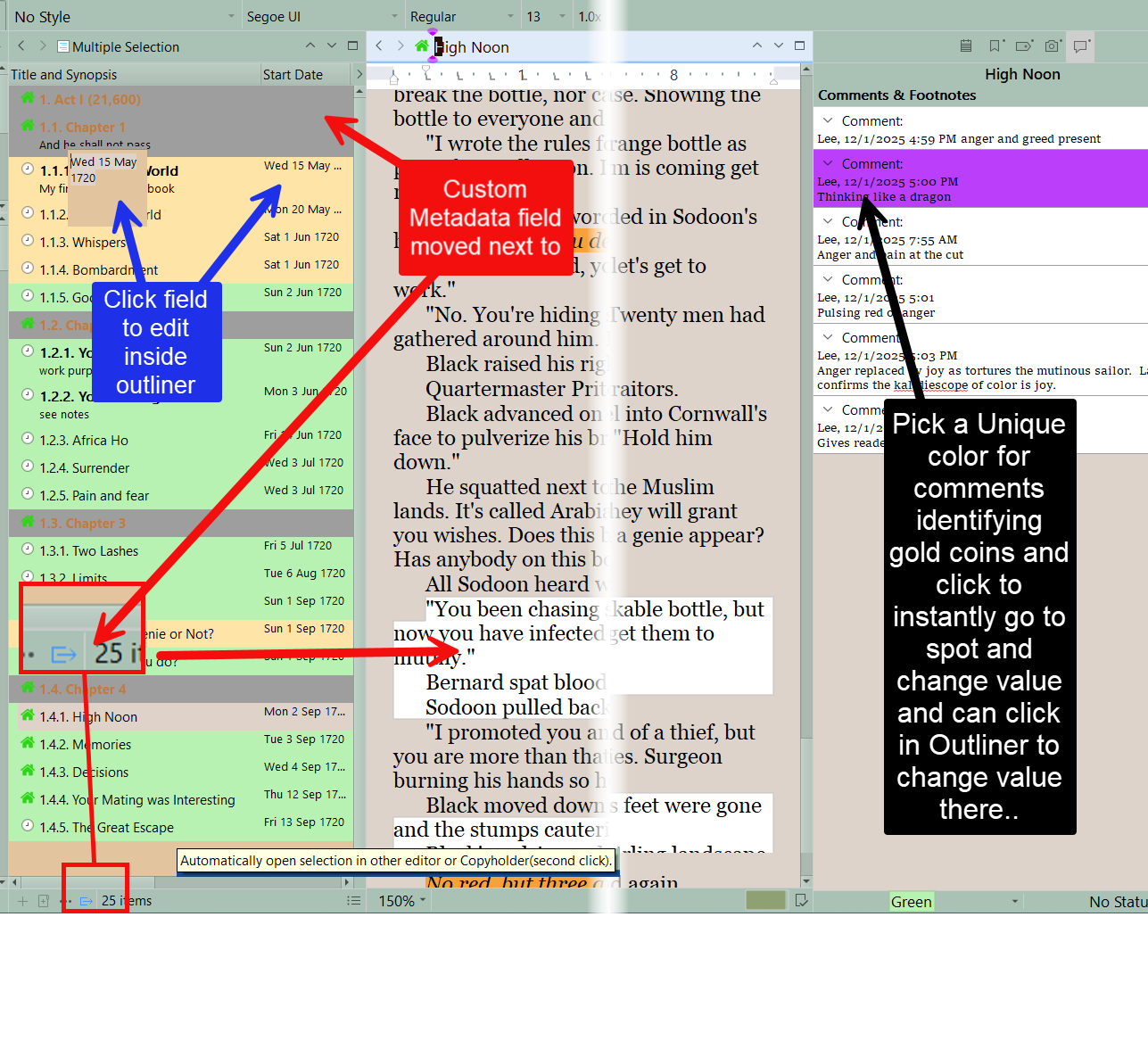
I would suggest using custom metadata for Gold coins or whatever with a text field. (You can create a collection of documents with gold coin values and put collection in the Outliner view) You could then have that as a column in the Outliner view like an excel spread sheet. If you search can search for the custom metadata field of Gold coins. You could use a Specific comment color like Gold (or green for Money) and when open a document with the gold coin you can click on the comment to take you to the point to change the value. Not automatic but easy to fix. Can edit gold values from inside the Outliner.

See example (I have Start date for the event in my story) and clicking any outliner opens it in other editor window to adjust and comments pinpoint location.

1 Like

Interesting, thanks for sharing!

The manual process of updating the ripple effect of a change is the biggest hurdle for me, especially during revisions when I make a change in an early chapter that then has to be updated hundreds of times across the rest of the book.

I think you should rather use a spreadsheet.
Set your formula, then have that spreadsheet as a reference in your project bookmarks.
Leave it open in the background for quick editing.

A .. B
C .. D
E .. F

→ D = B+C
→ F = D+E

A,C,E is changed by +x or -x (by you)
B,D,F is the total at that time/scene (automatic)
Any change you’ll eventually make to the first column, anywhere, will cascade all the way down in the second/right column. Your total at each scene will adapt automatically.

Scrivener doesn’t keep track of the whole project live. It loads documents only as the user requests them (by selection in the binder or other).
I can’t see your request ever working natively.
(Unless they decide to integrate speadsheets.)

LibreOffice is free and has spreadsheets.

1 Like

Except Scrivener has both Word Count and Total Word Count columns available in the outliner, where the latter gives you cumulative totals per folder. This is roughly similar to the functionality the OP is looking for.

If Custom Metadata had a new category of Numeric and corresponding option to ask for a companion “Total ___” that would be cumulative (perhaps with reset per folder option), that would do what the OP is looking for.

(I can see why one might hesitate to add a Numeric metadata type, since immediately someone is going to want rich math abilities and there will be no keeping a lid on that!)

1 Like

Perhaps it’d be possible to design some sort of python script to read the project file and fetch a value in a comment specifically identified or a custom metadata field. (?)
Then it’d do the math and spit out a visual (column) representation. (Or maybe reinject it as a per scene current total, perhaps.)

1 Like

To be honest, gold coins never seem to accumulate with me, so I have never needed such a function. :face_with_raised_eyebrow:

3 Likes

Perhaps bullets then?

I guess the closest thing to avoiding that ripple at the moment would be to use the custom metadata not to track current total but just expenditure. so…

+500

-50

-10

-20

+7

… and do the math manually every now and again to check you’re not giving yourself an issue. It depends which task you dislike more: typing or addition!

As a more practical solution… most books and films get round this by not caring.

“He hands the shopkeeper a few coins from his purse.”

“Thank you kind stranger. Here’s a bag of gold.”

or even…

{sprays bullets indiscriminately}

{checks magazine}

“One bullet left”

{shoots bullet at cable holding a piano suspended above two remaining bad guys}

1 Like

Agree with pigfender, unless this is a vital statistic no one cares how much gold he had in the mountain scene, just how much he payed for something and whether he got a good price and whether he has enough gold to buy the sword, wand, or free the princess. You could even say he gained x gold over the past month of doing whatever or lost gold on his trip to the capital.

1 Like

One way to achieve the “change it once and everything downstream updates automatically” behavior you are imagining is to use Scrivener’s inline annotations and its External Folder Sync feature.

In Scrivener, configure inline annotations to appear in the synced Markdown files as plain text, wrapped in the prefix and suffix you choose. If you set those wrappers to something simple, such as (( and )), then every inventory note becomes a predictable marker in the .md files.

Once that part is in place, a small Python script can handle both the math and the updating. The script can scan all the synced Markdown files, find every annotation like ((gold +150)) or ((arrows -2)), and compute the running totals in the exact order the scenes appear.

One cool thing about the Python approach is that you can make the process fully automatic by adding a tiny file watcher. The watcher sits quietly in the background and notices whenever Scrivener syncs a file. As soon as a change appears, the watcher triggers the script. The script recalculates everything from the beginning and rewrites the updated totals into the later inline annotations. Scrivener then pulls those updated files back in during the next sync, so the corrected numbers appear in your manuscript’s inline annotations without any manual work on your part.

This gives you the behavior you described at the start. You revise the inventory in the inline annotation of the scene where the event happens, and every later mention updates itself. You never have to chase down comments or adjust anything by hand.

I recently learned how to write Python scripts and really enjoy it. But if writing a Python script is not your thing, you can still use the same workflow, minus the automation, with an AI assistant instead. Claude Projects, for example, can read the local Scrivener sync folder through its file connector, recalculate the running totals, and update the Markdown files whenever you ask it to. The idea is the same, though you have to tell Claude to make a new calculation, as it’s not automatic like it would be with the Python approach. Scrivener provides the structured metadata, and the external tool handles the math.

Once set up, the entire system is very simple. Put the inventory changes into inline annotations, sync the project to a folder as Markdown, let either a watcher‑enabled Python script or an AI assistant recalculate and update the annotations, and let Scrivener sync the corrected numbers back into your manuscript. You get a clean draft and automatic recalculation whenever you revise the inventory earlier in the book.

ADDED A LITTLE LATER:

It never ceases to amaze me how Scrivener solves problems that I hadn’t even thought of yet. Here’s a great example:

Scrivener always makes a full safety copy of the project just before performing an External Folder Sync. This is built into the feature and does not require any settings on your part. Every sync event gets its own timestamped snapshot inside the project’s “Syncs” folder, so if anything ever goes sideways while the script or AI is updating the Markdown files, you can roll back to the exact state the project was in before the sync. It is a quiet safety net that makes this kind of automation much less stressful.

Pretty cool, huh?

2 Likes

For some genres - e.g. LitRPG where writers track actual stats - this would make Scrivener a killer app.

1 Like

I bet it would! The key is using the Scrivener sync file together with using inline comments that get passed through to the markdown files, thereby exposing them to scripts (my preference) or even an AI such as Claude Projects.

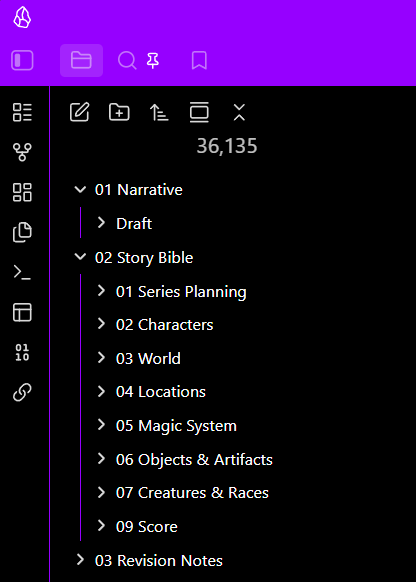
One thing I didn’t mention is the idea of placing the sync file inside of an Obsidian vault, where we can add our story bible and other useful information. That’s what I do for my fantasy novel series, because it lets me work on my narrative in either Obsidian or Scrivener, while Scrivener’s syncing keeps them aligned. My Scrivener Sync folder sits as a “Narrative > Draft” folder alongside the story bible folders.

Lots of great, helpful ideas, thank you.

I ended up creating a spreadsheet with formulas for tracking everything and it is amazing. Now I just create reference comments with the inventory change. I wish it was all integrated into one program, but this will work great. I love Scrivener so much that I want it to do everything, but when it can’t I just don’t do it rather than implement another tool. (Or I just don’t know all its capabilities, lol. I probably only use half of its features.)

2 Likes

That’s how I would have done it, too — easy and uncomplicated. I’m glad you came up with a solution that works best for you.

Still, I enjoyed coming up with a way to meet the lofty challenge you set before us:

… to maintain the history of changes for: what, when, and how much; rather than their latest current inventory so that you can visit any chapter and have a complete picture of that character’s inventory up to that moment.

The solution I came up with leverages Scrivener’s arguably underappreciated sync folder feature to expose your chapters to an automated Python script, or use something like Claude Projects to do the work behind the scenes. It was super fun figuring this out. Thanks for the challenge. :slight_smile:

Though this was obviously a bit more work than needed for this particular need, the basic idea of having an external script or even AI access one’s narrative via the sync folder is a powerful one. I bet it can solve lots of other needs for writers willing to dive in.

I should mention that it was this idea from @Vincent_Vincent that got me noodling on using a Python script to accomplish what we needed. My contribution, perhaps, was the idea of using the sync folder to expose the narrative to a Python script without operating directly on Scrivener files—something that would be unwise as it could easily break things.

:slight_smile:

1 Like

I appreciate the effort. With how hit or miss AI can be (especially when it tells you it is doing what you ask then hallucinating results) I don’t have time to figure a solution out with it with a strong enough level of confidence it would be accurate. I would must rather trust a python script, but I don’t know how to code and don’t have time to learn.

1 Like

Hey, no worries. I already understood that my solution was overkill. It was fun figuring it out, though. I’m glad you found a simple path forward. :slight_smile:

It actually isn’t to track gold but rather plot related solutions within the magic system; but the concept for inventory with gold was easier to communicate the idea.