I don’t really see how this would be very feasible, I’m afraid (it requires a Pandoc install for a start, and involves mixing up different types of export). MathType equations contain MathML, but there’s no easy way of converting MathML to the OMML that Docx files use.
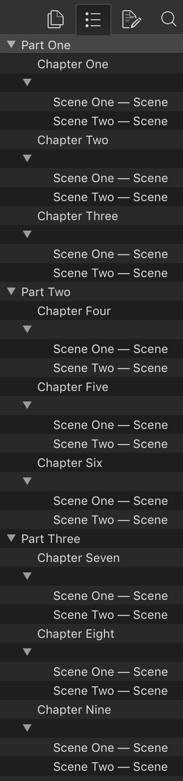
Hi KB, my screenshot in this thread shows the bug, the screenshot in the other thread shows how it should compile : what you should see in Word is THREE Level 1 headings « Part One »« Part Two »« Part Three » with chapters as level two, but your Word doc shows only the first « Part One » Level 1 heading present (well it does in my Word V16.26), if you go to « Part Two » text in Word you’ll see it is a normal style, explaining why it doesn’t make it to the outline.
The following tech support thread is about a problem someone had with getting footers to work and which was resolved by turning ON enhanced converters. It might point to a kink in the in-house converters, so just dropping a note here in case.
Footnotes and live links to email addresses seem to be lost if a .docx file is imported using the new converters, but they are retained when using the Aspose converters.
However, footnotes written in Scrivener and exported using the new converters seem to be fine.
Further to this, after experimenting with two more .docx files.
Embedded graphics objects - mostly tables and graphs pasted from Excel into Word- are not imported using the new converter, but are imported using the Aspose converter. This applies to all three files.
Footnotes are imported using the new converter for just one of the three .docx files.
Each file is the result of a collaboration, so some parts were originally drafted in Scrivener, but subsequently edited, including inserting the graphics objects, in Word for Mac and Word for Windows.
“Recent Work” is a short document created using Word for Mac 2011, with a few footnotes and embedded (by copy/paste) spreadsheet and chart. This imports perfectly with the new converters.
“RP paper extract” is a few pages from a collaboratively authored academic paper, with footnotes and embedded graphics, substantially drafted by my colleague using Word for Windows. The footnotes and graphics do not import with the new converter but are OK using the Aspose converter.
Thanks very much for the reply. I have now decided to write the book in Scrivener with AmberV’s LaTeX template and compile to LaTeX, bypassing Word entirely. That seems like the best way forward.
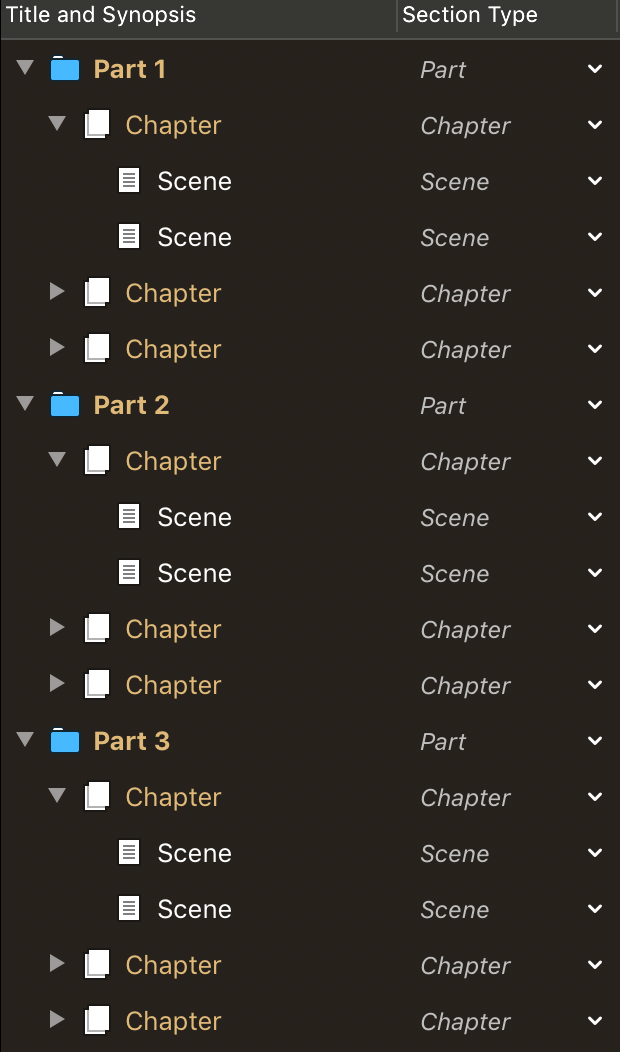
Just to mention, the Heading 1 outlining bug is still present in V3.1.4, the output shoud have three “Level 1” sections each [Part], with three “Level 2” sections [Chapter], each with two “Level 3” sections [Scene]. In the Scrivener converter output, “Level 1” Part Two and Part Three are missing:
This issue/bug is still present in V3.2, and though not relevant to Scrivener’s converter per se the Aspose output is now also missing level 1 and level 2 headings. That means at present the method of assigning Heading 1-6 styles to section titles to allow proper outlining in DOCX is currently broken in V3.2; unless there is a new way to achieve this.
Sorry, is this a bug in the Aspose conversion only, or in Scrivener’s own .docx converter too? I’m confused as this is the Scriv converter thread but you seem to be saying it’s the Aspose ones. If it’s Aspose, how does RTF do? (Aspose converts from RTF.)
This is an issue in Scrivener’s converter, where only the first Level 1 heading gets assigned the “Heading 1” style (and thus Word cannot outline without a styled heading). This applies to V3.14, and remains an issue in V3.2. There is a regression in Scrivener V3.2 in that the RTF (and as a result the Aspose output) now does not get Level 1 or Level 2 headings, only Level 3 headings and you can see the result in the Word outliner in the screenshot here:
I can confirm that both DOCX and RTF output now correctly exports all heading styles, thanks!
I am a bit confused by the new Preferences dialog:
[attachment=0]Screen Shot 2020-11-21 at 09.18.58_SML.png[/attachment]
As I understood it, there are 3 options: (1) macOS legacy converter. (2) Aspose converter, (3) Scrivener’s native converter. The menu gives two options, and I’m not sure how we can select between (2) and (3) using this dialog?
I forget now but I thought the older V3.1.x dialog also gave a bit more opinionated recommendation of which option is “better”? The new dialog doesn’t recommend one option over the other, though I think Scrivener’s converter is much better than the macOS one, while being faster than the Aspose one (though possibly less “complete”)… I almost wonder whether it is better to remove the macOS one (hiding it behind a defaults commandline setting or something)?
A small pedantic GUI text point, .doc is a different format than .docx; the dialog infers it only applies to the legacy .doc format, whereas it applies to both. I suspect most users don’t differentiate betweeen the legacy binary and “modern” XML formats (i.e. most users read .docx as .doc) and you are trying to simplify the description, but my geek pedanticism feels obliged to mention it
Ah, it seems I was using another JDK (openjdk that doesn’t symlink into /Library/Java/JavaVirtualMachines/) on my laptop, removing it and installing adoptopenjdk (which does symlink), and everything works:
 : what you