Hi - When editing in a split pane, I’m getting an unwanted Outliner expansion in the opposite pane with the first character entered, followed by an unwanted Multiple Selection with the second character entered.
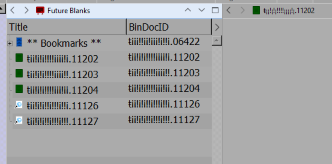
- I have an outliner view of the folder Future Blanks in the left pane, and I’m about to edit document 11202 in the right.
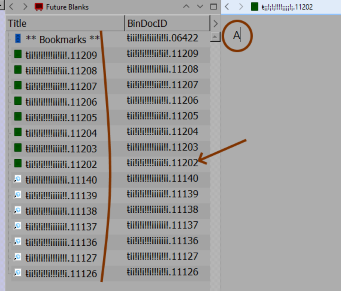
- I’ve entered the letter A in the editor pane for doc 11202. Future Blanks has expanded to show the subdocuments of its first member document, called ** Bookmarks **. Note the expanded documents are in reverse order to what they’d be if I’d expanded the subdocument deliberately.
- I’ve entered a second character, letter b, in the editor pane. Now the left pane shows the same expanded set of documents as Multiple Selection, though I haven’t selected anything.
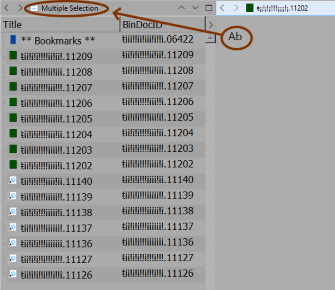
To get out of Multiple Selection, I can use the left pane navigation arrow to back out and proceed forward again to an unexpanded Future Blanks. But the outliner expansion and Multiple Selection will reoccur on the next two characters typed into the matching editor pane.
Just to assure, there is no AutoHotkey script running. Unfortunately I can’t reproduce the behavior on the Tutorial or on small test projects; it’s strictly a phenomenon of my production project. Still, the behavior is so specific, with two phases of expansion on two entered characters, that there surely has to be some obvious candidates for the rogue routine.
User tip: It’s helpful to have an easily-reached folder in Outliner View for use as a “shelf” when relocating documents within the Binder. That’s a secondary use of Future Blanks here.
Rgds - Jerome