I have a folder called “book”, containing several texts which are called “chapter 1”, “chapter 2” etc. I know the concept of folder vs. text is fluid in Scrivener, and that when I select “book”, I could as well type text in the editor. But for me, “book” as a text is empty.
When I select “book”, sometimes, and this is the behaviour that I like, all the text of the individual chapters, in order, is displayed in the editor. But sometimes, I select “book” and the editor stays empty. Which means that, if I want to search through the whole text, I first have to multi-select all chapters.
I can’t describe any better how to reproduce this, as I haven’t found out any possible difference that could be the cause for the one or the other thing happening. It almost seems like one day this behaviour, another day the other.
I’ve filed this as a general query for now. It’s unlikely a bug of this magnitude is floating around, but if you find there is, we’ll get it filed appropriately.
For the moment though, it’s almost certainly what is described above. Ctrl1 / ⌘1 is the keyboard shortcut to toggle between scrivenings view and single-text view, when looking at groups. It might be you intended another shortcut nearby, like ⌘`, which would switch between open windows.
My parent document has a context menu entry “Convert to File”, so I guess it must be a folder. And about the modes: if I were in the wrong mode, I would either see corkboard or outliner, but not a blank page - right?
No, because as was said above you could be in “single document “ mode, where the editor is displaying what you have typed in the folder text are, not the child documents, and if you haven’t typed anything, it’ll be blank.
As a double-check, next time you get the surprise behavior, check the toolbar immediately and see if it shows you to be in Scrivening’s mode or not. That will determine where the issue lies.
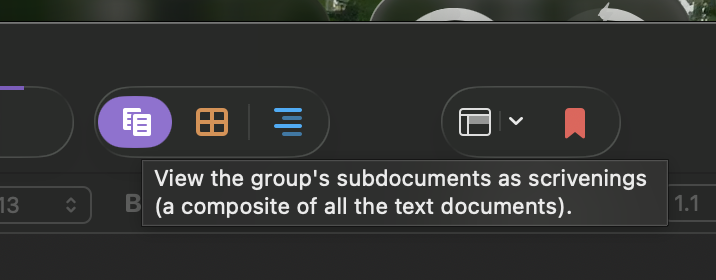
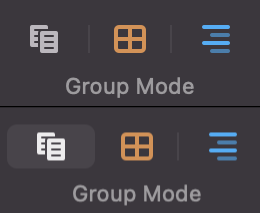
I’m not at my computer at the moment, but as (I think it wa @AmberV ) said above, if you select a folder in the binder, Cmd/Ctrl-1 toggles between Scrivenings mode, displaying all the text entered on the folder itself and on all of the child documents and Single Document mode when only the text on the folder is displayed in the editor. The left hand button in the triple “mode button“ on the bar has the same function.
Ok, mystery solved. It really seems to be “single document mode” (Cmd-1 on the Mac, indeed). I must have gotten into and out of that unconsciously. And I had no idea one could click Scrivenings to deactivate it. I always thought Scrivenings - Corkboard - Outliner was a radio button where you could choose one of three modes. “Single” seems to be a somewhat hidden fourth mode then, not represented by a UI element.
Your idea is somewhat true, but as others already said, the first one also acts as a toggle between those two “document modes” (single / multiple). Clicking it multiple times or repeatedly hitting ⌘1 cycles through its two modes.