My file structure and associated Section Types looks like:
Chapter Folder ----- Chapter
Epigraph File ------ Epigraph (based on Section Text+As-Is)
PoV File ------------ PoV (based on Heading)
Scene(s) File(s) ---- Section Text + Scene
The PoV Files are the interesting one here. The Title of that file is the person’s name that this chapter is in the PoV of (e.g. “Jason”) and the file content is empty.
Compiling the above works fine visually (yay!), but the automatically generated ToC (epub and pdf both) have links to those PoV files, which is super weird and I’d love to avoid that.
Through lots of tinkering, it appears that this outcome is a hidden/behind-the-scenes effect of checking the box in the Section Layouts for the PoV section type in the ‘Title’ column.
First off: is my understanding of the situation correct?
I can workaround this by duplicating the character’s name into the content of that file, unchecking the Title box in the Section Layouts, and instead checking Text. So this is not a huge deal.
But (1) it took me a really long time of tinkering to come up with this hypothesis about what’s happening under the hood, and more-so (2) perhaps there’s a small feature request here along the lines of a little checkbox somewhere (maybe the Settings tab in the formatting window under the Section Layouts box?) that would give me control over if this section generates a ToC entry or not?
There’s a whole chapter on ToCs in the manual, which includes a discussion of how to create your own if you don’t like the automatically generated one. But the short answer is that the ToC is built from the structure of the Binder. Anything with a visible title will get a ToC entry by default.
For ePubs, the Settings tab in the Section Layout editor lets you include/exclude a given layout from the ToC.
For PDFs, there’s very little control beyond an all or nothing option (in the PDF Settings tab of the Compile Format Editor) to toggle the PDF outline on or off. Note that our longstanding recommendation if you want publication-quality PDFs is to Compile to an editable format and make your final tweaks there.
Yeah: The chapter in the manual about ToCs isn’t helpful when we’re talking about the automatically generated ones (which is the only practical solution when in any stage of development that isn’t the final stages), at least not in this regards.
It turns out that it has nothing to do with the Binder structure (unless you’re automatically assigning Section Type by binder structure, which is the wrong thing to do in the case outlined).
It looks like it has everything to do with your “visible title” statement, which is not in the manual nor obvious that what is meant by that term is “the Title of the card is actually visible in the output” which corresponds 1:1 with the “Title” column being checked in the Section Layouts.
Hence, since there really is no documentation, I first wanted to sanity check my hypothesis, and secondly to suggest that the Setting toggle for epub (which I didn’t know about until now: so, Thanks for that! ) be propagated to PDF also (and perhaps other formats). Or perhaps, add a comment about the reality of the situation to the documentation in order to save people time chasing it down.
If your POV is simply a character’s name related to each specific scene or chapter, then why not read it into your Scene file (or Chapter folder) by using a placeholder from the labels field, or if that’s being used, from a custom metadata field you create? That will solve the dilemma at hand.
This does solve the immediate at-hand problem: I can insert <$label> in the Section Layout for my PoV Section Type, and it works like a charm. Yay! Thank you
And it’s clear that an even more optimal approach (as you suggested) would be to scrap this empty placeholder file and just have this text print as a result of the label’s presence in the Chapter Folder or the scene files.
But I can’t quite figure out how to make that work in this case. I’ve got:
Chapter Folder (labeled by the PoV for the chapter)
Epigraph file (labeled with a different PoV)
Scene files (labeled with the PoV for the chapter).
(there are often multiple Scene files in a chapter, and there are often a handful of keywords on any/all of those files/folders)
If I put the <$label> in the Chapter Section Layout, then it shows before the Epigraph, which is weird and not what I’m looking for.
If I put the <$label> as a Prefix for the Scene files, then it shows up on all the scenes in the chapter, instead of just the first (if there’s a way to specify that it shows on just the first Scene file in the Chapter, that would work).
And it’s not clear how to get that metadata into the Epigraph Section Layout (if the data were available, then I could use a Suffix for the Epigraph, which would work great). I guess I could add another metadata field for those epigraphs, but it feels cleaner to just instead continue to use the empty file that I have already.
Do you use the Synopsis for anything in particular?
One advantage Synopsis has over placeholders is if a placeholder’s record is blank, it still leaves a gap in the respective document if built into the layout, whereas if you turn on reading in something from the Synopsis and a folder or document’s Synopsis is blank, Scrivener doesn’t create the extra space.
Aside from the above, I don’t quite understand your dilemma for your PoV. Every folder or document in a project would have the same metadata fields available to the respective folders and documents. I’d assume an epigraph wouldn’t need a PoV—so would be left blank—unless you decide you want 10 Dylan quotes throughout your manuscript and 10 Springsteen quotes, etc. and track it that way, whereas the Chapter’s PoV is the focus character of the chapter. For the scenes you’d just need to repeat the Chapter PoV character’s name or select it from a dropdown list you’ve customised.
The thing is, for compiling, you choose what to include or leave out for Chapter, Epitaph and Scene, as each is a unique Section Type associated with a Section Layout that you’d customise.
That’s good to know about the synopsis. Good tip @RevoTiLlor , Thanks!
A typical chapter for me looks like this:
Chapter (Folder, label=PoV for the chapter)
– Epigraph (File, label=Epigraph Source)
– PoV designator (Empty File, label=PoV for the chapter)
– Scene (File, label=PoV for the chapter)
– Scene (File, label=PoV for the chapter)
– Scene (File, label=PoV for the chapter)
What I want printed is:
“Chapter Three” (or whatever is appropriate, of course)
[Epigraph Text]
[“Jason” (or whatever the PoV for the chapter is)]
[Scene text]
[Separator]
[Scene text]
[Separator]
[Scene text]
That’s working now, thanks to your suggestion of using <$label> for the PoV empty file.
The quest is to figure out how to get rid of that file (since it’s empty, and it’s label is redundant with the label on the Chapter and on the Scene(s) ).
But the problem is:
if I have it print as part of the Scene layout (say, as a Prefix), then I’ll get extra “PoV” text in between all the scenes; I only want it to print before the first one.
if I have it print as part of the Chapter layout, (say, as a Suffix), then it shows before the Epigraph, which is the wrong place.
if I have it print as part of the Epigraph layout, then … where do I get the correct label?
Since I’m not aware of another approach, and none of the three that I can think of work, I’m sticking with a blank file that’s only role is to serve as a mechanism for carrying the PoV label into the compilation stage. Which is fine really, it just seems like perhaps there may be an even more elegant way.
This is Windows, but I assume it’ll be pretty much the same on Mac.
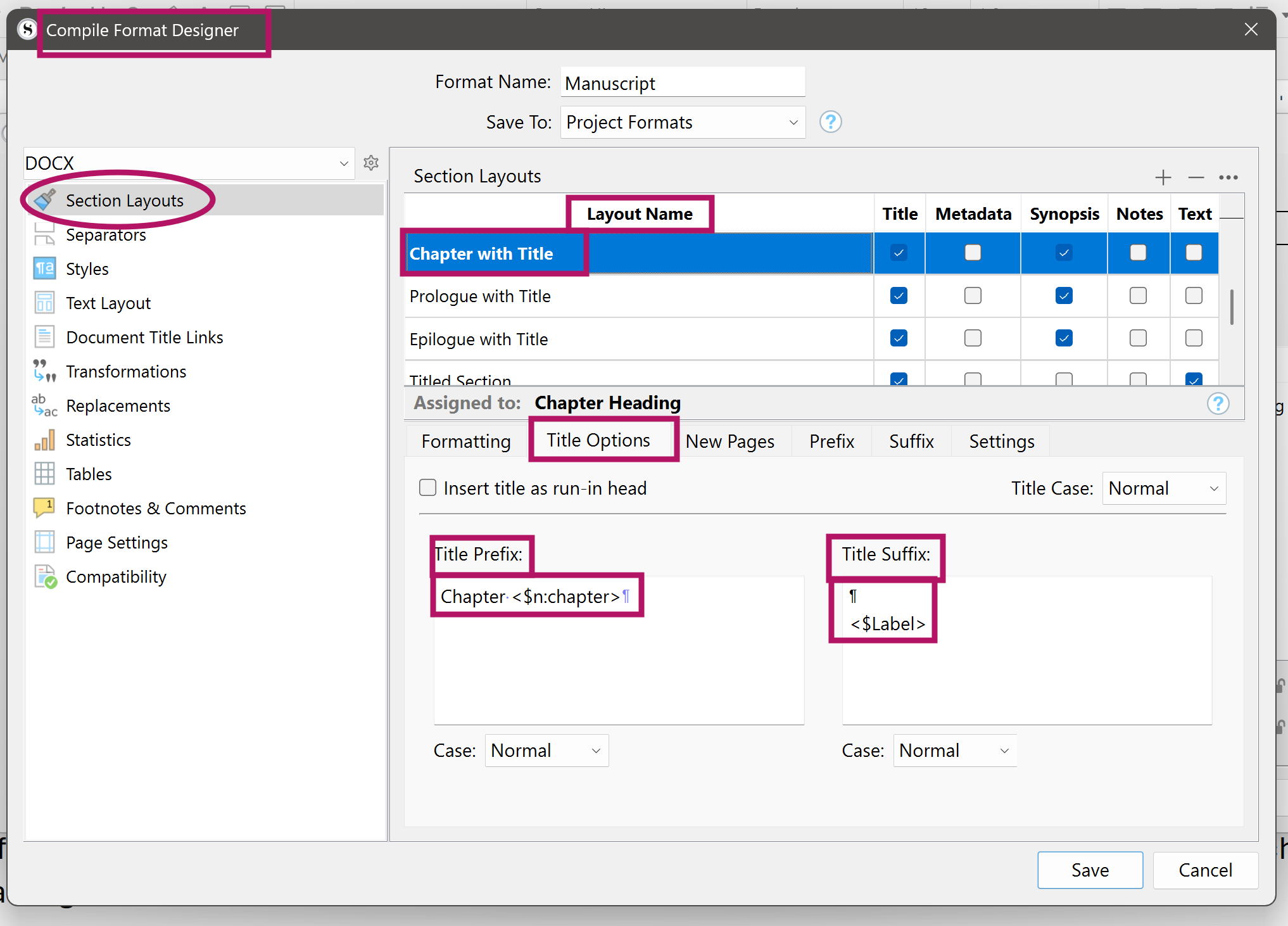
Here’s an example of how to place a Label List placeholder in you compile layout for your chapter. My names might differ, but you should get a fair idea.
You could stick the <$Label> placeholder under in the Prefix box if you like, too.
I am trying to get people to show compile solutions for issues they have like this. I show an example of how to add prologue text to a chapter using custom metadata which may apply to epigraph text for you.
see at this link page
 ) be propagated to PDF also (and perhaps other formats). Or perhaps, add a comment about the reality of the situation to the documentation in order to save people time chasing it down.