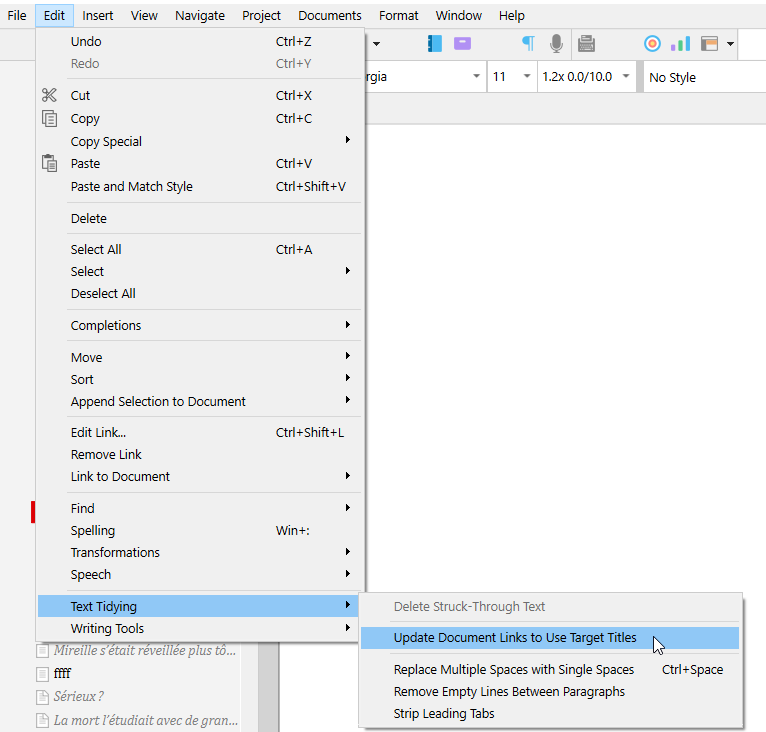
I am trying to import my chapter titles into the Table of Contents automatically, but I cannot find the right code to put in. I have tried a few, but it comes in blank. Is there a way? I do see that it brings in the chapter number in the prefix, but the title? Anything? Or do we have to wait until we finalize all of our chapter titles before we can import (copy special and all that) them to the TOC?
Edit: the obvious reason being that if I make a change to a chapter title, it would be nice to have it update the TOC like it does the numbers.
Unfortunately, it did not work. I selected the entire TOC section and highlighted that option. I made a change to a chapter title to test, and the chapter number disappeared while the old title remained. The change threw it off, and it invalidated that auto input, it seems.
For example:
BEFORE compile (after copy paste special):
TITLE ………………<$p>
AFTER compile returns
2 - TITLE 6
Where the 2 is auto-generated chapter number at compile, as well as the page number. The title copies as a static value.
So when I go back and change the title to TITLES, for example and compile again, it shows:
TITLE 6, the old title, no prefix chapter number, and the correct page number.
It would be nice if changes to the chapter title comes in after future edits. Maybe I am missing something.
You are, but I can’t put my finger on what it is atm.
If your TOC is the result of a compile pasted back in the project, changing the title of a document as per your test should’ve compiled the new name, not the old one.
Something must be off with the way you did it.
. . . . . . .
It’d be good to know what format this is intended to be compiled to as a final.
Epub?
. . . . . . . .
Else, if the way you’ve done it so far worked except for when you change a document’s title, I’d say that in this case the best for you would be to recompile your TOC (I assume you have a compile format dedicated to that) everytime you want to refresh your TOC, + one last time at the very end – to be sure all is right –, and paste/overwrite that in your TOC document.
I can’t see the project being able to update your TOC for you (the function I screenshotted in my first reply), blind to the compile result…
That, or you manage/edit your TOC yourself, by hand. (The numbers as prefixes, at the very least. Or use a dedicates <$n> stream.
<$n:toc> Link to your document…<$p>)
Or you use compound placeholders, maybe. But the only thing that you’d gain is that you wouldn’t have to compile for every TOC refresh. But… the TOC would be useless to the project itself, until you actually compile the project. [I wouldn’t go down that path, personally.]
Ok thanks for replying. Let me know what I did wrong. As per my searches online, I highlighted my Chapter titles only (not the scenes) and then copy pasted special the option for “to TOC” and the pasted in the new object I title Table of Contents.
It pasted:
TITLE……………………………<$p>
That is all I did. Then when I compiled it showed this which was great:
Prologue 2
1 - TITLE1 4
2 - TITLE2 6
…etc…
Then I edited a title to test it.
Then when I did what you said, it appeared grayed out, so I clicked it anyway and it just came back without the correct edited titles. Missing chapter numbers, BUT correct actual page numbers.
I edited the title in the binder, not in the TOC document. Just an FYI. I want to edit the title in the binder and it come over to the TOC automatically like the chapter number does and the page number does.
Exactly, so I am looking for the code for retrieving the title of the chapter and insert it, like <$p> so it auto updates upon pulling. <$n:section> or whatever doesn’t work. I am looking for that code.
This will have your listed chapters to be numbered at compile, and will allow you to update your TOC as per my very first reply.
The only constrain is that your TOC must match your binder (the auto-numbered structure at compile), else, the numbers won’t match past the point of difference.
The other viable option (and less demanding, by far), is indeed to wait until you are done with the project.
Note that I am not an expert as regard to TOCs. There could very well be other ways to achieve it. Better, even, perhaps. [@nontroppo]
Yeah, it didn’t update the actual title but FWIW it you did give me the code for the number prefix. Thanks for your help. I think I will have to just do it at the end, but I feel like there is a code, I will keep hunting.
Just be aware that there is no way that the features in-project (Scrivener’s menu functions) will guess what it/anything comes out as after compile.
Just like for the page number. It inputs <$p>, not the actual page number ; because it (Scrivener) has no way of knowing ahead of compile.
(<$p> is later replaced with the actual page number at compile. It is just a placeholder.)
. . . . . . . .
May I ask why you need (or if you even need) the TOC before you are done with the project ?
The binder is/should be your TOC/reference at this point.
I just have so many chapters in an epic fantasy and I am in final *6th) editing and it would be a good reminder of what’s happening where is all, for plot holes. I have a plot speadsheet, but thought it would be nice to have a TOC and other front matter as editing is tedious. Wanted to work on something else to get it package ready.
In that case, personally I would create a dynamic collection, set to list only the desired documents (chapters, as per their section type, likely – a common metadata exclusive to them), and then display that dynamic collection in the outliner.
This would invariably remain up-to-date, no matter what you do to those documents.
It won’t list page numbers, though. Just like a pre-compile TOC can’t.
But you’ll have wordcounts if you wish, and other custom metadata. Anything you want that pertains to the documents, and that is not relative to compile.
POV - Weather - Time of day - Arc - Anything, any info you wish displayed, via custom metadata.