I’m having trouble with the indentations of the first line of each paragraph in my document. They’re way too big and when I compiled into a Word Doc and adjusted the indentation, I still had too much space there. I’m trying to figure out how to either standardize the first line indent in Scrivener or in Word.
Yes, I’m a neo-Luddite. Please help.
Indents in the Editor are set on the Ruler. For the Default Formatting using the No Style setting, choose File > Options > Editing > Formatting , and set the Indents on the Ruler there.
The Compiler has the setting for the Indents in the Settings tab in the Setion Layouts Pane of the Compile Format Designer. Double-click the Compile Format you’re using in the left-hand side column of the Compile Overview windows to open the Compile Format Designer.
Hope this helps
1 Like
Thank you. I’ll try this. Appreciate it.
I’ll also suggest enabling the View > Text Editing > Show Invisibles setting. That will help you see if your documents have tabs at the beginning of each paragraph.
If you do, then the compile format is taking those tabs and adding the indents from the compile format’s settings, which may double them in the output file.
The tab marker in Scrivener’s main editor looks like this:
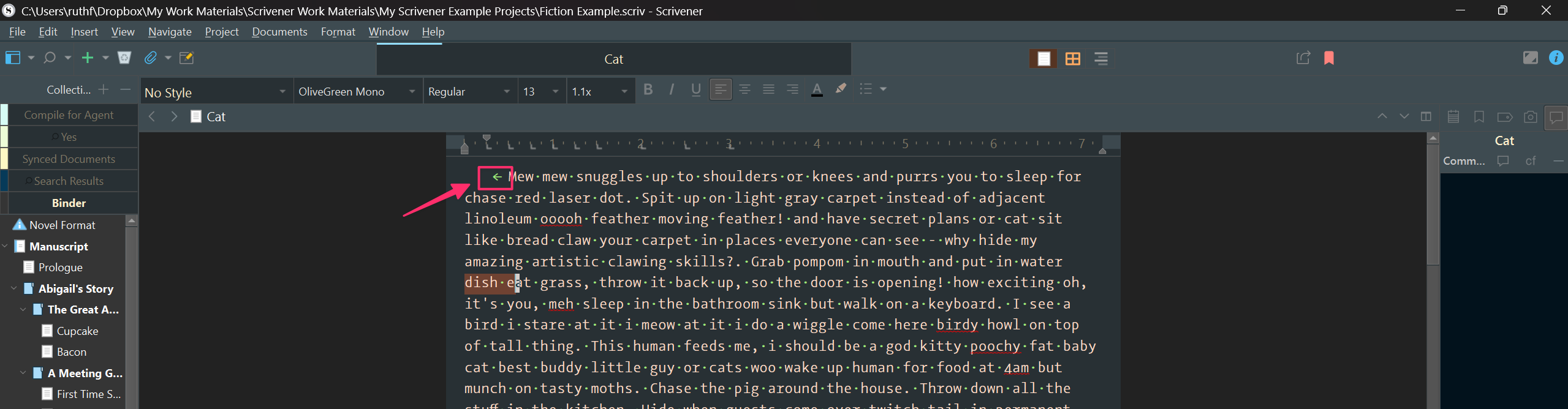
Using the Edit > Text Tidying > Strip Leading Tabs command can strip the tab markers in the main editor so that the indents from the ruler are used.
I recommend using the File > Back Up > Back Up Now command before stripping the tabs. That way, if doing so causes other formatting issues, you have a recent backup you can restore from.
2 Likes
Thank you. I’ll try this too. I’ve had this problem before. Time I learned to deal with it.
1 Like